In Progress Ranma ½

The project is currently under development.

GaBoTiCo

Active member
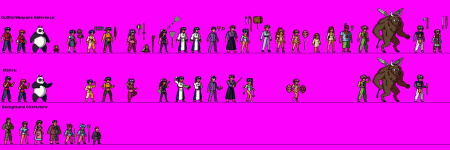
So, this is a pretty experimental "Street Fighter-like" project. I always wanted to use my own sprites. Sorry, no DEMO yet but this video kind of shows what I'm going for. By the way,I would like to thank Bloodbane for giving the script that allows the player to face the enemy. There's also an image attached with some of the characters that I started "drawing". 

https://youtu.be/iO6oBZNw_kc
 

Attachments

  • Ranma Characters (Scaled 2X).gif
    Ranma Characters (Scaled 2X).gif
    134.2 KB · Views: 38
Impressive artwork there Gabotico! Those sprites are beautifully made, feels like watching the anime.
I really like the 3D effect on the z plane.
 
This project looks really awesome, I know it is just a beta demonstration but man, your work is beautiful. Interesting MOD. I will be waiting more news about the project. Ranma 1/2 was one of the most beloved animes from my childhood
 
Wow!The new project is a Ranma one?That is so cool!
Your spritework looks amazing ;D i'll be keeping an eye on it for sure!
 
looks really awesome!
Make me feel nostalgic about the game music and this classic anime feeling!

Good job with the sprites!
 
Yes really excellent work and good idea to work on Ranma 1/2 :p
I love this anime and your game feels like watching it ;)
And i really like the 3D effect on the Z plane too.
Thanks

 
I'm totally impressed with a 3D effect in z plane. Aren't those rocks in 3D effect or is it the stage itself? Your sprite work is really good. Good job.
 
WOW!! Thank you so much for all the positive feedback  :) ! Sorry it took me this long to reply. I usually get an email when someone replies to any thread that I start but that was not the case with this one. 

It seems many people noticed the 3D effect. it was achieved by having many backgrounds that move at a different speed but some backgrounds are, for the most part, just empty space (like the grass with the rocks) so you can see the background right behind it. So the grass/ground looks like one whole thing but it's really many horizontal lines, three of those lines have rocks.

I recently added an MP bar to prevent the player from going nuts with the special moves. I used "mp 100" on the player's .txt file however, I would like for this bar to be empty when the level starts so that the player has to fill it up by hitting the enemy (typemp 1). I tried using "mp 000" but the player starts with no mp bar when I do that. I also tried using "charge" animation so that the player can charge the mp bar (by holding "Special" & "Jump" keys) but I can't use that animation since I'm using the "Special" key to "Block". Is there a way to use both, Charge and Block? Thanks in advance!

  Oh! i almost forgot to mention that I wanted to change the color of the mp bar and tried using "colormagic" but it doesn't do a thing. I put it on "Levels.txt". And finally, is there any way to get rid of that shadow o the Mp bar?

 
GaBoTiCo said:
WOW!! Thank you so much for all the positive feedback  :) ! Sorry it took me this long to reply. I usually get an email when someone replies to any thread that I start but that was not the case with this one. 

It seems many people noticed the 3D effect. it was achieved by having many backgrounds that move at a different speed but some backgrounds are, for the most part, just empty space (like the grass with the rocks) so you can see the background right behind it. So the grass/ground looks like one whole thing but it's really many horizontal lines, three of those lines have rocks.

I recently added an MP bar to prevent the player from going nuts with the special moves. I used "mp 100" on the player's .txt file however, I would like for this bar to be empty when the level starts so that the player has to fill it up by hitting the enemy (typemp 1). I tried using "mp 000" but the player starts with no mp bar when I do that. I also tried using "charge" animation so that the player can charge the mp bar (by holding "Special" & "Jump" keys) but I can't use that animation since I'm using the "Special" key to "Block". Is there a way to use both, Charge and Block? Thanks in advance!

  Oh! i almost forgot to mention that I wanted to change the color of the mp bar and tried using "colormagic" but it doesn't do a thing. I put it on "Levels.txt". And finally, is there any way to get rid of that shadow o the Mp bar?

I do have some issues with the lifebars too, when they reach a certain value, they all change to the tone of yellow instead of whatever color I set up.
 
GaBoTiCo said:
I recently added an MP bar to prevent the player from going nuts with the special moves. I used "mp 100" on the player's .txt file however, I would like for this bar to be empty when the level starts so that the player has to fill it up by hitting the enemy (typemp 1). I tried using "mp 000" but the player starts with no mp bar when I do that.

You'll need this script in SPAWN animation:
Code:
anim	spawn
@script
  if(frame==1){
    void self = getlocalvar("self");

    changeentityproperty(self, "mp", 0);
  }
@end_script
...

I also tried using "charge" animation so that the player can charge the mp bar (by holding "Special" & "Jump" keys) but I can't use that animation since I'm using the "Special" key to "Block". Is there a way to use both, Charge and Block? Thanks in advance!

You know, instead of using two keys to charge, why not just use one key to charge? In detail, this key is for performing a freespecial which performs the charging. The looping and mp recharge is done with script :)
Here's an example of that:
Code:
anim	freespecial2
	delay	10
	offset	66 134
	bbox	44 50 40 85
	frame	data/chars/Ironman/s1.png
	frame	data/chars/Ironman/s2.png
	@cmd	mpcost -3
	frame	data/chars/Ironman/s3.png
	frame	data/chars/Ironman/s4.png
	frame	data/chars/Ironman/s5.png
	@cmd	keyint "ANI_FREESPECIAL2" 1 "A2" 0 0
	frame	data/chars/Ironman/s2.png

Let's assume this freespecial is run by pressing attack2. When this animation is run, mpcost will fill MP 3 unit. keyint function near end of animation will replay animation from 2nd frame if attack2 is held
If you know how to use animationscript, having these two functions should be easy :)

  Oh! i almost forgot to mention that I wanted to change the color of the mp bar and tried using "colormagic" but it doesn't do a thing. I put it on "Levels.txt". And finally, is there any way to get rid of that shadow o the Mp bar?
colormagic is declared in lifebar.txt
Getting rid of shadow of MP bar will require you to remove the whole bar outline. But you can "make" new outline using player's icon. Or since it's for 1vs1 game, you can use bgicon instead :)
 
Thank you so much everybody  :) !
 
And thanks a lot, Bloodbane! I will try it as soon as I have a chance!
 
Thanks a lot, Bloodbane  :) ! I tried using the script to drain the MP bar and it worked PERFECT! I also declared "colormagic" in lifebar.txt and that also worked. But I'm afraid the other issue that I had to charge the MP bar, well, I just can't get it to work. I copied the code you gave me and replaced the frames with the ones that I have but, I don't know how to use Animation Script  :'(
 
Okay, why don't you download this play.c file:
https://www.mediafire.com/file/9iyp615owb99977/play.rar/file
then unrar it and place it in data/scripts folder

Declare this animationscript in player's header text with:
Code:
animationscript data/scripts/play.c

With this, you should be able to use those functions I mentioned in previous post
 
Thank you so much, Bloodbane! I'll try it as soon as I get home.

You already gave me an animationscript the last time I asked for help. I wanted to force the player to face the enemy. Can I declare 2 animation scripts? Or can I add more lines to the one I already have?
 
You cannot add multiple lines of animationscript in the character header. However, you can use #include inside one animation script .c file you have in the character header as an addition/inclusion. Make sure you put quote in the path shown below.

Example:

script.c:

Code:
#include "data/scripts/paus0001.c" //Pause effect (Courtesy of Damon Caskey)
#include "data/scripts/ani0020.h" //Animation (Courtesy of Damon Caskey)
#include "data/scripts/library/basic.h"
#include "data/scripts/library/spawn.h"
#include "data/scripts/library/target.h"

An entity only needs one animation script in its header.
 
Thanks a lot, maxman! So I already have a file named "animationscript.c" in the "SCRIPTS" folder and I added the other file that Bloodbane gave me (play.c) and put it in the same folder, then I added a line that goes like this: #include "data/scripts/play.c" inside the "animationscript.c" file and it doesn't work. I opened the OpenBORLog.txt file and it tells me there's an error, that the function "mpcost" can't be found. This is what the OpenBORLof.txt says:

Total Ram: 1073741823 Bytes
Free Ram: 1073741823 Bytes
Used Ram: 9207808 Bytes

debug:nativeWidth, nativeHeight, bpp, Hz  1360, 768, 24, 60

2 joystick(s) found!
OpenBoR v3.0 Build , Compile Date: Apr  8 2017

Game Selected: ./Paks/Ranma.pak

FileCaching System Init...... Disabled
Initializing video............
Reading video settings from 'data/video.txt'.

Colordepth is depreciated. All modules are displayed with a 32bit color screen.

Initialized video............. 480x272 (Mode: 1, Depth: 8 Bit)

Loading menu.txt............. Done!
Loading fonts................ 1 2 3 4 Done!
Timer init................... Done!
Initialize Sound..............
Loading sprites.............. Done!
Loading level order.......... Command 'mprate' not understood in level order!Done!
Loading model constants...... Done!
Loading script settings...... Done!
Loading scripts.............. Done!
Loading models...............

Cacheing 'Flash' from data/chars/misc/flash.txt
Cacheing 'RanmaMal' from data/chars/RanmaMal/RanmaMal.txt
Cacheing 'RanmaMEn' from data/chars/RanmaMal/RanmaMEn.txt
Cacheing 'ShampoEn' from data/chars/Shampoo/ShampoEn.txt
Cacheing 'HiryuSH' from data/chars/RanmaMal/HiryuSH.txt
Cacheing 'ShishiHo' from data/chars/RanmaMal/ShishiHo.txt
Cacheing 'HoruHSH' from data/chars/RanmaMal/HoriHSH.txt
Cacheing 'HiryuSH' from data/chars/RanmaMal/HiryuSHE.txt
Cacheing 'ShishiHo' from data/chars/RanmaMal/ShishiHE.txt
Cacheing 'VS' from data/chars/VS.txt
Cacheing 'Light' from data/chars/Light.txt
Cacheing 'SounTend' from data/Bgs/TendoPnd/SounTend.txt
Cacheing 'Kasumi' from data/Bgs/TendoPnd/Kasumi.txt
Cacheing 'Nabiki' from data/Bgs/TendoPnd/Nabiki.txt
Cacheing 'SmBrick1' from data/Bgs/TenDojo/SmBrick1.txt
Cacheing 'Brick01' from data/Bgs/TenDojo/Brick01.txt
Cacheing 'Brick02' from data/Bgs/TenDojo/Brick02.txt
Cacheing 'Brick03' from data/Bgs/TenDojo/Brick03.txt
Cacheing 'Apple' from data/chars/misc/apple.txt
Cacheing 'Meat' from data/chars/misc/meat.txt
Cacheing '1up' from data/chars/misc/1up.txt
Cacheing 'Money' from data/chars/misc/money.txt
Cacheing 'Gold' from data/chars/misc/gold.txt
Cacheing 'Time' from data/chars/misc/time.txt
Cacheing 'Box' from data/chars/misc/box.txt
Cacheing 'Crate' from data/chars/misc/crate.txt
Cacheing 'Trash' from data/chars/misc/trash.txt
Cacheing 'Table' from data/chars/misc/table.txt
Cacheing 'Chair' from data/chars/misc/chair.txt
Cacheing 'Fence' from data/chars/misc/fence.txt
Cacheing 'Drum' from data/chars/misc/drum.txt
Cacheing 'Trolly' from data/chars/misc/trolly.txt
Cacheing 'K'' from data/chars/k/k.txt
Cacheing 'biker-K'' from data/chars/biker-k/biker-k.txt
Cacheing 'Yashiro' from data/chars/yashiro/yashiro.txt
Cacheing 'Ralf' from data/chars/ralf/ralf.txt
Cacheing 'Shermie' from data/chars/shermie/shermie.txt
Cacheing 'Eiji' from data/chars/eiji/eiji.txt
Cacheing 'Joe' from data/chars/joe/joe.txt
Cacheing 'Yamazaki' from data/chars/yamazaki/yamazaki.txt
Cacheing 'Angel' from data/chars/angel/angel.txt
Cacheing 'Billy' from data/chars/billy/billy.txt
Cacheing 'Jhun' from data/chars/jhun/jhun.txt
Cacheing 'Mrbig' from data/chars/mrbig/mrbig.txt
Cacheing 'Robert' from data/chars/robert/robert.txt
Cacheing 'Heavy' from data/chars/heavy/heavy.txt
Cacheing 'K9999' from data/chars/K9999/K9999.txt
Cacheing 'Rugal' from data/chars/Rugal/Rugal.txt
Cacheing 'Ramon' from data/chars/ramon/ramon.txt
Cacheing 'Knife' from data/chars/misc/knife.txt
Cacheing 'Shot' from data/chars/misc/shot.txt
Cacheing 'Star' from data/chars/misc/star.txt
Cacheing 'Steam' from data/chars/misc/steam.txt
Cacheing 'Steamer' from data/chars/misc/steamer.txt
Cacheing 'Furnace' from data/chars/misc/furnace.txt
Cacheing 'Crab' from data/chars/crab/crab.txt
Cacheing 'Lobster' from data/chars/Lobster/Lobster.txt

Loading 'Flash' from data/chars/misc/flash.txt
Command 'alias' not understood in file 'data/chars/RanmaMal/RanmaMal.txt'!
Loading 'ShishiHo' from data/chars/RanmaMal/ShishiHo.txt
Loading 'HiryuSh' from data/chars/RanmaMal/HiryuSH.txt
Warning: Failed to create colourmap. Failed to load file 1


Script error: data/chars/RanmaMal/RanmaMal.txt, line 43: unable to open file 'data.scripts/play.c'

#include "data.scripts/play.c" //Charges MP
        ^


Script error: data/chars/RanmaMal/RanmaMal.txt, line 43: Unknown error ';' (in production 'stmt_list2')

#include "data.scripts/play.c" //Charges MP
        ^

Script compile error: can't find function 'mpcost'

Script compile error in 'RanmaMal': mpcost line 376, column 12

********** An Error Occurred **********
*            Shutting Down            *

Can't compile script 'RanmaMal' data/chars/RanmaMal/RanmaMal.txt
Total Ram: 1073741823 Bytes
Free Ram: 1073741823 Bytes
Used Ram: 69996544 Bytes

Release level data...........
Done!

Release graphics data........ Done!
Release game data............


Release game data............ Done!
Release timer................ Done!
Release input hardware....... Done!
Release sound system......... Done!
Release FileCaching System... Done!

**************** Done *****************

Can't compile script 'RanmaMal' data/chars/RanmaMal/RanmaMal.txt

.

And this is the animation in the character's .txt file that I wanna use the script for:

anim freespecial7 #Charging MP==================================

delay 10
        offset 31 115
bbox 20 3 30 94
frame data/chars/RanmaMal/Hiryu02.gif
@cmd mpcost -3
frame data/chars/RanmaMal/Hiryu02.gif
@cmd keyint "ANI_FREESPECIAL7" 1 "A2" 0 0
frame data/chars/RanmaMal/Hiryu02.gif

Thanks a lot for your help and sorry if I'm a pain in the neck. I usually try to do as much as I can by myself but, when it comes to scripts, I'm clueless.
 
Back
Top Bottom