A little help

You have a problem.

Code:
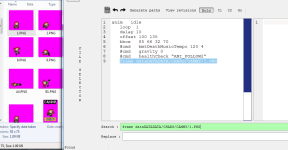
frame dataDATADATA/CHARS/CAMMY/1.png
"dataDATADATADATADATADADADADADADATATATATATATATATATATATATATATATATATA" 😆

hokuto-no-ken-hnk.gif


Aside from that (a joke, isn't it?), put "data" like this and it should work fine. Whether it's in small letters or caps, it doesn't matter, so don't worry about it.

Code:
frame DATA/CHARS/CAMMY/1.png

Take a look at the path above your Windows Explorer carefully. Do you see where it says "data"? Correct your path name for the frame.

6-15-2025 9-57-14 AM.png

Code:
anim idle
    offset 140 188
    delay 13
    loop 1
    bbox 116 93 57 95
    frame data/chars/heroes/Terry/0_0.png
    frame data/chars/heroes/Terry/0_1.png
    frame data/chars/heroes/Terry/0_2.png
    frame data/chars/heroes/Terry/0_3.png
    frame data/chars/heroes/Terry/0_4.png
    frame data/chars/heroes/Terry/0_5.png
    frame data/chars/heroes/Terry/0_6.png
    frame data/chars/heroes/Terry/0_7.png
 
You can either type # to exclude the character you don't want from being shown or you can remove it in one line in models.txt. Remember. It has to be from models.txt. If you see any related stuff for that character, find the ones you want to exclude. For example, check which one you want to exclude and let's say it's Hadoken which is from Ryu. But what I'm saying is you check the specific name of the model in its own folder/txt file or wherever it is. Go back to models.txt and check which one you don't want in the game so that you exclude/remove them.

Code:
#load    Clint        data/chars/clark/clark.txt
 
Back
Top Bottom