

O Ilusionista
Captain 100K
Making Sprite Sheets With Glueit
Original topic by Itz Hellzone
Have you ever downloaded sprites and wanted to make them into a sprite sheet? Well I've found an awesome tool that would help with that. Within just a few simple Steps you can be making sprite sheets yourself!!! The Reason I found this tool because a buddy of mine had a lot of mortal kombat sprites that he need made into sprite Sheets so i told him I would do it and after the first character with 5 to go still I decided to look for a tool to make my life a little bit easier and after a few hours of searching with different key words I found something, Glueit Sprite Sheet Maker. Now lets Get into how to use this program
Step One. Download Glueit (http://www.varcade.com/blog/glueit-sprite-sheet-maker-download/)
Now once you have downloaded the program and extracted it we can begin the process.
Step Two. Open Glueit
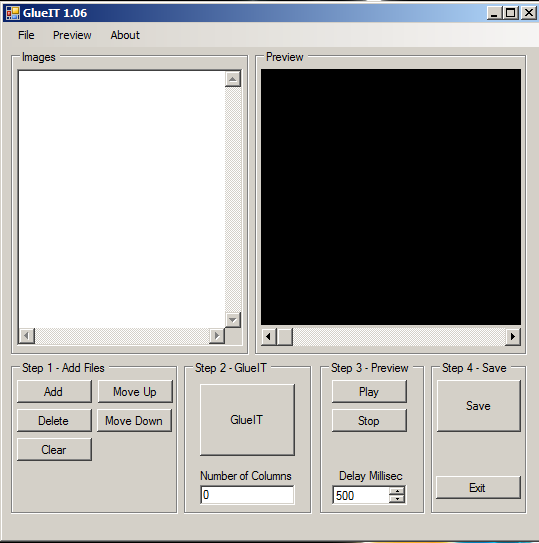 Now let me explain a little bit on how to use this program, Glueit allows you to open as many sprites as you have of the character and it will give you the option to make a sprite sheet
Add - Adds Sprites
Delete - Deletes Sprites
Clear - Removes All Sprites
Move Up - Moves The Sprites Up
Move Down - Moves The Sprites Down
Also Glueit has the option to save as a project so you can open everything up a future date so you don't loose your progress.
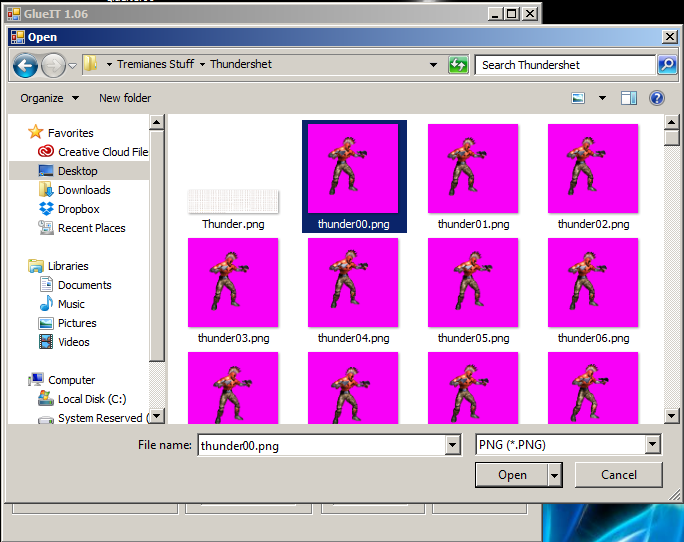
Step Three - Click The Add Button to add your sprites to the Glueit, Add all of your sprites at the same time. Depending on how many sprites your importing at once it may take a short time or 30 seconds
Now once you have added all of your sprites, you will see a big button where it says "Glueit" and there will be an option below it where it says "Number Of Columns"
The Button Glueit will make your sheet right away but if you don't setup how many columns you want it it will give you an error and wont properly save your sheet when you try to save it
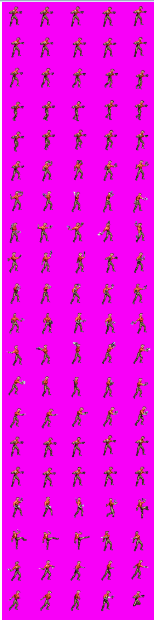
Here is an example what a 5 column sprite sheet would look like
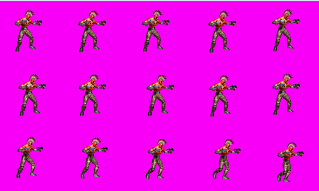
Step Four - Now you want to decided on how many columns "rows" you want, I've personally done up to 20 but 5 or 10 is the best for more optimal output. Once you have clicked "Glueit" it will process and a preview window will pop up to show you a preview of what you have chosen
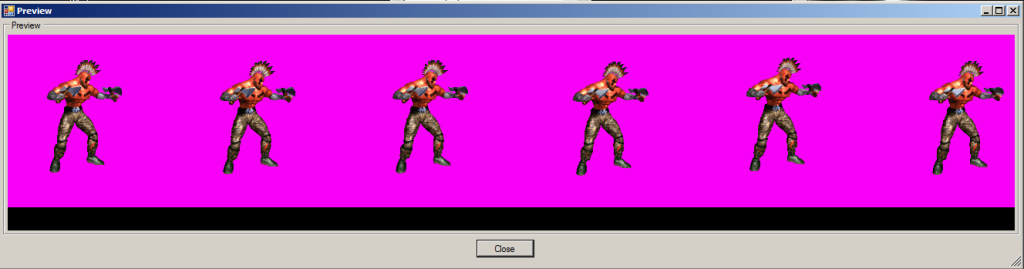
Step Five - Click The Save button and choose your desired path where you want your sprite sheet to be saved and bam now you have a sprite sheet ready so you can index your sprites and rip them, This is the end result
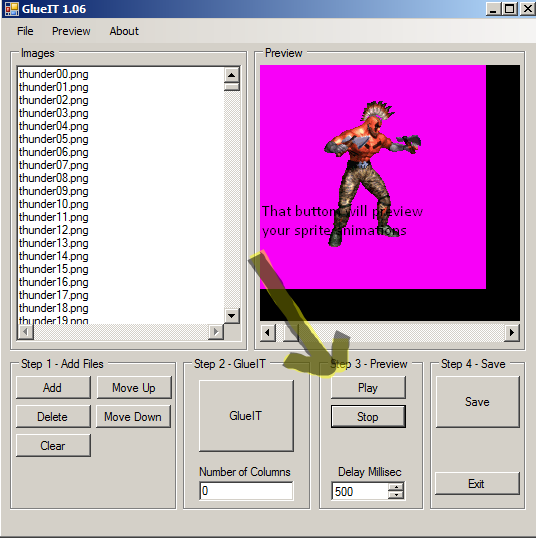
Also glueit has another awesome feature built into it, you have the ability to preview sprite animations in with the program, so lets say your ripping sprites for a game and you want to see how there stance animation would look you could import the sprites and preview the sprites animation
I hope everyone can find this useful! Thank you for reading.
Over And Out
Hellzone
Itzhellzonemugen
http://defconawesome.wix.com/itzhellzonemugen
Original topic by Itz Hellzone
Have you ever downloaded sprites and wanted to make them into a sprite sheet? Well I've found an awesome tool that would help with that. Within just a few simple Steps you can be making sprite sheets yourself!!! The Reason I found this tool because a buddy of mine had a lot of mortal kombat sprites that he need made into sprite Sheets so i told him I would do it and after the first character with 5 to go still I decided to look for a tool to make my life a little bit easier and after a few hours of searching with different key words I found something, Glueit Sprite Sheet Maker. Now lets Get into how to use this program
Step One. Download Glueit (http://www.varcade.com/blog/glueit-sprite-sheet-maker-download/)
Now once you have downloaded the program and extracted it we can begin the process.
Step Two. Open Glueit
Add - Adds Sprites
Delete - Deletes Sprites
Clear - Removes All Sprites
Move Up - Moves The Sprites Up
Move Down - Moves The Sprites Down
Also Glueit has the option to save as a project so you can open everything up a future date so you don't loose your progress.
Step Three - Click The Add Button to add your sprites to the Glueit, Add all of your sprites at the same time. Depending on how many sprites your importing at once it may take a short time or 30 seconds
Now once you have added all of your sprites, you will see a big button where it says "Glueit" and there will be an option below it where it says "Number Of Columns"
The Button Glueit will make your sheet right away but if you don't setup how many columns you want it it will give you an error and wont properly save your sheet when you try to save it
Here is an example what a 5 column sprite sheet would look like
Step Four - Now you want to decided on how many columns "rows" you want, I've personally done up to 20 but 5 or 10 is the best for more optimal output. Once you have clicked "Glueit" it will process and a preview window will pop up to show you a preview of what you have chosen
Step Five - Click The Save button and choose your desired path where you want your sprite sheet to be saved and bam now you have a sprite sheet ready so you can index your sprites and rip them, This is the end result
Also glueit has another awesome feature built into it, you have the ability to preview sprite animations in with the program, so lets say your ripping sprites for a game and you want to see how there stance animation would look you could import the sprites and preview the sprites animation
I hope everyone can find this useful! Thank you for reading.
Over And Out
Hellzone
Itzhellzonemugen
http://defconawesome.wix.com/itzhellzonemugen


