
You are using an out of date browser. It may not display this or other websites correctly.
You should upgrade or use an alternative browser.
You should upgrade or use an alternative browser.
Request to edit virtual keys.
- Thread starter stin
- Start date


I was looking into fixing the option to scale the screen so you could set the screen safely outside of the virtual keys.
This is what appears on the screen.
I did not say anything until today, because I thought the thing would be solved by itself.
An example with your latest build:
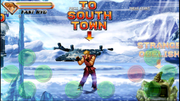
Instead, this is what appears with the ppsspp emulator:
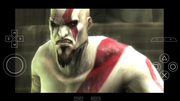
Very nice, because it allows you a complete setting of both virtual keys and screen scaling.
Thank you.
I did not say anything until today, because I thought the thing would be solved by itself.
An example with your latest build:
Instead, this is what appears with the ppsspp emulator:
Very nice, because it allows you a complete setting of both virtual keys and screen scaling.
Thank you.
The screen scaling worked on android a long time ago at some point it broke I will try to fix it but right now I am very busy with moving home.

O Ilusionista
Captain 100K
The buttons covering the image is a byproduct of having virtual controls. I don't think we should change their size, because this could make the detection harder with smaller buttons.
I've played some emulators with small buttons and the experience is terrible. It's an UX rule t not have smaller buttons next to each other (what they did wrong in PPSSPP emulator, btw).
I've played some emulators with small buttons and the experience is terrible. It's an UX rule t not have smaller buttons next to each other (what they did wrong in PPSSPP emulator, btw).
O Ilusionista,
if you say that, you're probably not a real Gamerz!
I have tried everything in my life as a videogamerz and the buttons on the screen are an added plus.
I find myself better than with a pad.
And it's not even what you say about the small buttons, because probably, you have not thoroughly tested a ppsspp emulator.
The buttons can be moved, enlarged and spaced, for the best use requirement.
And sometimes, the onscreen keys are more comfortable, on tram or bus, do not bring a pad.
msmalik681,
it is possible to suggest a setting (or layer) in which the buttons and the screen scaler can be resized, spaced and moved?
if you say that, you're probably not a real Gamerz!
I have tried everything in my life as a videogamerz and the buttons on the screen are an added plus.
I find myself better than with a pad.
And it's not even what you say about the small buttons, because probably, you have not thoroughly tested a ppsspp emulator.
The buttons can be moved, enlarged and spaced, for the best use requirement.
And sometimes, the onscreen keys are more comfortable, on tram or bus, do not bring a pad.
msmalik681,
it is possible to suggest a setting (or layer) in which the buttons and the screen scaler can be resized, spaced and moved?
O Ilusionista
Captain 100K
stin With all due respect, first of all, please stop with this behavior of "you are not a real gamer". We treat everyone with respect here and we do not like that kind of attitude, which seems pretty juvenile. YouTube and Facebook already exist for this.
You are free to disagree with anyone here. We only ask that this be done in an adult way, ok? We are not a bunch of kids into a console war.
I agree witht the idea if its possible to let the user move the buttons around and even scale them if he wants to (including making them smaller), but not making them smaller by default. So we can have both of the worlds.
You are free to disagree with anyone here. We only ask that this be done in an adult way, ok? We are not a bunch of kids into a console war.
I am aware of that - I test (and code) my game almost every single day using an Android phone.And sometimes, the onscreen keys are more comfortable, on tram or bus, do not bring a pad.
I agree witht the idea if its possible to let the user move the buttons around and even scale them if he wants to (including making them smaller), but not making them smaller by default. So we can have both of the worlds.
I have respect for everything and for everyone and I am also Old man.
But if there are posts like these (in which you want to justify something, which maybe you do not want to do), from Old Videogamerz, I get angry, forgive me!
If the thing is feasible, I'm happy, if it is not feasible, I'm happy anyway.
But if there are posts like these (in which you want to justify something, which maybe you do not want to do), from Old Videogamerz, I get angry, forgive me!
If the thing is feasible, I'm happy, if it is not feasible, I'm happy anyway.
O Ilusionista
Captain 100K
No hard feelings 
I don't know much thing about Android, but I THINK its deasible.
It would be cool to have it.
I don't know much thing about Android, but I THINK its deasible.
It would be cool to have it.
To be truthful I don't know if this is something I can do but I can give it a try and hopefully I will figure it out. But all my engine development work has been put on hold until I finish at least 1 of my mods.
O Ilusionista, 
msmalik681,
do not worry, take the time you want for your mods and your projects.
And guys, thank you again for your patience.
msmalik681,
do not worry, take the time you want for your mods and your projects.
And guys, thank you again for your patience.