
You are using an out of date browser. It may not display this or other websites correctly.
You should upgrade or use an alternative browser.
You should upgrade or use an alternative browser.
Resource Update Help
- Thread starter Diversee
- Start date

I'm having a problem, I can't upload another file to update the download in the vault.
Go to the resource, and look for Post an Update button:

Press it, and you will get the update screen.

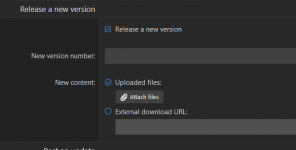
If you want to replace the file with your updated version, you need to check the Release a new version box. When you do that, the version number and file upload fields appear.
HTH,
DC

Diversee
Member
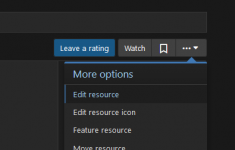
I'm trying to delete the old post but I can't, only update but the first one is still there, before I could update.
Go to the resource, and look for Post an Update button:
View attachment 622
Press it, and you will get the update screen.
View attachment 625
If you want to replace the file with your updated version, you need to check the Release a new version box. When you do that, the version number and file upload fields appear.
View attachment 624
HTH,
DC


Diversee
Member
but i'm writing in englishInglês, por favor [USER = 11666] @Diversee [/ USER]