Chronocrash Modders Tools

ChronoCrash Modders Tools 0.7.9.10.1

No permission to download
2. Animation --> Body Box / Attack Box
Simplify on/off version of bbox and attack box
As Ilu said, what you want already exists ;)

Also dropv is already supported too, but only in legacy commands, because in non-legacy/new style, it's called something else entirely.


As for the first suggestion, it's typically a function that would be better located in the tools dialog imo. As far as I remember there is no "batch process" style buttons in animation editor, and I think it's better it stays that way (the animation interface is already pretty busy as it is)
 
Last edited:
Current stable build doesn't do this, but next release allows you to use attack/body none to close a body/attack.
What do you mean by close ? Disable it (like attack 0) ? Or like a sort of closing bracket that you put after all attack/body boxes lines ?

I guess the first one but just to be sure.
 
What do you mean by close ? Disable it (like attack 0) ? Or like a sort of closing bracket that you put after all attack/body boxes lines ?

I guess the first one but just to be sure.


Disable. Sorry.

Attack none == attack 0
 
The good news is that CMT can easily go from legacy to new style (back and forth). So as long as you use CMT to define attack/body boxes in legacy mode, CMT will be able to automatically convert your old-style entities to new style.

I could even add a feature to keep legacy style while viewing/editing file in CMT, even though the actual save would be done in new style (you just won't see it as the CMT user). But I think it's a bad idea for many reasons and @DCurrent will probably agree.

But it doesn't matter because there's a better idea I think. At the end of the day what old users will miss most about legacy system is it's compactness (as Bruce post suggests). The fact that it takes one line instead of multiple lines. But I could add a feature in CMT to be able to display boxes definition in collapsed or expanded way. Basically with this feature enabled, by default the whole attack/body box lines would be hidden and instead you would have a single line "{ attack ...} " (or "{body ...}"). And when you click on that line to edit the box, the actual detailed/property lines would show up instead. And when you click on a line outside of this box definition, the detailed lines would be hidden again and replaced by the single "{attack ...}" line.

This concept could even be expanded on multiple levels. Like for example by default you could choose to see only something like this for an animation :
Code:
{header ...}
{frame 0 ...}
{frame 1 ...}
{frame 2 ...}

And when you click on "{header ...}" it would expand and show all detailed headers (animation) properties lines. When you click on a "{frame X ...}" line it would show all detailed lines (delay, offset, ...) for chosen frame.
 
but i think v4 and v3 would need own editor each ?
I don't think so. At most a third option, like now there is legacy and non-legacy options. But the packaging thing I mentioned in my previous post already applies to non-legacy style that is supported by engine since almost ten years now I think.
 
When exporting gif, CMT is stacking the sprites:
View attachment 6621
It's because when no palette is applied export uses sprite background, so it will stack if background is empty.

There's a workaround though. Use an alternatepal that is same as default sprite palette, and then do the export after selecting this palette. It will force the "classic" pink background for all sprites. You'll notice that when exporting after setting a palette (other than default), there is no stacking. It's because after having a palette applied I'm forced to overwrite transparency.

I let it that way because I think there might be cases where people don't want the original background to be overwritten.
 
but i dont think anyone wants stacked sprites in animation, imo you should not leave it like this.
I use export a lot
 
but i dont think anyone wants stacked sprites in animation, imo you should not leave it like this.
I use export a lot
It doesn't stack if you use a palette or if background of sprites is not transparent. It stacks only if the source material is transparent (like not pink or something).

People probably never want the stack, but they might want the original color though. So until I add a way to select background color of export I'll let it that way.
 
If you remember I added a lot of "tricks" to support the transparency of some sprites.
yeah I remember that.
Using an alternate palette worked as a workaround:
YLrbbqN.gif


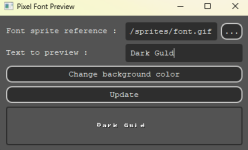
Another thing to mention - text preview outputs the characters with a big kerning than the actual font have
1704573858099.png

The right kerning:
pdc - 0013.png
 
Some points to share:

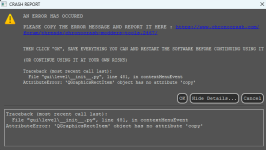
- whenever I click copy and then paste on the stage preview, it returns me this error:
1705208014636.png

- When you are in the stage preview and turn off something (like shadow), then go the text editor and return to the stage preview, everything you had turned off is turned on again. Is there a chace to make it persistent - like if we turned the shadows (or anything) off, it will stay off until we turn on again?
Maybe we will need a "reset appearance" to revert everything to default.
 
Piccolo, take a look at this when I open a level tab before the text tab. (I'm using 0.5.7.2.)

Code:
Traceback (most recent call last):
  File "gui\main\__init__.py", line 470, in <lambda>
  File "gui\main\__init__.py", line 337, in setView
  File "gui\level\__init__.py", line 222, in loadLines
  File "gui\level\__init__.py", line 1190, in loadLines
IndexError: list index out of range

I don't know if it's fixed in the last version, but I found his.
Code:
Traceback (most recent call last):
  File "gui\entity\animselector.py", line 213, in enterEvent
AttributeError: 'EverydayEditor' object has no attribute 'mainSplitter'

When I move the mouse to the line from fglayer for previewing the images, the image that has its height size as 500, is okay (48x500) because it doesn't disappear. But when I move it to the panel line that declares a very big image because of its size of 1000x1500, the preview of that image shows in a second and *poof* disappears. Is it because the image size is too large to see when previewing it? If you don't understand what I mean, I'll show you the video. You can take a look at @danno's Spider Man mod. That's what I'm using.
 
Back
Top Bottom