

Did you know you can install ChronoCrash as an app? You can and it's easy! ChronoCrash has been available as a PWA (Progressive Web App) since 2021. Here's how to use it.
Open the forum in your browser and click the Hamburger menu.

Scroll down to Install the App and click the Install button.
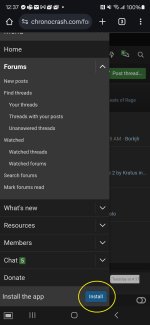
You should get a prompt to install or cancel. Click Install.
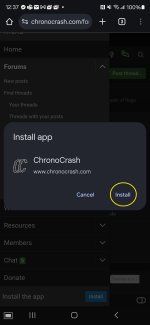
The app install may take a few moments, and it might not look like anything is happening. Depending on your system, an alert prompt will appear when complete.

Once install completes, ChronoCrash is now a fully functioning application, able to send push alerts and display numeric alert count overlays in the icon just like any social media platform.

Open the forum in your browser and click the Hamburger menu.
Scroll down to Install the App and click the Install button.
You should get a prompt to install or cancel. Click Install.
The app install may take a few moments, and it might not look like anything is happening. Depending on your system, an alert prompt will appear when complete.
Once install completes, ChronoCrash is now a fully functioning application, able to send push alerts and display numeric alert count overlays in the icon just like any social media platform.