Chronocrash Modders Tools

ChronoCrash Modders Tools 0.7.9.11

No permission to download
that was a bit useless to me but hey :)

Talking about real useful updates, do you think it would be able to add an option to still display the walls when you are editing a stage, but locking their positions?
If we could lock then case by case it would be even better. Think when you want to move a wall that was placed above other wall and you want to move it - you need to comment the other wall code. Or when you want to move some entity while still seeing the walls, to avoid placing them inside walls.

I even have a specific case - can't post a pic here - when we have a wall on the lower part of the stage (so its placed between the viewer and the characters) and you want to move any entity, you end moving that wall.
 

Attachments

  • Untitled.png
    Untitled.png
    53.3 KB · Views: 2
Thank you so much for quick update.
Can you please check it?
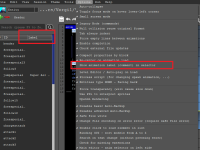
I unchecked the label option and restarted the app, but the label tab is still there.
Please see the attachment,
I can not live without your app because it saves me a lot of time!
thanks again for your awesome work.
Yeah I checked before uploading and checked again now, it works. Try restarting the app once again to make sure, even though it shoudn't be needed. If it doesn't work then it means there must be an interference with some other setting. I'll check but I need to be really sure it's not working for nobody (me excepted).

EDIT : ok, got it, it doesn't work when using settings from mod location.
 
Last edited:
that was a bit useless to me but hey :)

Talking about real useful updates, do you think it would be able to add an option to still display the walls when you are editing a stage, but locking their positions?
If we could lock then case by case it would be even better. Think when you want to move a wall that was placed above other wall and you want to move it - you need to comment the other wall code. Or when you want to move some entity while still seeing the walls, to avoid placing them inside walls.

I even have a specific case - can't post a pic here - when we have a wall on the lower part of the stage (so its placed between the viewer and the characters) and you want to move any entity, you end moving that wall.
Yeah I remember vaguely, it's from a time when I had no time to handle requests, so there's a bunch that are not processed.

I can do that one
 
Piccolo updated Chronocrash Modders Tools with a new update entry:

Changelog 0.7.9.11

- Text and Animation editor : New option to hide animation labels in selector didn't work when using local settings (settings loaded from game folder). Now fixed @Bruce

- Level Editor : added checkbox to lock geometry and checkbox to lock entities @O Ilusionista

Note : I know there is a minor bug in the right panel when those checkboxes are on and you "select" walls/entities, but it's nothing serious, you can bypass it by changing tab. I tried to fix it...

Read the rest of this update entry...
 
Back
Top Bottom