
just wondering!!

  • Thread starter Thread starter C0dS0cket
  • Start date Start date
yeah, I think we won't get to nowhere, but I will make my last try.

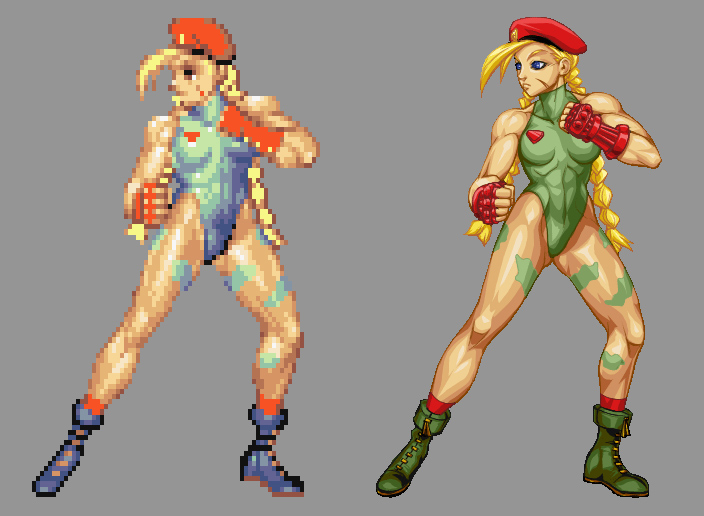
Look at this image. The chars have the same size (almost), but the PIXEL size is different.
Street_Fighter_HD___Cammy_by_UdonCrew.jpg


Look at the size of the pixels at the image at the left (Low Resolution) and look at the pixel size at the right (High Definition)

For example, I can set (in Mugen) HD resolution without changing the screen size. I can use HD sprites in 320x240 screen. Can you do it on OpenBor? no. In other words, I can CHANGE THE PPI of the screen in mugen.

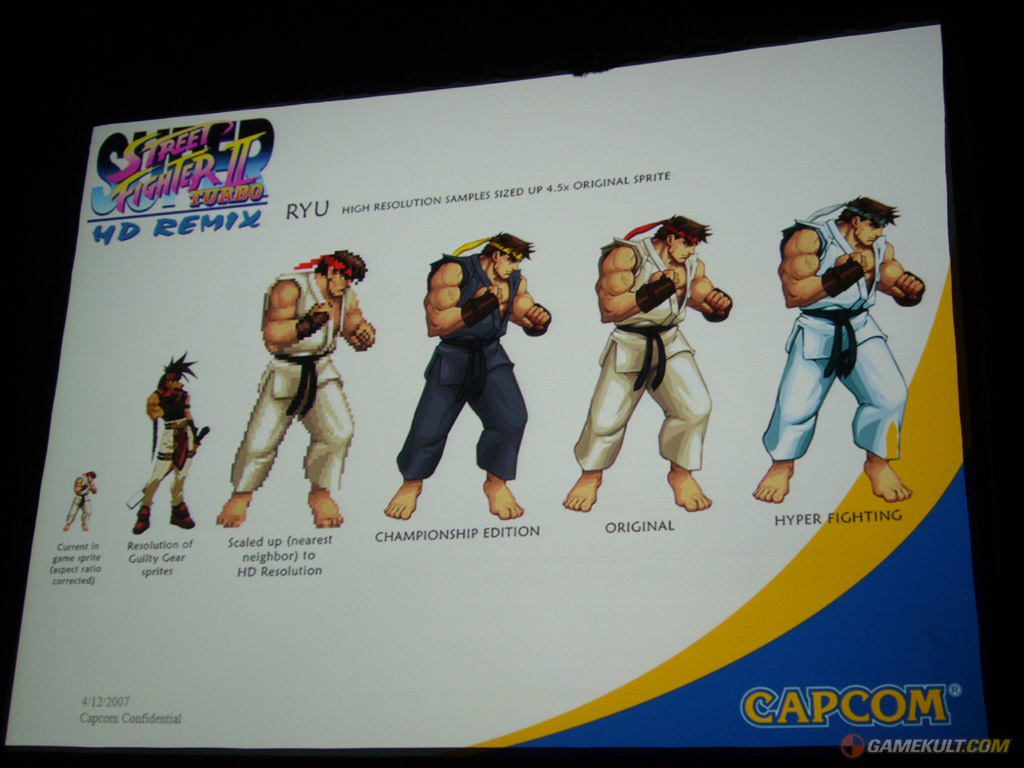
And this is not me talking only, there is an image done by Capcom where the explain the same thing, take a look
hdspritesqj8.jpg


Imagine this:
you have a box of 1 meter, and you have a room with 960meters wide. How much boxes you can put side by side? 960. This is what BOR does.

In mugen, I can say "The box has 0,5 meter". How much boxes will fit on the SAME room, side by side? 1920. I haven't changed the room size, but the box size.

Got it?

Beyond this, I can't explain more. But I am not wrong.

Ilu.
 
I'm not saying you are wrong, I'm saying we are talking about different things - which we clearly are.

No, OpenBOR cannot change pixel size or pixel aspect ratio, and that means you won't be making HD modules with a 320 screen (though why would you want to?).

That doesn't mean you can't make a module with HD sprites and effects, it just means currently doing so is done more or less by brute force.

What I was getting at is that that changing screen size in OpenBOR has no effect on image size, nor does it apply any kind of scaling effect. This is a separate issue from PPI.

It wouldn't be out of the question to look at PPI settings for OpenBOR, though I wonder if anyone would really do anything with it worthwhile. It's one thing to make a High Res character for a one to one fighter. It's quite another to make 20 and the multiple, lengthy stages to go with them that you would need for a side scroller, and thus far no one has even managed to scratch the surface of what's available already.

DC


No, OpenBOR cannot change pixel size or pixel aspect ratio.
Even I been an atheist, I must say: Praise the Lord :) For a moment, I suspected I was out of my mind.

It's one thing to make a High Res character for a one to one fighter. It's quite another to make 20 and the multiple, lengthy stages
I know, its exaclty what Mugen does. We have full games in HR and HD resolution. The image quality is way better. But it require way more memory and are way heavier. This is why Mugen mostly runs only in Windows.

and that means you won't be making HD modules with a 320 screen (though why would you want to?).

This is the reason
WffO4i6.png

Way more details on the same size. Compare the pixel sie (the pink dot) on both images.

It wouldn't be out of the question to look at PPI settings for OpenBOR, though I wonder if anyone would really do anything with it worthwhile.

Yeah, they will be able to do REAL HD stuff. So, is this possible? To make a HD OpenBOR?

Ilu.
 
What you are talking about is bicubic or other blurring out algorithm to resize sprites, openbor supports only nearest pixel when resizing with drawmethod thats why its doesnt look like in mugen, also looks like mugen runs everything in hd and blurs out pretending its lowres.
 
nope, I am not talking about algorithm to resize sprites, I am talking about PPI change.
An HD sprite in mugen, if you take a close look, its not blurried.
 
that zangief is blurry, it is a gimmick cause they use hd resolution no matter whats your set resolution, that stage is different resolution, zangief is different resolution and that crappy rescale of zangief shouldnt exist  ;D its probably how openbor would rescale with its nearest neighbour.
Its kinda like importing sprites into flash animation.
one pixel is one pixel, raw pixel counts not blurried one and you cant compare 2 images where 1 pixel on one is like 4 pixels on other.
3sMw80z.png

That zangief is using real resolution, stage is upscaled and his opponent is upscaled
 
Here only zangief is using real 640x480resolution, rescale him down even more and he will be shitty as well, lifebars are bad upscaled res, stage is bad upscaled res and his opponent is bad upscaled res.
17CGe2P.png
 
what i would like to know really is take the street fighter poster for instance
look at the first two characters (Ryu and Sol Badguy),

now imagine Ryu is the size of every other beats of rage character  on the mod, where as Sol Badguy is twice the size of the other characters,

typically you would want sol to be the same size right, well how would you go about making him that size, but still maintaining the quality.

re sizing him is a big no no as you well know you lose the quality???

the debate here has gone abit astray more like a cons and pros game between the two engines.

Sorry this was not my intentions both engines are good ok  :'(
 
yeah i tried nearest neighbor, all the bicubic types and still get a crappy result lol
 
the results of before and after.

hope i did this right lol  :P

[attachment deleted by admin]
 
so basically there is nothing i can do to correct this.  :(

well hey ho never mind there are plenty more things i can do.
one simple thing wont stop me, will just take an alternative approach to things.

thanks for all the help guys  :)

 
you my friend are a legend.

still not perfect but still looks bloody good to me.  ;D ;D

back on track now Thanks again Brother
 
Yeah, the stuff we are talking about has little to do with resizing - in fact that was sort of the point. The engine WON'T re-size anything unless you specifically tell it to. Trust me, the last thing you would want is the engine messing with your sprites "without permission".

As for resizing work, there are multiple algorithms out there, and most imaging applications can use several. Each one has its advantages (these are just a few of the more common):

  • Nearest Neighbor: This is what OpenBOR uses. It's excellent for up-sizing (zooming in) and good all around for sprites because it tends to maintain hard, clean edges. Not so great for downsizing though.
  • Bilinear: This is a good method for photographic images, but in most cases is a poor choice for 2D graphics. It muddles sprite edges and falls apart when scaling over a certain degree.
  • Bicublic: Generally the best method for scaling down. It's a nice balance between Nearest Neighbor and Bilinear when it comes to consistent sampling vs. hard edges.

The simple fact of the matter though is that no matter what algorithm is used, scaling a sprite WILL result in degradation of quality. It's mathematically impossible to do otherwise. When up-sizing, well obviously you can't get more information out of a sprite than was put into it - all you can do is magnify the pixels that already exist.

In the case of downsizing, same deal, just in reverse. If you have a sprite that is 10*10 (100 pixels) then you simply can't force it into a 50 pixel space without throwing half the pixels out. Even with the most meticulously designed algorithm the computer can only do so much guessing as to what pixels should be overwritten, recolored, tossed and so on. Some methods are better than others, but you will still need to do some down and dirty hand editing to get the very best results.

DC
 
yeah i understand that completely.

i knew what you where saying from the start before it ended in a grudge match between openbor and mugen. lol

it wasnt so much about resizing the sprite itself as we know for downgrading you cant cram the same number of pixels into a smaller space which is pretty much what your telling it to do when decreasing the size. but rather even if it just appeared smaller.

but on the other hand if you place a magnifying glass over an object it appears bigger when in fact, its still the same size.

we got there in the end tho which is what its all about  :D

the best part about all this is no matter what the problem,
there are so many people willing to lend there knowledge.

truly grateful
 
i knew what you where saying from the start before it ended in a grudge match between openbor and mugen.
Two people talking about different engines aren't in a grudge. This is called "discussion", its a health thing to do.
Just saying.
 
i apologize if that came across the wrong way  :P

it was implemented as a joke. lol
 
Back
Top Bottom