maxman
Well-known member
You seem quite lost. Sorry if I don't remember how they're done without scripts. Did you press back + attack during anim grab?
Press forward + attack (during anim grab) = anim grabforward
Press back + attack (during anim grab) = anim grabbackward
To understand better, look at these frames in these animations. slamstart is used after the target is actually grabbed by player's anim .
Using slamstart2, it's almost like anim grab, but you grab 'em instantly with it.
Without anim grab, anim grabforward will take its place, only to grab and throw forward.
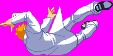
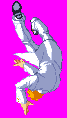
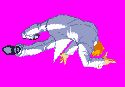
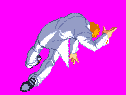
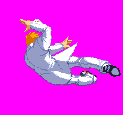
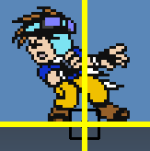
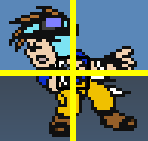
I can see the offset is quite confusing for you. That's why I put its axis/offset around the joints of their legs, as well as putting certain frames that are different frame what you see from his. You can add same frames with different offsets. But for me, I'd suggest putting its axis on the back of his stomach. Plus, the number of frames for a specific fall animation for slams doesn't matter. What matters is you pick which frame you want the entity to act like he's being grabbed, as well as placing an axis above feet
For O Ilusionista's part, you put one frame and place one offset on his feet. That's the first frame. Use the same sprite for another frame, but this time, you place it on his stomach. That's the second frame. Then, use the same sprite for another frame again and place it on its head. That's the third frame. Then, you do the following procedure with whatever sprite you want to put. Take a look at this for example on the Soldier enemy from his Avengers module. Pay attention to its offset used.
OK. I'm gonna stop now because I don't want to derail this topic. I will let O Ilusionista take care of this.
BTW the select screen is nicely done in different modes. Great job!
Press forward + attack (during anim grab) = anim grabforward
Press back + attack (during anim grab) = anim grabbackward
To understand better, look at these frames in these animations. slamstart is used after the target is actually grabbed by player's anim .
Code:
anim    grabbackward
    loop    0
    delay    4
    offset    68 96
    fastattack    1
    flipframe    8
        @script
    if(frame==4)
    {
           int SFX1 = loadsample("data/chars/captain/at4.wav");
           int SFX2 = loadsample("data/chars/captain/at45.wav");
           void vSelf = getlocalvar("self");
                 int r = rand()%30;
                 if(r > 0){
               playsample(SFX1, 0, 120, 120, 100, 0);
                 }
                 if(r <= 0){
               playsample(SFX2, 0, 120, 120, 100, 0);
                 }
        }
    @end_script
    @cmd    slamstart 1
    @cmd    position 0 20 0 -1 0
    frame    data/chars/captain/att31.gif
    frame    data/chars/captain/att21.gif
    delay    8
    frame    data/chars/captain/bgrab1.gif
    @cmd    position 0 20 0 -1 0
    sound    data/sounds/grab.wav
    @cmd    position 5 7 48 -1 0
    @cmd    velo001 -0.5 0 0
    frame    data/chars/captain/grab10.gif
    delay    5
    offset    68 91
    @cmd    position 10 10 30 -1 0
    frame    data/chars/captain/grab12.gif
    delay    45
    @cmd    depost 0
    @cmd    throw 25 2 5 1 0 0
    @cmd    velo001 0 0 0
    frame    data/chars/captain/grab11.gif
    offset    68 96
    delay    10
    @cmd    clearL
    move    0
    frame    data/chars/captain/rise1.gif
    frame    data/chars/captain/rise2.gif
    frame    data/chars/captain/get.gif

anim    grabforward
    loop    0
    delay    20
    offset    68 96
    fastattack    1
        @script
    if(frame==5)
    {
           int SFX1 = loadsample("data/chars/captain/at2.wav");
           int SFX2 = loadsample("data/chars/captain/at3.wav");
           void vSelf = getlocalvar("self");
                 int r = rand()%30;
                 if(r > 0){
               playsample(SFX1, 0, 120, 120, 100, 0);
                 }
                 if(r <= 0){
               playsample(SFX2, 0, 120, 120, 100, 0);
                 }
        }
    @end_script
    @cmd    slamstart 1
    @cmd    position 0 20 0 -1 0
    sound    data/sounds/grab.wav
    frame    data/chars/captain/bgrab1.gif
    delay    8
    @cmd    position 0 0 0 1 0
    frame    data/chars/captain/bgrab2.gif
    @cmd    position 0 -10 0 1 1
    frame    data/chars/captain/bgrab2.gif
    @cmd    position 5 -7 48 -1 0
    frame    data/chars/captain/bgrab3.gif
    delay    8
    @cmd    position 7 0 63 -1 0
    frame    data/chars/captain/grab06.gif
    @cmd    position 10 10 50 -1 0
    @cmd    depost 0
    @cmd    throw 25 2 6 0.5 0 0
    frame    data/chars/captain/grab07.gif
    delay    30
    @cmd    clearL
    frame    data/chars/captain/bgrab5.gif
Using slamstart2, it's almost like anim grab, but you grab 'em instantly with it.
Code:
anim    freespecial57 #Grab-to-throw forward
    offset    27 99
    delay    2
    range 0 35
    followanim    9
    followcond    2
    fastattack    1
    hitfx data/sounds/empty.wav
    frame    data/chars/ryu/371.gif
    delay    7
    attack 37 7 25 51 0 0 1 1 50 0 0
    frame    data/chars/ryu/371.gif
    delay    2
    frame    data/chars/ryu/371.gif
    offset    27 98
    attack    0
    frame    data/chars/ryu/372.gif
    offset    27 92
    frame    data/chars/ryu/373.gif
    offset    27 93
    frame    data/chars/ryu/374.gif
    frame    data/chars/ryu/375.gif

anim    follow9 #Forward punch throw
    offset    48 94
    delay    25
    @cmd    slamstart2
    @cmd    position 0 -36 3 -4 1 #position {frame} {x} {y} {z} {facing} #
    @cmd    camFocus 1
    frame    data/chars/ryu/376.gif
    delay 8
    offset    24 95
    @cmd    position 1 -20 21 -1 1
    frame    data/chars/ryu/377.gif
    offset    15 98
    @cmd    position 2 12 26 1 1
    frame    data/chars/ryu/378.gif
    offset    14 87
    @cmd    position 3 47 77 -1 1
    frame    data/chars/ryu/379.gif
    offset    8 77
    @cmd    position 4 67 76 0 1
    @cmd    camFocus 0
    frame    data/chars/ryu/380.gif
    @cmd    position 4 67 76 0 1
    @cmd    depost 0
    #@cmd    throw 5 1 4.2 2.5 0 0 #throw {damage} {type} {x} {y} {z} {facing}
    @cmd    finish 5 1 3 2 0 0 # finish {damage} {type} {x} {y} {z} {facing}
    # -7 of y; -24 of x;
    @cmd    clearL
    frame    data/chars/ryu/380.gif
    offset    11 72
    frame    data/chars/ryu/381.gif
    offset    12 70
    frame    data/chars/ryu/382.gif
    offset    30 78
    frame    data/chars/ryu/383.gif
Code:
anim freespecial33 #Grab to Back kick throw
    offset    27 99
    delay    2
    followanim    19 #back throw
    followcond    2
#    jugglecost 2
    fastattack    1
    attackone    1
    hitfx data/sounds/empty.wav
    frame    data/chars/ryu/371.gif
    delay    7
    attack 37 7 25 51 0 0 1 1 50 0 # } {x} {y} {right} {down} {damage} {knockout} {block} {noflash} {z}
    frame    data/chars/ryu/371.gif
    delay    2
    frame    data/chars/ryu/371.gif
    offset    27 98
    attack    0
    frame    data/chars/ryu/372.gif
    offset    27 92
    frame    data/chars/ryu/373.gif
    offset    27 93
    frame    data/chars/ryu/374.gif
    frame    data/chars/ryu/375.gif

anim follow19 #Back kick throw
    offset    48 94
    delay    25
    flipframe 0
#    @cmd    anti
    @cmd    slamstart2
    @cmd    position 0 -36 3 -4 1 #position {frame} {x} {y} {z} {facing}
    @cmd    camFocus 1
    frame data/chars/ryu/376.gif
    @cmd position 1 -33 3 -4 1
    offset 36 94
    delay 8
    frame data/CHARS/Ryu/384.gif
    offset 18 79
    @cmd position 5 -2 16 -3 1
    frame data/CHARS/Ryu/385.gif
    offset 22 58
    @cmd position 6 38 26 -2 1
    frame data/CHARS/Ryu/386.gif
    offset 36 58
    @cmd position 6 38 26 -2 1
    @cmd depost 0
    @cmd    throw 5 1 4.2 2.5 0 0 #throw {damage} {type} {x} {y} {z} {facing}
    @cmd clearL
    @cmd    camFocus 0
    frame data/CHARS/Ryu/387.gif
    offset 33 61
    delay 30
    frame data/CHARS/Ryu/388.gif
    offset 30 48
    delay 9
    frame data/CHARS/Ryu/389.gif
    offset 33 44
    frame data/CHARS/Ryu/390.gif
    offset 24 60
    frame data/CHARS/Ryu/391.gif
Without anim grab, anim grabforward will take its place, only to grab and throw forward.
gonna keep working and or trying throughout the day..real life stuff sadly.. but question... i have these 8 sprites.. how do you choose and or which would you choose for mid, feet, head... or am i to make8 for each? thanks for all the assist
View attachment 9204View attachment 9205View attachment 9206View attachment 9207View attachment 9208View attachment 9209View attachment 9210View attachment 9211
I can see the offset is quite confusing for you. That's why I put its axis/offset around the joints of their legs, as well as putting certain frames that are different frame what you see from his. You can add same frames with different offsets. But for me, I'd suggest putting its axis on the back of his stomach. Plus, the number of frames for a specific fall animation for slams doesn't matter. What matters is you pick which frame you want the entity to act like he's being grabbed, as well as placing an axis above feet
For O Ilusionista's part, you put one frame and place one offset on his feet. That's the first frame. Use the same sprite for another frame, but this time, you place it on his stomach. That's the second frame. Then, use the same sprite for another frame again and place it on its head. That's the third frame. Then, you do the following procedure with whatever sprite you want to put. Take a look at this for example on the Soldier enemy from his Avengers module. Pay attention to its offset used.
Code:
anim    fall7
    loop    0
    delay    1000
    offset    90 116
    @cmd    subjectWall 0
    frame    data/chars/enemies/soldier/fall1.gif
    offset    89 87
    frame    data/chars/enemies/soldier/fall1.gif
    offset    96 76
    frame    data/chars/enemies/soldier/fall1.gif
    offset    79 108
    frame    data/chars/enemies/soldier/rotate_7.gif
    offset    92 86
    frame    data/chars/enemies/soldier/rotate_7.gif
    offset    105 84
    frame    data/chars/enemies/soldier/rotate_7.gif
    offset    68 95
    frame    data/chars/enemies/soldier/rotate_6.gif
    offset    93 89
    frame    data/chars/enemies/soldier/rotate_6.gif
    offset    107 94
    frame    data/chars/enemies/soldier/rotate_6.gif
    offset    74 77
    frame    data/chars/enemies/soldier/rotate_5.gif
    offset    93 90
    frame    data/chars/enemies/soldier/rotate_5.gif
    offset    96 103
    frame    data/chars/enemies/soldier/rotate_5.gif
    offset    86 69
    frame    data/chars/enemies/soldier/rotate_4.gif
    offset    92 90
    frame    data/chars/enemies/soldier/rotate_4.gif
    offset    85 106
    frame    data/chars/enemies/soldier/rotate_4.gif
    offset    101 73
    frame    data/chars/enemies/soldier/rotate_3.gif
    offset    90 94
    frame    data/chars/enemies/soldier/rotate_3.gif
    offset    77 99
    frame    data/chars/enemies/soldier/rotate_3.gif
    offset    109 84
    frame    data/chars/enemies/soldier/rotate_2.gif
    offset    88 91
    frame    data/chars/enemies/soldier/rotate_2.gif
    offset    76 85
    frame    data/chars/enemies/soldier/rotate_2.gif
    offset    107 101
    frame    data/chars/enemies/soldier/rotate_1.gif
    offset    88 90
    frame    data/chars/enemies/soldier/rotate_1.gif
    offset    83 76
    frame    data/chars/enemies/soldier/rotate_1.gif
    offset    95 111
    frame    data/chars/enemies/soldier/rotate_8.gif
    offset    88 87
    frame    data/chars/enemies/soldier/rotate_8.gif
    offset    94 74
    frame    data/chars/enemies/soldier/rotate_8.gif
    offset    118 111
    frame    data/chars/enemies/soldier/fall3.gif
    offset    83 107
    frame    data/chars/enemies/soldier/fall3.gif
    offset    67 103
    frame    data/chars/enemies/soldier/fall3.gif
    offset    92 115
    frame    data/chars/misc/empty.gif
OK. I'm gonna stop now because I don't want to derail this topic. I will let O Ilusionista take care of this.
BTW the select screen is nicely done in different modes. Great job!