
Solved Characters disappear from the selection screen bug

Question that is answered or resolved.

kimono

Well-known member
Hello OpenBor experts, I'm currently encountering a bug related to the camera's automatic vertical scrolling.
When I exit the game and return to the character selection screen, the character is no longer positioned correctly.
I only experience this issue with this set and this level.
How can I fix this problem? (I'd really like to make him jump from the giant skeleton's hand to the ground, by the way.)
 
Solution
Hello OpenBor experts, I'm currently encountering a bug related to the camera's automatic vertical scrolling.
When I exit the game and return to the character selection screen, the character is no longer positioned correctly.
I only experience this issue with this set and this level.
How can I fix this problem? (I'd really like to make him jump from the giant skeleton's hand to the ground, by the way.)
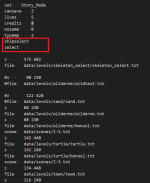
It seems that the Z values in the "skeleton_select" level is affecting the player character position.
I made some tests and you can interrupt the Z value using skipselect/select like this.

1771585132860.png
Hello OpenBor experts, I'm currently encountering a bug related to the camera's automatic vertical scrolling.
When I exit the game and return to the character selection screen, the character is no longer positioned correctly.
I only experience this issue with this set and this level.
How can I fix this problem? (I'd really like to make him jump from the giant skeleton's hand to the ground, by the way.)
It seems that the Z values in the "skeleton_select" level is affecting the player character position.
I made some tests and you can interrupt the Z value using skipselect/select like this.

1771585132860.png
 
Solution
Thanks Kratus for your support, it's perfect, problem solved!
I'm happy because I was able to create a simple and clean way to have custom intros in the levels, like this:
For characters :
Code:
anim follow1 # walking intro
    delay    8
    offset    60 98
    @cmd dasher 0.7 0 0
    frame    data/chars/ax/wd1.png
    frame    data/chars/ax/wd2.png
    frame    data/chars/ax/wd3.png
    frame    data/chars/ax/wd4.png
    frame    data/chars/ax/wd5.png
    frame    data/chars/ax/wd6.png
    frame    data/chars/ax/wd1.png
    frame    data/chars/ax/wd2.png
    frame    data/chars/ax/wd3.png
    frame    data/chars/ax/wd4.png
    frame    data/chars/ax/wd5.png
    frame    data/chars/ax/wd6.png
    frame    data/chars/ax/wd1.png
    frame    data/chars/ax/wd2.png
    frame    data/chars/ax/wd3.png
    @cmd  dasher  0 0 0
    delay    20
    frame    data/chars/ax/idle1.png

and in the level:
Code:
levelscript @script
void main()
{
int P1 = getplayerproperty(0, "entity");
int P2 = getplayerproperty(1, "entity");
int P3 = getplayerproperty(2, "entity");
int P4 = getplayerproperty(3, "entity");

if(P1){
changeentityproperty(P1, "position", -50,168, 0);
changeentityproperty(P1, "direction", 1); //Face right
changeentityproperty(P1, "animation", openborconstant("ANI_FOLLOW1"));
}
if(P2){
changeentityproperty(P2, "position", -50,188, 0);
changeentityproperty(P2, "direction", 1); //Face right
changeentityproperty(P2, "animation", openborconstant("ANI_FOLLOW1"));
}
if(P3){
changeentityproperty(P3, "position", -50,208, 0);
changeentityproperty(P3, "direction", 1); //Face right
changeentityproperty(P3, "animation", openborconstant("ANI_FOLLOW1"));
}
if(P4){
changeentityproperty(P4, "position", -50,228, 0);
changeentityproperty(P4, "direction", 1); //Face right
changeentityproperty(P4, "animation", openborconstant("ANI_FOLLOW1"));
}
}
@end_script

It remains to be seen if I can use another follow to make it jump in the intro from the skeleton's hand to the ground.
 
Last edited:
Back
Top Bottom