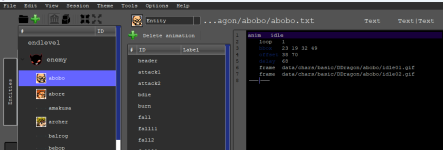
Chronocrash Modders Tools

ChronoCrash Modders Tools 0.7.9.10.1

No permission to download
its hard to go back to old stuff and trying to remember what was what. and what type it had... so yeah im pretty irritated, spending time on finding entities., it takes 2 seconds in models.txt, here it can take a long time ...
Just press F2, write part of the name of the entity you want, press enter, and it will filter the view.

If you want to filter back to the full list, press F2 again, backspace until the search input is empty, then press enter.
 
  • Like
Reactions: ABK
@Piccolo here, I managed to record a video.

Once I open this entity, I can see the IDLE and HEADER options on the menu. Once I click on HEADER, I cannot click again on IDLE.

I've attached the entity
Yeah actually it's a new global bug present only in last revision, since I added the button to delete animations. I prevent idle delete and mistakenly it also prevents loading idle animation. Will be fixed in next release.
 
OK! Found the cause, playback anim, try to change delay but you hover mouse cursor so the side tabs will expand - crash.
I tried on both Linux and Windows and it never crashes for me.
What I tried exactly was :
  • Load an entity
  • Load an animation
  • Play that animation
  • Hover left so that side panels expand/collapse
  • Tried to change delay in text while anim is playing
  • Tried to change delay with spinbox (on the right) while anim is playing

If this is what you did and it crashed, then can you send me the content of the animation you used ?

I don't need the sprites files, just the text content of the animation.
 
Just press F2, write part of the name of the entity you want, press enter, and it will filter the view.
Yeah, its very easy to find stuff. Even scripts :)

Yeah actually it's a new global bug present only in last revision, since I added the button to delete animations. I prevent idle delete and mistakenly it also prevents loading idle animation. Will be fixed in next release.
I was about to test other versions but I had no time, sorry. But good that you found the cause :)

I wanna help you with a theme for this tool, but last night I had a hard time trying to find the "delay" color on theme, as I want to try other colors since its hard to read against black background:
1700837464247.png

What is this item name on the theme file?
 
Piccolo updated Chronocrash Modders Tools with a new update entry:

Changelog 0.4.7.0

Introducing advanced auto-backup feature

  • This feature will be customizable in the future, this is just the first version
  • Right now this auto-backup feature does two things :
    • Each time you save a file, it stores a revision that you can access later
    • Every minute, it checks for unsaved files and stores a revision that you can access later. A new revision is stored only if there was a change since the last stored revision. So you won't have...

Read the rest of this update entry...
 
I wanna help you with a theme for this tool, but last night I had a hard time trying to find the "delay" color on theme, as I want to try other colors since its hard to read against black background:
My bad, this was fixed months ago or maybe more, but the script I use to clean the public version before creating a release uses old files for editor themes.

EDIT : hum actually it somewhat works in public version but only when using Theme -> Widgets -> Dark and Theme -> Editor -> Vim (dark) and then restarting the app. I'll make it so it is more consistent

EDIT2 : ok in next release this will support hot theme change, so that you don't have to restart to get the light/dark colors for the syntax coloring.
 
Last edited:
EDIT : hum actually it somewhat works in public version but only when using Theme -> Widgets -> Dark and Theme -> Editor -> Vim (dark) and then restarting the app. I'll make it so it is more consistent
Thanks, I got the new version and the synthax color is right now.

Just the tab color is a bit hard to read - maybe you can let it in white:
1700849306067.png

And the bug I mentioned is gone :)

Also, I think you can replace the "delete animation" with the same MINUS icon you use here:
1700849396973.png

Thanks so much for all your hard work
 
Piccolo updated Chronocrash Modders Tools with a new update entry:

Changelog 0.4.7.1

- Fixed a bug where if you changed the single delay of a looping playing animation to value 0, then the program would radically slow down and freeze (@bWWd )


- Auto-backup feature V2 : added lots of options in "Edit" -> "Settings" -> "Auto-backup". Basically you can set up multiple types of backup : per hour backup, per day backup, and just a classic last sequential history.

- The classic last sequential history keeps X amount of last revisions per file, irrespective of...

Read the rest of this update entry...
 
he search fields being on bottom ... i dit not seen them until you mentioned them, no idea its a search field , maybe a SEARCH text next to it ?

Also IMO it should be on the top not the bottom + i removed "idle" from search field but all i see is only idle animation, this should auto swich once i remove all stuff from the
search box, but somehow it does not autoupdate to show me all anims again, same for search box for entities , it still shows onlyu the one i searched despite not having anything in searchbox anymore... the little things only new users will notice.
 
he search fields being on bottom ... i dit not seen them until you mentioned them, no idea its a search field , maybe a SEARCH text next to it ?

Also IMO it should be on the top not the bottom + i removed "idle" from search field but all i see is only idle animation, this should auto swich once i remove all stuff from the
search box, but somehow it does not autoupdate to show me all anims again, same for search box for entities , it still shows onlyu the one i searched despite not having anything in searchbox anymore... the little things only new users will notice.

I'll probably add search icon, but I didn't want "Search" label to take space on small screens. But yeah in english "search" is a pretty small word.
EDIT : I'm dumb I will just put a placeholder text when the entry is empty

I will add an option to update search results without pressing enter every time a character in the search entry changes, but personally I don't like this behavior at all for this kind of treeview widget so it's very deliberately set like this. For the list of backups for example it filters automatically as soon as the text entry changes, because it's a simple table view.

So right now for the library widget (entities, files, ...) every time you want to update the view to match filter, you have to press enter. In a next update I'll add one or two options to customize this.
 
Last edited:
Great now its obvious search, i mean i dont like really telling oyu what to do and all but i think i can provide some interesting input on how the sofftware can be experienced by someone new to it, so some stuff is obvious for longtime users and thats great but its still IMO important to make it as obvious and intuitive as possible ...

Im a big fan of not pressing enter in search so it shows results realtime and you can lookup stuff faster like this if you forgot the name .

So far the software is great but yeah when i start new character and have to type in 15 paths manually. and dealing with indents...

I think there should be a faster way to do it, did you thought about letting us to actually browse and select the frames and multiple frames at once then import them alphabetically ? maybe its too much , i think the gui thingy i pasted works equally good.

But maybe its too much, its just those things are pita.

Can You include openbor manual so we can lookup commands ?

I have manual open at al times in separate text file but having it in the software would be nicer, same with openbor packer.
 
Last edited:
Can You include openbor manual so we can lookup commands ?
There are plans for that, @O Ilusionista proposed the idea and the goal is to integrate the manual a bit like it was in openborStats. I guess it's also possible to integrate the full manual as well, and put it in a shortcut like the TODO and Log shortcuts in the upper right corner of main text editor.

So far the software is great but yeah when i start new character and have to type in 15 paths manually. and dealing with indents...
I think there is an actual feature to create a character based on a template. But it's probably from 2016 or 2017 and I don't remember at all what it was exactly.

And no problems with suggestions, I'll consider them. Basically all the work I've done on this in the past few years has been exclusively adjustments or features based on suggestions.

I'm also open to include things I don't like as long as it can be included as options.

I think there should be a faster way to do it, did you thought about letting us to actually browse and select the frames and multiple frames at once then import them alphabetically ? maybe its too much , i think the gui thingy i pasted works equally good.
Yeah probably could be done. But as for all suggestions like that I need very clear details on how it should work. What I interpreted here is :
- you right click in an editor in CMT, a context menu opens, you select an option in contextmenu to do the feature you want, it opens a dialog letting you select multiple images files (sprites)
- then when you validate the dialog it outputs (at the position you clicked) a list of lines like "frame data/chars/path..." in alphabetical order, where the paths in those lines matches the selected files
 
There are plans for that, @O Ilusionista proposed the idea and the goal is to integrate the manual a bit like it was in openborStats.

If I may, please... please don't do that. That's one of things that looks great on paper, but never work in practice. It's just going to be one more detached manual that inevitably gets out of sync and causes more confusion among users.

Leave the documentation to the forum where it belongs (which I'm working on feverently). Let the editor do editing. :)

DC
 
If I may, please... please don't do that. That's one of things that looks great on paper, but never work in practice. It's just going to be one more detached manual that inevitably gets out of sync and causes more confusion among users.

Leave the documentation to the forum where it belongs (which I'm working on feverently). Let the editor do editing. :)

DC
Ok I don't mind anyway personally.

A workaround then would be to fetch the manual page and opens it in CMT like if it was a web browser tab. Without storing it. This is possible.

Another way but that would implies work on the manual server side is to have some kind of database and api, and then CMT fetches that api based on commands names to get the matching description.

In both cases the source would not be duplicated/split.
 
  • Like
Reactions: ABK
Ok I don't mind anyway personally.

A workaround then would be to fetch the manual page and opens it in CMT like if it was a web browser tab. Without storing it. This is possible.

Another way but that would implies work on the manual server side is to have some kind of database and api, and then CMT fetches that api based on commands names to get the matching description.

In both cases the source would not be duplicated/split.

I would still be nervous about that, because then it means any time I need to update the manual, consolidate a page, etc., it's going to break something. I would really prefer just a basic link to the wiki, and let users find their way around.

We've tried manual caching and direct linking in my professional work a few times too. It's just not a good idea in the long run. Too many moving parts.

DC
 
Manual at hand and having it in software is just one less windows to clutter desktop so... how about a normal html/pdf/txt viewer panel that will just open html or txt or whatever, and we can just put the manual as html, pdf or txt ourselves in one of the folders so its our choice ?

And the searchbox woud be automated so we type in command and it already appears without havin to enter

A searchable so we can search for anything inside manual but also edit the manual ourselves maybe not in program itself but like a normal html or txt.


About the path creating thing, IMO fastest is just having one line and clicking a button to autogenerate next lines, but that assumes people store frames like me - incrementaly frame01,frame02 etc... its fastest cause you dont have to browse and all logic is within the one click or two to confirm how many frames i thould generate after that one .

So theres also other way to actually click a button and start selecting frames in order from a folder but it takes time to browse, and this order is respected and when we approve it then software accepts the files and automatically generate paths to each image in order of selection.

If its a button or right click popup no difference as long as it saves time typing all the frames in.

So the script i pasted detects whats the frame number and it automatically assigns numbers and creates as man frames as you choose , theres extra box to set amount of frames to generate .

I mean, what other things people have issues with , what takes up most of their time when making openbor games ?

Maybe thats a good question and it will make the software pretty much perfect for fast workflow and most monotone tasks will be automated


Even entity creator, where you can pick type and it autogenerates for you, that would be pretty nice but i guess complex to build , like selecting frames per animations, selecting animations , maybe no sounds and all that but selecting offsets for group of frames or single frames ?

Im sure there are still ways to make all of this faster , we had like 3-4 editors already, no source to expand on them so its great that you are here still checking .


Oh and as DC mentioned, wiki link would be great too, even tho it wont be there forever , its up to date.

There was lavalit now chronocrash, there were other sites before and they disappeared without much trace i dont even remember all their names so ... im still prefering to have things offline to access even if you have no internet.
 
Last edited:
I like @bWWd's idea. If implemented, it would be nice if we could have diferent formats (I hate to ask that, cause it's just piling on requests). Each person generaly has their own convention. For example, I like idle_0, idle_1, idle_2, and sometimes even an appendix: idle_0_tabard, idle_0_coat, ...

The later might seem strange, but it's very handy to keep things organized if you use binding to create metasprites and special effects:

idle_0.pngidle_0_coat.pngidle_0_tabard.png
valis_idle_unarmed_0_demo_lrg_0.png
 
Last edited:
Manual at hand and having it in software is just one less windows to clutter desktop so... how about a normal html/pdf/txt viewer panel that will just open html or txt or whatever, and we can just put the manual as html, pdf or txt ourselves in one of the folders so its our choice ?

And the searchbox woud be automated so we type in command and it already appears without havin to enter

A searchable so we can search for anything inside manual but also edit the manual ourselves maybe not in program itself but like a normal html or txt.
You can already do that with txt, in the upper corner with the TODO and Log buttons. And those can be expanded using "Edit" -> "Settings"-> "Misc", even though you can't really set the names right now, just numbers (2,3,4,...). Ctrl+F works here,and it's automated. What return key does here is to go to the next occurrence.

I can easily add support for html.
 
I like @bWWd's idea. If implemented, it would be nice if we could have diferent formats (I hate to ask that, cause it's just piling on requests). Each person generaly has their own convetion. For example, I like idle_0, idle_1, idle_2, and sometimes even an appendix: idle_0_tabard, idle_0_coat, ...

The later might seem strange, but it's very handy to keep things organized if you use binding to create metasprites and special effects:

View attachment 5833View attachment 5834View attachment 5835
View attachment 5837
I can add a mask just like for the binding GUI. And each time you add a mask it gets stored so that you can reuse it later.

Example of masks :
Code:
    blabla{frame-number}

Code:
    blabla_{frame-number}

Code:
    blabla_{frame-number}_whatever

Where {frame-number} would be replaced by current index
 
Back
Top Bottom