gianluca mastroianni
New member
wowwwwww


Thanks! I'll take that as a compliment.wowwwwww
I 6 personaggi in basso (Snake Men) sono il ciclo successivo. Il primo personaggio (King Hiss) potrebbe essere complicato. Vorrei dargli una seconda forma, un po' come Tung Fu Rue nel primo Fatal Fury. Spero di riuscirci. Se non ci riesco, forse gli darò una mossa speciale in cui mostra la sua seconda forma durante quella mossa, un po' come Tung Fu Rue in Fatal Fury Special. E Snake Face potrebbe anche essere complicato, dato che è praticamente come una Medusa maschio, quindi avrà una mossa in cui letteralmente pietrifica il suo avversario.
Great. Thank you so much for Rattlor. Now for the really important ones, MANTENNA and HORDAK, with their followers, are missing. Thank you so much. There's just one thing I ask you to do, if possible. Right now, the sprites are too tall and not very wide. Let's say they're slightly disproportionate in height and width. The MOTU were very muscular and less slender. If you can, adjust this height/width ratio slightly. Lower them slightly. If you can, of course. For now, I can only express my greatest admiration.The 6 characters on the bottom (Snake Men) are the next cycle. The first character (King Hiss) might be tricky. I would like to give him a second form kind of like Tung Fu Rue in the 1st Fatal Fury. I hope I can figure it out. If I can't then perhaps I'll give him a special move where he shows his second form during that move, kind of like Tung Fu Rue in Fatal Fury Special. And Snake Face might also be tricky since he's pretty much like a male Medusa so he will have a move where he literally petrifies his opponet.
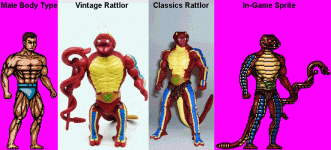
No need to thank me! Working on this project has been a lot of fun so far. Regarding the characters proportions, with the exception of Ram-Man and Extendar I'm using the same male model for ALL male characters. That male model I think is very muscular. As much as I love the vintage figures they did look kind of chubby and short. I feel that CLASSICS had better body proportions and posture. Also, Vintage Rattlor had a longer torso and very short legs compared to the other characters. Rattlor had this gimmick where he could extend his neck (Like Mekaneck). I think that explains the size of his torso, it needed to be big enough so you could fit the neck inside so he could have that gimmick. CLASSICS on the other hand didn't feature any gimmicks. I like "Classics Rattlor" better because his body proportions are more consistent with the rest of the characters. I uploaded a picture that will "hopefully" help me explain better what I'm trying to say. Sorry dude, I had already started animating Rattlor BEFORE I read this message. I hope all is well.Great. Thank you so much for Rattlor. Now for the really important ones, MANTENNA and HORDAK, with their followers, are missing. Thank you so much. There's just one thing I ask you to do, if possible. Right now, the sprites are too tall and not very wide. Let's say they're slightly disproportionate in height and width. The MOTU were very muscular and less slender. If you can, adjust this height/width ratio slightly. Lower them slightly. If you can, of course. For now, I can only express my greatest admiration.
First of all, thanks for the reply, as always. Rattlor, the original, is the vintage one, with the short legs. But since you've granted my wish, thank you so much. And then I'd like to ask you one last thing. The colors of the MASTERS were more intense, colorful, pastel. Can you modify those a bit? Right now they look a bit dull. Anyway, thank you very much.No need to thank me! Working on this project has been a lot of fun so far. Regarding the characters proportions, with the exception of Ram-Man and Extendar I'm using the same male model for ALL male characters. That male model I think is very muscular. As much as I love the vintage figures they did look kind of chubby and short. I feel that CLASSICS had better body proportions and posture. Also, Vintage Rattlor had a longer torso and very short legs compared to the other characters. Rattlor had this gimmick where he could extend his neck (Like Mekaneck). I think that explains the size of his torso, it needed to be big enough so you could fit the neck inside so he could have that gimmick. CLASSICS on the other hand didn't feature any gimmicks. I like "Classics Rattlor" better because his body proportions are more consistent with the rest of the characters. I uploaded a picture that will "hopefully" help me explain better what I'm trying to say. Sorry dude, I had already started animating Rattlor BEFORE I read this message. I hope all is well.
As much as I LOVE the original vintage figures, I always prefered darker colors. I uploaded a picture using "Beast Man" as an example. I feel that Classcis made many improvements with the details and body proportions and the paint job as well. Alfredo Alcala (one of my favorite artists) made a slightly darker version of Beast Man while still being based on the action figure. And another amazing artist (Simo Sol) also made a darker version of the character while still being true to the original design. I just happen to like darker colors, I feel they make the character look a little more realistic.First of all, thanks for the reply, as always. Rattlor, the original, is the vintage one, with the short legs. But since you've granted my wish, thank you so much. And then I'd like to ask you one last thing. The colors of the MASTERS were more intense, colorful, pastel. Can you modify those a bit? Right now they look a bit dull. Anyway, thank you very much.
Okay, you're the creator and I can only accept that, but the originals, in my opinion, are always the originals. Like the 80s cartoon, for example. But I don't want to make you angry, so I accept everything.As much as I LOVE the original vintage figures, I always prefered darker colors. I uploaded a picture using "Beast Man" as an example. I feel that Classcis made many improvements with the details and body proportions and the paint job as well. Alfredo Alcala (one of my favorite artists) made a slightly darker version of Beast Man while still being based on the action figure. And another amazing artist (Simo Sol) also made a darker version of the character while still being true to the original design. I just happen to like darker colors, I feel they make the character look a little more realistic.

It's all good, dude! I'm NOT angry. I was just taking the time to explain the reasons behind "some" of the decisions I've made while working on this game.Okay, you're the creator and I can only accept that, but the originals, in my opinion, are always the originals. Like the 80s cartoon, for example. But I don't want to make you angry, so I accept everything.
thanksIt's all good, dude! I'm NOT angry. I was just taking the time to explain the reasons behind "some" of the decisions I've made while working on this game.
No problem, dude!thanks

Hello everybody! I hope all is well.
I have a "flickering" issue. There's a character (Snake Face) who has the ability to turn his opponents into stone. I found a tutorial on YouTube on how to freeze/petrify a character. I works really well, but sometimes during the opponent's "turned into stone" state there's some flickering. This only seems to happen during the opponent's "Dash Forward" animation so far. Also, if you turn the opponent into stone while the opponent is in the air they get hit by the attack but they do NOT turn into stone, they just "float" in the air. I also tried using Chill Penguin's "P2 FROZEN STATE" from "Mega Man: Robot Master Mayhem" and I had a similar issue but instead of flickering the character just becomes invisible during their "Frozen State". I have NO idea why this happens. It does NOT happen in Robot Master Mayhem. I noticed, for that game, MUGEN 1.00 was used. I'm using MUGEN 1.1 Beta 1. So, I tried using an older MUGEN version but I get an error message saying that it can't open the character (Snake Face). Plus, all the colors are all messed up. Thankfully this does NOT happen all the time but I wish I had a clue what the reason is.

Wow, I never ever saw a flickering issue in Mugen in my entire life.I have a "flickering" issue.
Also, if you turn the opponent into stone while the opponent is in the air they get hit by the attack but they do NOT turn into stone, they just "float" in the air. I also tried using Chill Penguin's "P2 FROZEN STATE" from "Mega Man: Robot Master Mayhem" and I had a similar issue but instead of flickering the character just becomes invisible during their "Frozen State". I have NO idea why this happens. It does NOT happen in Robot Master Mayhem.
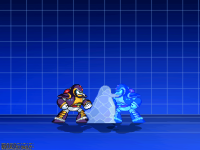
And we force this new state on the last setting of the hitdef:;---------------------------------------------------------------------------
;P2 FROZEN STATE
[Statedef 4950]
movetype= H
velset = 0,0
ctrl = 0
[State 1499, 1]
type = PosAdd
trigger1 = time >= 160
x = 1-2*(time%2)
[State 1499, 2]
type = PosFreeze
trigger1 = 1
trigger1 = time > 1
value = 1
[State 1499, 3]
type = changeanim
trigger1 = 1
value = (anim)
elem = (animelemno(0))
[State 1499, 4]
type = PalFX
trigger1 = time != 0
add = 0,50,240;
mul = 120,224,241;
time = 1
[State 1499, 6]
type = HitOverride
trigger1 = Pos Y < 0
time = 1
attr = SCA,NA,SA,HA,NP,SP,HP,NT,ST,HT,AA,AT,AP;SCA,AA, AT, NP
forceair = 1
[State 1499, 7]
type = SelfState
trigger1 = time = 180
ctrl = 1
value = 0
[State 1499, 7]
type = SelfState
trigger1 = life = 0
ctrl = 0
value = 5050;0
[State 1499, 8]
type = SelfState
trigger1 = time = 179
trigger1 = Pos Y != 0
ctrl = 1
value = 5040
Activate the debug by pressing CTRL+D, it will show useful informations and it will warn you if there is any missing animation.[State 2506, 1]
type = HitDef
trigger1 = !time
attr = S,SA
damage = 10,0
animtype = Light
guardflag = MA
hitflag = MAF
priority = 3;, Hit
pausetime = 0,0
sparkno = s913
sparkxy = 20,-15
hitsound = s1,2
guardsound = S8500,0
ground.type = Low
guard.ctrltime = 20
ground.slidetime = 15
ground.hittime = 20
ground.velocity = 0,0
air.velocity = 0,0
p2stateno = 4950
yep, you can't use a delay of 0Because that frame was set to "0 ticks"

Sorry, I forgot to answer your question. That picture of Chill Penguin on your previous post WAS exactly what I was talking about. Thansks again for your help!yep, you can't use a delay of 0