
Chronocrash Modders Tools

ChronoCrash Modders Tools 0.7.9.10.1

No permission to download
This is great, Now i can have eveyrthing actually inside the program, this is actually pretty neat , can even run borpacker, paxploder guis i created and all the stuff you desire, even graphic software, small thing but really expands functionality.

Anyone knows small app that can edit palettes and i can plug into it ? Not really wnt to run CS3 and wait for it to load just to edit pal.
 
Anyone knows small app that can edit palettes and i can plug into it ? Not really wnt to run CS3 and wait for it to load just to edit pal.
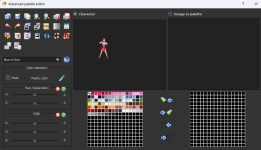
Fighter Factory has a superb palette editor (better than Photosshop). you can drag colors, copy colors from other images, generate a palette from many images, apply a palette to many images, etc

just go to TOOL > ADVANCED PALETTE EDITOR

1701707789531.png
 
I have it but It wont accept gif so it has no use for me, i dont like using 8bit pngs, they get confused with non 8bit superfast and i dont want that mess in exchange of almost no advantage
 
OK i have another idea for speedup...

When we highlight a word in animations , how about we will be able to right click it and select new "Replace all with" option which wil bring up text input box and if we input for example "whats" then all highlighted text occurencies in this animation will be replaced with "whats" word so its kinda like replace function in notepad++.

So when text input shows up then its already filled with highlighted text and its up to us what we will replace it with, its just to prevent retyping in or recopying in highlighted paths or whatever.

This will speedup changing paths or whatever else we highlight like frame names.

It also would be cool if we would be able to replace all occurencies of highlighted word in entire txt file not just in one animation.

I have that functionality in my gui but it shouldn be super complex to add it ? store current anim in memory and replace strings then paste back.
1701726101220.png
 
OK i have another idea for speedup...

When we highlight a word in animations , how about we will be able to right click it and select new "Replace all with" option which wil bring up text input box and if we input for example "whats" then all highlighted text occurencies in this animation will be replaced with "whats" word so its kinda like replace function in notepad++.

This will speedup changing paths or whatever else we highlight like frame names.

It also would be cool if we would be able to replace all occurencies of highlighted word in entire txt file not just in one animation.

I have that functionality in my gui but it shouldn be super complex to add it ? store current anim in memory and replace strings then paste back.
View attachment 5991

There is already a similar feature in "Text" editor. At the bottom.

And you can use Ctrl + F to focus on the search input, and Ctrl + R to focus on the replace input.

Though (*) be aware that there is currently a known bug with this feature that I need to fix. The bug only happens when using "Replace all" of a string that contains the same string in it.

So if you replace "car" with "bus", no problem. But if you replace "car" with "caramel" it will trigger an infinite loop (because "car" will still be in "caramel", and so on, I just need to add a stop condition so as to not process text twice).

* EDIT : I'm uploading a new rev with this particular bug fixed so you won't have to worry about it.
 
Last edited:
oh, i wasnt really using text editor at all and just used the small one in animation preview mode... can you move those replace buttons there as well ?
When i use generate paths thingy in text editing mode, and set from 0 to 13 then it genreates 13 copies of the identical path without actual numbers from 0 to 13 at the end of the filenames before extension
 
oh, i wasnt really using text editor at all and just used the small one in animation preview mode... can you move those replace buttons there as well ?
yeah but in next update, I just uploaded the new one before your post. In the meantime the one in all animation will do the trick.
If you only want to replace entries in select portion (single animation) and not whole text, set cursor at desired start position and use replace (not replace all) multiple time (enter key) until everything you want is replaced.
 
@Piccolo Hey man, I was using the version 0.4.7.7 (I didn't test the 0.4.7.7.1 yet) and while editing some hitboxes I saw that the CMT automatically moved my "hitflash" command at the animation header to a wrong place. Is it possible to make a small update where this behaviour does not occur? Thanks buddy :)

1701729881106.png
 
@Piccolo Hey man, I was using the version 0.4.7.7 (I didn't test the 0.4.7.7.1 yet) and while editing some hitboxes I saw that the CMT automatically moved my "hitflash" command at the animation header to a wrong place. Is it possible to make a small update where this behaviour does not occur? Thanks buddy :)

View attachment 5993
Is it really a wrong place though ? Basically, for each frame, CMT packs every defined attack properties (hitflash is considered an attack property) together instead of letting them dispersed. But while doing so it doesn't alter the frame at which they are defined. So here hitflash is still defined for frame 0, as it was before. It is just written next to all the attack properties for that frame.

I could add code to force the rebuild script to keep the initial dispersion of attack properties, but honestly I don't really see the point and it complicates the code that read and rebuild text animations. In fact I decided to remove the code that handled those properties separately recently because it was basically the source of a bug reported here.
 
Is it really a wrong place though ? Basically, for each frame, CMT packs every defined attack properties (hitflash is considered an attack property) together instead of letting them dispersed. But while doing so it doesn't alter the frame at which they are defined. So here hitflash is still defined for frame 0, as it was before. It is just written next to all the attack properties for that frame.

I could add code to force the rebuild script to keep the initial dispersion of attack properties, but honestly I don't really see the point and it complicates the code that read and rebuild text animations. In fact I decided to remove the code that handled those properties separately recently because it was basically the source of a bug reported here.
I understand your point, but I thought that CMT try to fix the only edited properties and ignore unchanged things. And I didn't understand why CMT fixes one property and lets others in the original location, as you can see in my post that jugglecost/forcedirection/otg are unchanged.
 
I understand your point, but I thought that CMT try to fix the only edited properties and ignore unchanged things. And I didn't understand why CMT fixes one property and lets others in the original location, as you can see in my post that jugglecost/forcedirection/otg are unchanged.
Only because jugglecost and forcedirection are not processed at all right now. But if CMT was complete it would do the same things with those other attack properties. And, see, this is exactly why I decided it was a good idea to not have code that process attack properties separately, because there's a whole lot of them :p And if I have to add separate support for them the code would be really bloated.

The only reason hitflash is processed by CMT (even though you can't edit it with a widget) is because it can be translated (back and forth) from legacy command to new command style (attack.
effect.hit.flash.model) automatically.

Basically how CMT work for animation is :
- For every line : check command. If there is no code to process command, then ignore line
- if there is code to process command, then use code to convert line content

EDIT : So what I can do if you want, is add an option to create a custom "ignore list", to ignore some commands altogether. So if you ignore hitflash command for example, it will be considered as a "no code to process command" line, and thus would stay exactly as it was and where it was. Tell me if you're interested ;)
 
Last edited:
So what I can do if you want, is add an option to create a custom "ignore list", to ignore some commands altogether. So if you ignore hitflash command for example, it will be considered as a "no code to process command" line, and thus would stay exactly as it was and where it was. Tell me if you're interested ;)
I would really appreciate it if you could add this "ignore" list, when certain projects become too big it's better to maintain a default way to read/write codes in order to make updates easier. But only if it will not turn things too complicated for the CMT advancement, I know that some small additions may look easy for the users but internally are a pain to code 😅
 
I would really appreciate it if you could add this "ignore" list, when certain projects become too big it's better to maintain a default way to read/write codes in order to make updates easier. But only if it will not turn things too complicated for the CMT advancement, I know that some small additions may look easy for the users but internally are a pain to code 😅
That's okay that function will be very very easy to code, basically two little checks to add + the interface to input the ignore list.

The only potential problem could be for future compatibility maybe, or if you ignore commands that are very important.

I'll add this feature before going to bed, upload will probably be up in less than half an hour ;)
 
That's okay that function will be very very easy to code, basically two little checks to add + the interface to input the ignore list.

The only potential problem could be for future compatibility maybe, or if you ignore commands that are very important.

I'll add this feature before going to bed, upload will probably be up in less than half an hour ;)
Thanks a lot :) it will be very useful mainly for older projects. For the new ones I would code entirely in the new format to avoid compability issues.
 
Piccolo updated Chronocrash Modders Tools with a new update entry:

Changelog 0.4.7.8

In Edit > Settings -> Miscellaneous, added an option to ignore processing of certain commands in entity editor @Kratus
The lines with those commands will not be processed at all by CMT.


The list should be without spaces, and elements separated by coma. Example "hitflash,hitfx"

Use only if you are sure of what you are doing.

Note : you need to restart CMT for the new ignore list to take effect.

Read the rest of this update entry...
 
Back
Top Bottom