Chronocrash Modders Tools

ChronoCrash Modders Tools 0.7.9.10.1

No permission to download
as for the file update issue, could it be because it's in a synced dropbox folder. I've read reports of dropbox interfering with some file operations of other apps
Yeah it's probably related to that. I did some quick research and apparently dropbox sometimes does weird things with mtime, and this is what I use to triggers the warning that the file has been modified. If I add the size difference as an additional condition, this might fix it.
 
  • Like
Reactions: kzr
may I suggest that walls/basemaps have different colors for foreground and background lines? would help a lot when building complex levels
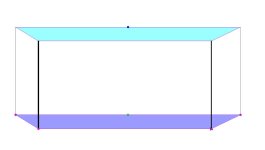
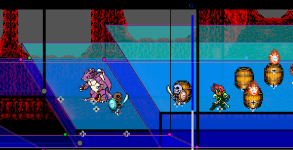
It's actually tricky to do exactly that, because the way walls are represented right now, the base form a single entity. Then you have the copy of the base on top of it, and the 4 verticals bars to join the two bases.

Best I can do without rewriting the whole thing is :
- differentiate the colors of the lower and upper base
- fill the lower and upper base (with different colors)
- change the colors of the vertical lines (those I can adjust independently as they are just lines), so that you can have the two front vertical lines with one color, and the two back vertical lines with another

EDIT : here's an example of what can be easily done on walls :
wall-example.jpg
 
Last edited:
  • Like
Reactions: kzr
Hey Piccolo. I was working on binding targets, but I encountered some issues here. It stops somewhere when you try to move the target's position. Sometimes it allows you, but sometimes it doesn't. Is it because of CMT's delay of binding?


I didn't realize that I can disable and then enable its Binding Settings box without changing models for enabling it until I made this video.

For the frame part in Binding Settings, could you limit the number of bound frames of models from reaching negative values since frame is always used for detecting specific frames starting from 0 and on?

 
Hey Piccolo. I was working on binding targets, but I encountered some issues here. It stops somewhere when you try to move the target's position. Sometimes it allows you, but sometimes it doesn't. Is it because of CMT's delay of binding?


I didn't realize that I can disable and then enable its Binding Settings box without changing models for enabling it until I made this video.

For the frame part in Binding Settings, could you limit the number of bound frames of models from reaching negative values since frame is always used for detecting specific frames starting from 0 and on?
I would just toggle (red cross, green plus) the bindings again if that happens. Or maybe toggle the visibility of the entity (uncheck show entity and check it again).

For frame I don't know. I think there might be uses case where you wan't negative values (like for triggering specific releases), so I don't think it's a safe idea to force positive values.
 
I would just toggle (red cross, green plus) the bindings again if that happens. Or maybe toggle the visibility of the entity (uncheck show entity and check it again).

For frame I don't know. I think there might be uses case where you wan't negative values (like for triggering specific releases), so I don't think it's a safe idea to force positive values.


+1.

The underlying structure of binding properties are signed and can have meaning.

DC
 
Testing the last version, so far, so good :)
Just now I realized how useful the "text/text" feature can be quite handy.

I would like to suggest something: guide lines.
in Fighter Factory, we have then and they are quite useful - and we can drag then to any place we want.
1707491459701.png
in CMT, it could be useful to align stuff and checking if all the attacks from an attchain have the same reach, etc.

I would suggest to add the ruler as we have in FF too, kinda like this, but maybe the interface would get too polluted
1707491710804.png

Also, have you saw my suggestion about P1 spawn location ? ChronoCrash Modders Tools
 
I agree with the guiding lines. How about also make it behind the model a bit like layer set due to the cross/offset?
 
@Piccolo Some things could be checked in how the tool display the drawmethod:
- You can preview "drawmethod scale 2" but not individual scales like "drawmethod scalex 2".
- Right now, if you use "drawmethod flipx 1" and wanna cancel it later, you need to type "drawmethod flipx 0", but this is not how we do in real coding. It would be better if we have "nodrawmethod" as a reset for any drawmethod preview.

Oh and, maybe, you can make the tool to read the "flipframe [frame]" from the animation header and make it to display the frames flipped?
Are those things hards to implement?

Also, remember when you fixed how the tool was displaying flipx, using the incorrect offset? Looks like the fix was applied only to the X axis - if you use "drawmethod flipy 1", the tool displays stuff using the wrong position. I can take some screenshots to show you.
 
Back
Top Bottom