Chronocrash Modders Tools

ChronoCrash Modders Tools 0.7.9.10.1

No permission to download
Hey Piccolo. I found another problem when I try to go to the subway level and then the test stage. I leave the level tab open while opening another level. Then, when I go back to the subway stage after the test stage, I receive this report.
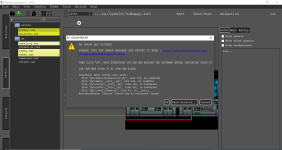
2-23-2023 10-35-28 PM.png

Details:
Code:
Traceback (most recent call last):
  File "gui\main\fileselector.py", line 723, in loadItem
  File "gui\main\__init__.py", line 131, in loadFile
  File "gui\level\__init__.py", line 150, in loadLines
  File "gui\level\__init__.py", line 801, in loadLines
  File "gui\level\items.py", line 50, in __init__
AttributeError: 'Entity' object has no attribute 'anims'

EDIT: Let me check the latest version if it has a similar problem.

Note from Version : 0.4.4.5

EDIT 2: Now I get this after I got version 0.4.4.10.
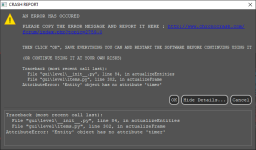
2-23-2023 10-51-15 PM.png
 
Last edited:
Tried the 0.4.4.7 version and it's working great thanks to @Piccolo
just wonder why when I use MCT my PC fan sounds louder? which means this happens because my PC to heat up a bit
doesn't sound loud like when playing modern open world games of course, but usually my pc fan never sounds at all while opening lots of mozilla tabs, photoshop, openborstats, obeditor, openbor.exe etc in hours
I am using intel i3 (not a very powerful cpu), does this have any effect?

*the fan sound a bit loud like when using handbrake app while converting videos
 
the fan sound a bit loud like when using handbrake app while converting videos

That's no surprise. Video encoding is extremely calculation intensive, and not something CPUs are good at, no matter how powerful they are. Usually your video encoder will try to use the GPU for hardware acceleration, but that’s not always possible depending on the settings you used and your graphics card. Even when you are able to use GPU acceleration the CPU is still working very hard.

DC
 
Tried the 0.4.4.7 version and it's working great thanks to @Piccolo
just wonder why when I use MCT my PC fan sounds louder? which means this happens because my PC to heat up a bit
doesn't sound loud like when playing modern open world games of course, but usually my pc fan never sounds at all while opening lots of mozilla tabs, photoshop, openborstats, obeditor, openbor.exe etc in hours
I am using intel i3 (not a very powerful cpu), does this have any effect?

*the fan sound a bit loud like when using handbrake app while converting videos
Hum this is weird :unsure: If you are sure it's not a coincidence, then you can check the CPU usage for the CMT process, maybe something is wrong. Normally it should not be intensive at all for a modern CPU.
 
Hum this is weird :unsure: If you are sure it's not a coincidence, then you can check the CPU usage for the CMT process, maybe something is wrong. Normally it should not be intensive at all for a modern CPU.
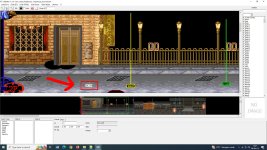
@Piccolo

Man, I checked this report and the same happened to me, for some reason the cpu usage growth around 30% only in the "animation" tab. Curiously the "level" tab growths only 5% even if there's animated entities at the background.

In addition, during my tests I noticed that if you open and then close an entity 2 or 3 times randomly it stops working and the entity will not be loaded anymore.
Both tests were made in the video below:

 
@Piccolo

Man, I checked this report and the same happened to me, for some reason the cpu usage growth around 30% only in the "animation" tab. Curiously the "level" tab growths only 5% even if there's animated entities at the background.

In addition, during my tests I noticed that if you open and then close an entity 2 or 3 times randomly it stops working and the entity will not be loaded anymore.
Both tests were made in the video below:


Yeah it's weird. I checked and my CPU usage is abnormally high in animation tab too, but there is no code running, so no explanation. Or maybe I'm missing something, I'll try to see the difference between this and the implementation of the level editor.

That being said I changed the sprite view to OpenGL rendering just to see, and (expectedly) the CPU usage was dramatically reduced. I'll include the option in the next release.
 
LOL Actually it had nothing to do with the frame view, it's a rendering leak created by some small buttons in the properties editor on the right :ROFLMAO:

I can't create a build at the moment, but the problem is fixed in the code, I will be able to upload a new build in two days.
 
Last edited:
Piccolo updated Chronocrash Modders Tools with a new update entry:

Version 0.4.5

- Fixed a rendering bug that was causing an abnormally high CPU usage. (ChronoCrash Modders Tools)

-Added option OpenGL Rendering. I don't recommend it though. I added it only to debug the aforementioned bug that was causing high CPU usage. Without the bug, ChronoCrash Modders Tools default rendering is not taxing on the CPU and is glitch free. OpenGL rendering on the other hand may cause visual...

Read the rest of this update entry...
 
Hi @Piccolo
I knew I needed to learn a lot about this tool since I just tried using it. even I'm still confused why some stages appear normally but others don't even show an entity at all

but for right now can you make something like this:
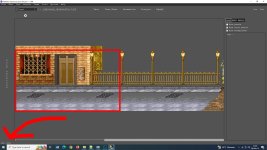
while in stage / level design, if we point our mouse to any point anywhere there it will automatically showing the coordinates like this:
pointer.jpg
if the coords automaticly show up it would be very helpful (with photoshop we can simply open info tab for something like this)
of course If this feature doesn't exist yet (because I haven't found it)

and Thanks
 
Last edited:
  • Like
Reactions: NED
Hi @Piccolo
I knew I needed to learn a lot about this tool since I just tried using it. even I'm still confused why some stages appear normally but others don't even show an entity at all

but for right now can you make something like this:
while in stage / level design, if we point our mouse to any point anywhere there it will automatically showing the coordinates like this:
if the coords automaticly show up it would be very helpful (with photoshop we can simply open info tab for something like this)
of course If this feature doesn't exist yet (because I haven't found it)

and Thanks
That feature exists, look at the lower left corner ;)

As for stages that don't load entities, I cannot fix this unless you send me your files so that I can look into it. I already fixed a problem that prevented entities from loading, but if it doesn't work on some of your files, then it means it wasn't the only one.
 
That feature exists, look at the lower left corner ;)
Ahh yes I see it now 😁
pointerCMT.jpg

As for stages that don't load entities, I cannot fix this unless you send me your files so that I can look into it. I already fixed a problem that prevented entities from loading, but if it doesn't work on some of your files, then it means it wasn't the only one.
stage.txt or?


And CMT animation tab now only 2% of cpu usage thank you, previous version was 15%
 
Ahh yes I see it now 😁


stage.txt or?


And CMT animation tab now only 2% of cpu usage thank you, previous version was 15%

I need at least "models.txt", "levels.txt", and the stage .txt that doesn't load properly. If the problem is not too deep I'll be able to fix it with just these. You can send me those here or in MP ;)
 
I need at least "models.txt", "levels.txt", and the stage .txt that doesn't load properly. If the problem is not too deep I'll be able to fix it with just these. You can send me those here or in MP ;)

it turns out this line causing the error so all entity not show up
Code:
##spawn sky_nh
flip 1
coords 0 259
at 0
I delete this and everything fine now

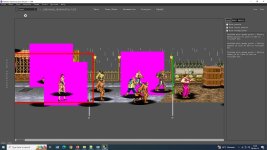
one more thing, why do so many enemies to appear like this?
Test CMT.jpg
 
it turns out this line causing the error so all entity not show up
Code:
##spawn sky_nh
flip 1
coords 0 259
at 0
I delete this and everything fine now

one more thing, why do so many enemies to appear like this?
Ok makes sense, I'll try to add this case in the level log on the right (if it isn't set already). For example, you can see in your screenshot above that in your file, the CMT parser detected some problems.

As for the "pink", it happens when sprites have weird color palettes that can't be properly decoded. CMT offers a workaround for this, but it makes the app slower. You just have to check "Options -> Force transparency". And restart, and the "pink" will be transparent.
 
Ok makes sense, I'll try to add this case in the level log on the right (if it isn't set already). For example, you can see in your screenshot above that in your file, the CMT parser detected some problems.

As for the "pink", it happens when sprites have weird color palettes that can't be properly decoded. CMT offers a workaround for this, but it makes the app slower. You just have to check "Options -> Force transparency". And restart, and the "pink" will be transparent.
Yes!! everything is great now I'll try to learn cmt from now on to get used to it
thank you so much 😘
 
Piccolo updated Chronocrash Modders Tools with a new update entry:

Changelog 0.4.5.1

- Fixed the close/load bug mentioned here : ChronoCrash Modders Tools (@Kratus)

- Filtering in library panel (left panel) is now case insensitive (as it was in earlier versions)

- The add/remove bbox and abox buttons will now refresh properly according to current frame (without causing high CPU usage !)


- Level Editor : added support of partially commented spawn points.

For...

Read the rest of this update entry...
 
Piccolo updated Chronocrash Modders Tools with a new update entry:

Changelog 0.4.5.2

- Fixed a bug with "save as" where the content of the wrong file was saved in the new file if you closed it right after saving it.
- Now before overwriting a file, CMT makes a copy of it (for example the previous version of "name.txt" will be backed up as ".name.txt.1"). As of now CMT keeps only the last saved version, but I may add an option to keep as many older versions of files as you want.
- Added visual "save", "undo" and "redo" buttons in main editor.
- Adjusted some colors in "Dark"...

Read the rest of this update entry...
 
@Piccolo
why the undo command (Ctrl+Z) not working? I mean when I mistakenly moved the entity then use undo they're not return to its original place

level tab
you I drag n drop enemy-obstacle etc there? because it's easier to design stages with visuals
 
Back
Top Bottom