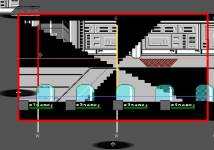
Though it's weird that flip reverse the entity in game. Isn't the purpose of "facing" to force the direction (so "flip" shouldn't affect it) ?
in fact, the "facing 1" isn't the culprit, because you have the same effect without it.
once I removed it from the header and reloaded the tool, the entity is still being displayed facing the wrong direction:
Probably you are handling type none the same way you treat type enemy (fliping it to the left on the stage), but in game -If I am nost mistaken - neither type NONE, PANEL or OBSTACLE aren't automatically fliped to left - only type ENEMY (dunno about NPC, haven't tested it).
IOW, only type ENEMY should be facing left (better saying, the opposite level direction) when you display the stage. The others should be facing the level direction.
Maybe this sound silly, but having a visual clue with the right direction is very important.
I know we can clearly see the entity is fliped on that case, but that is because the axis is located in on the sprite corner
but try having something like this and you will have problems:
Also, I've spoted a bug while working on this. Pay attention that I changed the axis to -400 and saved it.
Since the entity in on cache, the tool still displya the old axis on the stage preview.
But once I hit reload, I got an error:
Traceback (most recent call last):
File "gui\level\__init__.py", line 198, in actualizeEntities
File "gui\level\items.py", line 392, in actualizeFrame
KeyError: 'data/levels/2-militarhq/elevator_shad.gif'