
Solved how to spawn an entity multiple times in the level with different start time (delay)

Question that is answered or resolved.

Bruce

Active member
I've been reading manual and learning how to create levels, but I just got stuck :-(
I'm currently using this function
spawn {name} 1 because I want to unload the model when the level ends.

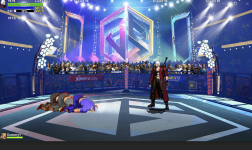
I am spawning the cheeering crowd entity 2 times in the kick boxing level.
However, they both start at the same time when the level starts which looks silly.
I looked at the manual, but I didn't find a solution for it....

Is there a way to spawn this entity multiple times with different start delays when the level starts?
I can create another model of these sprites, but I prefer not to do this.


Can someone please give me some advice?
Please see the attachment,
thank you so much for your help.
 

Attachments

  • Untitled.png
    Untitled.png
    2.5 MB · Views: 8
Solution
I've been reading manual and learning how to create levels, but I just got stuck :-(
I'm currently using this function
spawn {name} 1 because I want to unload the model when the level ends.

I am spawning the cheeering crowd entity 2 times in the kick boxing level.
However, they both start at the same time when the level starts which looks silly.
I looked at the manual, but I didn't find a solution for it....

Is there a way to spawn this entity multiple times with different start delays when the level starts?
I can create another model of these sprites, but I prefer not to do this.


Can someone please give me some advice?
Please see the attachment,
thank you so much for your help.
@Bruce There's no native way to...
@Bruce
1st thing that comes to mind is using some in-line script in place for the cheering crowd entity that can affect the frame rate-

that said, when it comes to crowds i go full autism and like to do (well not do, but split the crowd graphics into) individual sprites for each crowd members and you can even use script to make their frame speed "random" (if frame 1 jump to animation x with speed variants) or 3 to 7 copies of the same entities with diff speeds to make them seem more "organic"
 
I've been reading manual and learning how to create levels, but I just got stuck :-(
I'm currently using this function
spawn {name} 1 because I want to unload the model when the level ends.

I am spawning the cheeering crowd entity 2 times in the kick boxing level.
However, they both start at the same time when the level starts which looks silly.
I looked at the manual, but I didn't find a solution for it....

Is there a way to spawn this entity multiple times with different start delays when the level starts?
I can create another model of these sprites, but I prefer not to do this.


Can someone please give me some advice?
Please see the attachment,
thank you so much for your help.
@Bruce There's no native way to temporize spawns directly in the level file, since they are triggered by the level position and the "at". However, you can spawn all entities at the same time and freeze them using different delays at certain frames of the spawn animation.

In short, you will hold the spawn animation using a frame loop, and the loop counter limit can be freely defined in the level file using different values but applied on the same entity. This way, you don't need to create multiple entities, just change the spawn delay.

Animation script
Code:
void delayDetect()
{//Detect if a spawn delay was previously defined, lock frame advance until "delay" variable reach 0
    void self    = getlocalvar("self");
    int delay    = getentityvar(self, "spawnDelay");
    int reduce    = 1;

    if(delay > 0){
        setentityvar(self, "spawnDelay", delay-reduce);
        updateframe(self, 0);
    }
}

Level file example
Code:
spawn        Moto_Single_
@script
    void main()
    {
        setentityvar(getlocalvar("self"), "spawnDelay", 5);
    }
@end_script
flip        0
coords        520 240 0
at            500

Entity example
Code:
anim spawn
    loop    0
    delay    6
    offset    145 180
    frame    data/chars/enemies/fog/sor2/hide00.png
    @cmd delayDetect
    frame    data/chars/enemies/fog/sor2/hide00.png
    bbox    123 101 47 80
    @cmd sound "data/sounds/bike.wav"
    @cmd dasher 5 0 0
    @cmd changeShadow 7
    frame    data/chars/enemies/fog/sor2/mounted00.png
    @cmd dasher 4 0 0
    frame    data/chars/enemies/fog/sor2/mounted01.png
    @cmd dasher 3 0 0
    frame    data/chars/enemies/fog/sor2/mounted00.png
    @cmd dasher 2 0 0
    frame    data/chars/enemies/fog/sor2/mounted01.png
    @cmd dasher 1 0 0
    frame    data/chars/enemies/fog/sor2/mounted00.png
    @cmd dasher 1 0 0
    frame    data/chars/enemies/fog/sor2/mounted01.png
        delay    48
    @cmd dasher 0 0 0
    frame    data/chars/enemies/fog/sor2/mounted00.png
        delay    6
    @cmd dasher 1 0 0
    @cmd sound "data/sounds/bike.wav"
    frame    data/chars/enemies/fog/sor2/mounted01.png
    @cmd dasher 2 0 0
    frame    data/chars/enemies/fog/sor2/mounted00.png
    @cmd dasher 3 0 0
    frame    data/chars/enemies/fog/sor2/mounted01.png
    @cmd dasher 4 0 0
    frame    data/chars/enemies/fog/sor2/mounted00.png
    @cmd dasher 5 0 0
    frame    data/chars/enemies/fog/sor2/mounted01.png
 
Solution
@Bruce There's no native way to temporize spawns directly in the level file, since they are triggered by the level position and the "at". However, you can spawn all entities at the same time and freeze them using different delays at certain frames of the spawn animation.

In short, you will hold the spawn animation using a frame loop, and the loop counter limit can be freely defined in the level file using different values but applied on the same entity. This way, you don't need to create multiple entities, just change the spawn delay.

Animation script
Code:
void delayDetect()
{//Detect if a spawn delay was previously defined, lock frame advance until "delay" variable reach 0
    void self    = getlocalvar("self");
    int delay    = getentityvar(self, "spawnDelay");
    int reduce    = 1;

    if(delay > 0){
        setentityvar(self, "spawnDelay", delay-reduce);
        updateframe(self, 0);
    }
}

Level file example
Code:
spawn        Moto_Single_
@script
    void main()
    {
        setentityvar(getlocalvar("self"), "spawnDelay", 5);
    }
@end_script
flip        0
coords        520 240 0
at            500

Entity example
Code:
anim spawn
    loop    0
    delay    6
    offset    145 180
    frame    data/chars/enemies/fog/sor2/hide00.png
    @cmd delayDetect
    frame    data/chars/enemies/fog/sor2/hide00.png
    bbox    123 101 47 80
    @cmd sound "data/sounds/bike.wav"
    @cmd dasher 5 0 0
    @cmd changeShadow 7
    frame    data/chars/enemies/fog/sor2/mounted00.png
    @cmd dasher 4 0 0
    frame    data/chars/enemies/fog/sor2/mounted01.png
    @cmd dasher 3 0 0
    frame    data/chars/enemies/fog/sor2/mounted00.png
    @cmd dasher 2 0 0
    frame    data/chars/enemies/fog/sor2/mounted01.png
    @cmd dasher 1 0 0
    frame    data/chars/enemies/fog/sor2/mounted00.png
    @cmd dasher 1 0 0
    frame    data/chars/enemies/fog/sor2/mounted01.png
        delay    48
    @cmd dasher 0 0 0
    frame    data/chars/enemies/fog/sor2/mounted00.png
        delay    6
    @cmd dasher 1 0 0
    @cmd sound "data/sounds/bike.wav"
    frame    data/chars/enemies/fog/sor2/mounted01.png
    @cmd dasher 2 0 0
    frame    data/chars/enemies/fog/sor2/mounted00.png
    @cmd dasher 3 0 0
    frame    data/chars/enemies/fog/sor2/mounted01.png
    @cmd dasher 4 0 0
    frame    data/chars/enemies/fog/sor2/mounted00.png
    @cmd dasher 5 0 0
    frame    data/chars/enemies/fog/sor2/mounted01.png
Wow man, you are so good. It works perfectly. This script will also help me with something else for sure!
Thank you so much for all your help bro, you are the best!
 
that said, when it comes to crowds i go full autism and like to do (well not do, but split the crowd graphics into) individual sprites for each crowd members and you can even use script to make their frame speed "random" (if frame 1 jump to animation x with speed variants) or 3 to 7 copies of the same entities with diff speeds to make them seem more "organic"
Yes, splitting the crowd into many small sprites will make the level looks better too. However, this will take me forever to finish up my game as I still have many sprites that I still need to take care of. Still thanks a lot for your input in helping me. Greatly appreciated bro.
 
I used random frame skip for similar stuff
this will skip randomly from between frame 0 and 4
I had this in enemy rise animation so they dont all rise at the same time like robots.
@script
if(frame == 0){
int r = rand();
if(r < 0) r = -r;
r = r % 5;
changeentityproperty(getlocalvar("self"), "animpos", r);
}
@end_script


This will go to frame 5,10 or 15 randomly


@script
if(frame==1){
int r=rand(); if(r<0)r=-r;
r%=3;
changeentityproperty(getlocalvar("self"), "animpos", 5+r*5 );
}
@end_script
 
Last edited:
I used random frame skip for similar stuff
this will skip randomly from between frame 0 and 4
I had this in enemy rise animation so they dont all rise at the same time like robots.
@script
if(frame == 0){
int r = rand();
if(r < 0) r = -r;
r = r % 5;
changeentityproperty(getlocalvar("self"), "animpos", r);
}
@end_script


This will go to frame 5,10 or 15 randomly


@script
if(frame==1){
int r=rand(); if(r<0)r=-r;
r%=3;
changeentityproperty(getlocalvar("self"), "animpos", 5+r*5 );
}
@end_script
Wow, this is good stuff for randomly changing the frame position.
I don't think I can use this script for the crowd because there will be skipping frame rate, but I will definitely use it for the enemy animations!
Thank you so much for sharing.
 
Back
Top Bottom