
I want to shrink the gameplay area %3~5 to make it fit my overlay.

stonegolem

New member
Hello,

I have created a wide crt overlay for an OpenBor game (Final Fight LNS Ultimate) and I have applied it by using reshade. Everything works perfectly except I need to make game area smaller to make game UI visible while playing.

I want to shrink gameplay area %3~5 to make it fit better (All sides has to get black borders).

Is it possible to make it by changing any .ini or .cfg files? The windowed resolution settings doesn't work for me or I couldn't adjust it properly.

Thank you.
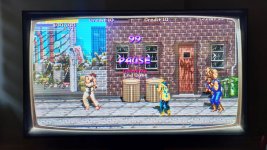
 

Attachments

  • overlay.jpg
    overlay.jpg
    238.8 KB · Views: 12
Yeah you can control ifebars position inside levels.txt file , so just add like 50 pixels on sides for player 1, but you have to reposition all players lifebars and text info, names etc.
There is no easy way to preview the lifebar position changes in realtime, we talked about it with Pico to add it to chronotools but i have no clue whats the status of it.
I use it often , i change lifebars position for every new game.

The effect You did looks very cool, where we can find info on what other effects /overlays we can add ?
I used overlays like this in retroarch , they add something to the experience.

OK enough blabber, go to openbor manual , look for : p{#}life {x} {y}
 
Welcome @stonegolem.

As @bWWd mentioned, you can move the HUD to adjust for bezels or whatever, and that's probably the easiest short term solution.

The answer to your actual question, is no. Yes, but no.

There is a menu option to change the entire display size output, but not the gameplay within a given output.

What you're asking for (scaling down content without changing resolution) is certainly doable. In fact, I just posted live coding video where I doubled the native resolution of a game in progress by scaling up gameplay content.

However, it's the sort of thing where if you have to ask if it's possible, then you don't have anywhere near the fundamental skill yet to do it (otherwise you'd already know how by proxy). Before you can start scaling screen elements, you're going to need a strong grasp of scripting, subscreens, drawmerhod, and how resolution vs. game world constraints actually works first.

DC
 
I should maybe write separate gui to generate hud values more easily with realtime preview, i need it myself, just need to figure out easiest way to do it.
Will be so much faster with actual preview in realtime.
did anyone attempted to do it by script ingame ? to generate hud values, but 2nd 3rd and 4th player locations should be calculated automaticaly imo. just player1 should be setup
 
I should maybe write separate gui to generate hud values more easily with realtime preview, i need it myself, just need to figure out easiest way to do it.
Will be so much faster with actual preview in realtime.
did anyone attempted to do it by script ingame ? to generate hud values, but 2nd 3rd and 4th player locations should be calculated automaticaly imo. just player1 should be setup

Your tools are pretty nice, but I don't know if that one would be worth it. Anyone who really cares that much just generates their own with script.

 DC
 
to generate hud values, but 2nd 3rd and 4th player locations should be calculated automaticaly imo. just player1 should be setup
In my case I have some scripted HUD elements and they are calculated automatically, usually I only define player 1 values.
Optionally you can make an automatic adjustment by detecting the "hresolution" and applying to the formula.

C:
int xPos = 1;
int xDif = 120; //DIFFERENCE BETWEEN EACH PLAYER HUD POSITION
int xAdd = xDif*pIndex; //FORMULA USED TO APPLY THE POSITIONS, CHANGES ACCORDING TO PLAYER INDEX NUMBER
drawbox(xPos+xAdd, yPos, pLife, ySize, layer2, healthColor);
 
Back
Top Bottom