
mp I have a question.

DD Tokki

Well-known member
C:
anim    freespecial1
    loop    0
    delay    1
    offset    28 109
    @cmd    checkPal2    "ANI_follow31" 5
    @cmd    checkPal2    "ANI_follow51" 9
    frame    data/sprites/sprite/chara/scorpion/idle-01.gif
    @cmd    anichange "ANI_FOLLOW1"
    frame    none

anim    follow
    loop    0
    energycost    30 1 0
    nokill    1
    delay    14
    offset    32 109
    bbox    4 0 45 105
    @cmd    degravity    -0.5
    frame    data/sprites/sprite/chara/scorpion/skill-a01.gif
    delay    4
    offset    27 95
    bbox    12 0 45 91
    frame    data/sprites/sprite/chara/scorpion/skill-a02.gif
    delay    2
    offset    27 83
    bbox    39 0 45 79
    sound    data/sounds/se/scorpion/se-sk1.wav
    attack3    127 4 30 30 20 0 0 0 0 20
    hitflash    flash-ken
    hitfx    data/sounds/se/misc/flash-ken1.wav
    dropv    2.4 1 0
    followanim    7
    followcond    2
    forcedirection    -1
    frame    data/sprites/sprite/chara/scorpion/skill-a03.gif
    @cmd    anichange "ANI_FOLLOW2"
    frame    none
KoR - 0070.png

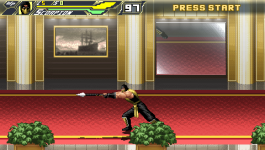
The photo shows the Scorpion firing Get Over Here. The problem is that I created a conditional branch in "freespecial" and connected it to "follow" below and applied "energycost", but mp does not decrease. I want to create an MP that can be used at any time.

I tried using "@cmd mpgain" but it reduces mp and doesn't stop the attack.
 
Last edited:
C:
anim    freespecial1
    loop    0
    @cmd    checkPal2    "ANI_FOLLOW31" 5
    energycost    40 1 0  
    nokill    1
    delay    14
    offset    32 109
    bbox    4 0 45 105
    @cmd    degravity    -0.5
    @cmd    stop
    frame    data/sprites/sprite/chara/scorpion/skill-a01.gif
    delay    4
    offset    27 95
    bbox    12 0 45 91
    frame    data/sprites/sprite/chara/scorpion/skill-a02.gif
    delay    2
    offset    27 83
    bbox    39 0 45 79
    sound    data/sounds/se/scorpion/se-sk1.wav
    attack3    127 4 30 30 20 0 0 0 0 20
    hitflash    flash-ken
    hitfx    data/sounds/se/misc/flash-ken1.wav
    dropv    2.4 1 0
    followanim    6
    followcond    2
    forcedirection    -1
    frame    data/sprites/sprite/chara/scorpion/skill-a03.gif
    @cmd    anichange "ANI_FOLLOW1"
    frame    none

Even if it is set to 0, the attack will still occur.
"@cmd checkPal2 "ANI_FOLLOW31" 5"
I put it in freespecial1 to bypass it depending on the color.

Since MP is not consumed alone, I tried to solidify the change in attack using the "checkPal" script and "Key" script you provided.
I'm a bit loss, I don't understand the problem. The scripts I posted are from my "cancel attack" codes, which works on a similar purpose based on mp check.
Once you are using keyscript+follow animations, the freespecial can be removed. Once you added a limiter based on mp and palette, the script should respect this rule.
I suggest checking if there's other scripts interfering.
 
I'm a bit loss, I don't understand the problem. The scripts I posted are from my "cancel attack" codes, which works on a similar purpose based on mp check.
Once you are using keyscript+follow animations, the freespecial can be removed. Once you added a limiter based on mp and palette, the script should respect this rule.
I suggest checking if there's other scripts interfering.
If so, I will prepare a test file.
The method I used is overly expedient.
 
@DD Tokki I looked at the Scorpion entity and saw that there's many copies of the same animation in different freespecial moves, all of them doing almost the same thing.

After removing it, the script worked fine. Once you are using keyscripts, I suggest removing all redundant freespecials because they are also triggered by key presses. You can even use keyscript with freespecials but the code should be accurately developed to not conflict with the native key detection, this is why follow animations are better in this case.

In addition, you are calling FOLLOW31 and this one is calling FOLLOW32, maybe it would be better to call the FOLLOW32 directly in the key script or mix both into a single animation.

C:
com         d a2 freespecial4
com         f a2 freespecial3
com         a2 freespecial1
com         a3 freespecial9

anim    freespecial4 #[기술4]
    loop    0
    delay    1
    offset    28 109
    @cmd    checkPal2    "ANI_FOLLOW32" 5
    @cmd    checkPal2    "ANI_FOLLOW34" 9
    frame    data/sprites/sprite/chara/scorpion/idle-01.gif
    @cmd    anichange "ANI_FOLLOW18"
    frame    none

anim    freespecial3 #[기술3]
    loop    0
    delay    1
    offset    28 109
    @cmd    checkPal2    "ANI_FOLLOW32" 5
    @cmd    checkPal2    "ANI_FOLLOW34" 9
    frame    data/sprites/sprite/chara/scorpion/idle-01.gif
    @cmd    anichange "ANI_FOLLOW16"
    frame    none

anim    freespecial9 #[스페셜 무브1]
    loop    0
    delay    1
    offset    28 109
    @cmd    checkPal2    "ANI_FOLLOW32" 5
    @cmd    checkPal2    "ANI_FOLLOW34" 9
    frame    data/sprites/sprite/chara/scorpion/idle-01.gif
    @cmd    anichange "ANI_FOLLOW26"
    frame    none
 
@DD Tokki I looked at the Scorpion entity and saw that there's many copies of the same animation in different freespecial moves, all of them doing almost the same thing.

After removing it, the script worked fine. Once you are using keyscripts, I suggest removing all redundant freespecials because they are also triggered by key presses. You can even use keyscript with freespecials but the code should be accurately developed to not conflict with the native key detection, this is why follow animations are better in this case.

In addition, you are calling FOLLOW31 and this one is calling FOLLOW32, maybe it would be better to call the FOLLOW32 directly in the key script or mix both into a single animation.

C:
com         d a2 freespecial4
com         f a2 freespecial3
com         a2 freespecial1
com         a3 freespecial9

anim    freespecial4 #[기술4]
    loop    0
    delay    1
    offset    28 109
    @cmd    checkPal2    "ANI_FOLLOW32" 5
    @cmd    checkPal2    "ANI_FOLLOW34" 9
    frame    data/sprites/sprite/chara/scorpion/idle-01.gif
    @cmd    anichange "ANI_FOLLOW18"
    frame    none

anim    freespecial3 #[기술3]
    loop    0
    delay    1
    offset    28 109
    @cmd    checkPal2    "ANI_FOLLOW32" 5
    @cmd    checkPal2    "ANI_FOLLOW34" 9
    frame    data/sprites/sprite/chara/scorpion/idle-01.gif
    @cmd    anichange "ANI_FOLLOW16"
    frame    none

anim    freespecial9 #[스페셜 무브1]
    loop    0
    delay    1
    offset    28 109
    @cmd    checkPal2    "ANI_FOLLOW32" 5
    @cmd    checkPal2    "ANI_FOLLOW34" 9
    frame    data/sprites/sprite/chara/scorpion/idle-01.gif
    @cmd    anichange "ANI_FOLLOW26"
    frame    none
Thanks for the analysis.
 
Back
Top Bottom