
Palette Error

CrimsonTomb

New member
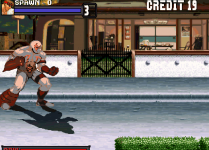
Hey everyone, it's great to be in this community finally, I've been playing these games for a while now and I figured its about time I should go ahead and make my own. However, I am having a bit of a problem when it comes to the palettes. I exported my sprites that were ripped straight from the mugen sff (via fighter factory) and I made sure the palettes were in the correct order (transparent color being the first, and the rest being on the bottom). Yet my character still seems to be glitched. I am making each playable character out of the characters already present (just adding that in there to see if any past palettes could interact with new images). Help would be appreciated, thanks!

 

Attachments

  • Capture.PNG
    Capture.PNG
    199.7 KB · Views: 20
Hi CrimsomTomb and welcome here. I notice that you use a Ryu character as a base. If you haven't define which image you use as a default palette, Openbor will take the colors of the first image of your txt file.
 
kimono said:
Hi CrimsomTomb and welcome here. I notice that you use a Ryu character as a base. If you haven't define which image you use as a default palette, Openbor will take the colors of the first image of your txt file.

Thank you for the response, but how do I define exactly which image I want to be set for my default file?
 
CrimsonTomb, if you don't declare palette command, palette will be picked from very first sprite in first defined animation

I appreciate you set palette properly. I need to ask, do your sprites use same palette?
 
Bloodbane said:
CrimsonTomb, if you don't declare palette command, palette will be picked from very first sprite in first defined animation

I appreciate you set palette properly. I need to ask, do your sprites use same palette?

Yes, the Spawn character uses the same palette for his sprite list
 
Quick update: This mixed palette for Spawn appears on any character I place it on, so is it possible that there was a problem with the way it was exported or something else is interacting with the colors?
 
Bloodbane said:
It's hard to tell the cause let alone solution like this
Can you upload your character's sprites together with his text for us to see?

Gladly, here is a temporary link to the borpak files I presented earlier. Let me know if you could find out what is wrong, that would be greatly appreciated.
https://www.mediafire.com/file/pcfgb5aoz2842fp/borpak.rar/file
 
Thank you so much, I really appreciate your response. I understand now why my approach was all wrong, (as opposed to Mugen, when I create a character I use a base and eventually work off of it with swapping the sprites at first). Sorry for any inconvenience and I will definitely keep everyone updated :D
 
Back
Top Bottom