Chrono Crash enables tagging other members in your posts. Tagging works just like Instagram or Facebook. Type @ and the member's name next to it. You should see suggestions appear, or you can just finishing typing the name out (goes without saying you have to get the name exactly right). When you post, the tag will take effect.
Example: Damon Caskey
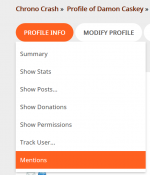
To see the posts you are tagged in, open your forum profile and look for Mentions under Profile Info. This will give you a list of all the posts you are tagged in, and allow you to choose if you'd like to receive emails whenever someone tags you.
Example: Damon Caskey
To see the posts you are tagged in, open your forum profile and look for Mentions under Profile Info. This will give you a list of all the posts you are tagged in, and allow you to choose if you'd like to receive emails whenever someone tags you.