

maxman
Well-known member
I'm trying to have a player model switch to a weapon model, but both models have different palettes from each other. For example, one player model has 16 colors, while a weapon model has 34 colors. The colors are not exactly the same at all. It does work well when I use palette none, but when I define palette, along with alternatepal for both models, they get messy colors. Plus, it crashes.

Player model:
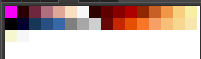
Weapon model:
Do those palettes have to be the same or have to be combined as a palette? Do I need to switch to a fake weapon model for spawning another player model? What can I do?
Player model:
Code:
name AthenaXI
type player
health 100
speed 11
weapons Athena94 AthenaXI
#palette data/chars/heroes/athena/xi/idle00.png
palette none
#alternatepal data/chars/heroes/athena/xi/paltest.png

com d f a freespecial

script @script
void main(){
    int index = getlocalvar("player");
    void self = getplayerproperty(index, "entity");
    if(self != NULL()){
        changeentityproperty(self, "name", "Athena");
    }
}
@end_script


anim idle
    loop 1
    offset 39 108
    delay 8
    frame data/chars/heroes/athena/xi/idle00.png
    frame data/chars/heroes/athena/xi/idle01.png
    frame data/chars/heroes/athena/xi/idle02.png
    frame data/chars/heroes/athena/xi/idle03.png
    frame data/chars/heroes/athena/xi/idle04.png
    frame data/chars/heroes/athena/xi/idle05.png
    frame data/chars/heroes/athena/xi/idle06.png
    frame data/chars/heroes/athena/xi/idle07.png

anim walk
    loop 1
    offset 32 108
    delay 8
    frame data/chars/heroes/athena/xi/walk00.png
    frame data/chars/heroes/athena/xi/walk01.png
    frame data/chars/heroes/athena/xi/walk02.png
    frame data/chars/heroes/athena/xi/walk03.png
    frame data/chars/heroes/athena/xi/walk04.png
    frame data/chars/heroes/athena/xi/walk05.png
    frame data/chars/heroes/athena/xi/walk06.png
    frame data/chars/heroes/athena/xi/walk07.png
    frame data/chars/heroes/athena/xi/walk08.png
    frame data/chars/heroes/athena/xi/walk09.png
    frame data/chars/heroes/athena/xi/walk10.png
    frame data/chars/heroes/athena/xi/walk11.png

anim pain
    offset 39 108
    delay 8
    frame data/chars/heroes/athena/xi/idle00.png
    #frame data/chars/heroes/athena/xi/idle01.png
    #frame data/chars/heroes/athena/xi/idle02.png
    #frame data/chars/heroes/athena/xi/idle03.png
    #frame data/chars/heroes/athena/xi/idle04.png
    #frame data/chars/heroes/athena/xi/idle05.png
    #frame data/chars/heroes/athena/xi/idle06.png
    #frame data/chars/heroes/athena/xi/idle07.png

anim fall
    offset 39 108
    delay 8
    frame data/chars/heroes/athena/xi/idle00.png
    frame data/chars/heroes/athena/xi/idle01.png
    frame data/chars/heroes/athena/xi/idle02.png
    frame data/chars/heroes/athena/xi/idle03.png
    frame data/chars/heroes/athena/xi/idle04.png
    frame data/chars/heroes/athena/xi/idle05.png
    frame data/chars/heroes/athena/xi/idle06.png
    frame data/chars/heroes/athena/xi/idle07.png

anim rise
    offset 39 108
    delay 8
    frame data/chars/heroes/athena/xi/idle00.png
    frame data/chars/heroes/athena/xi/idle01.png
    frame data/chars/heroes/athena/xi/idle02.png
    frame data/chars/heroes/athena/xi/idle03.png
    frame data/chars/heroes/athena/xi/idle04.png
    frame data/chars/heroes/athena/xi/idle05.png
    frame data/chars/heroes/athena/xi/idle06.png
    frame data/chars/heroes/athena/xi/idle07.png

anim freespecial
    offset 39 108
    delay 8
    weaponframe 7 1 #weaponframe {frame} {weapon}
    frame data/chars/heroes/athena/xi/idle00.png
    frame data/chars/heroes/athena/xi/idle01.png
    frame data/chars/heroes/athena/xi/idle02.png
    frame data/chars/heroes/athena/xi/idle03.png
    frame data/chars/heroes/athena/xi/idle04.png
    frame data/chars/heroes/athena/xi/idle05.png
    frame data/chars/heroes/athena/xi/idle06.png
    frame data/chars/heroes/athena/xi/idle07.png
Weapon model:
Code:
name Athena94
type none
health 100
speed 13
weaploss 3
weapons AthenaXI Athena94
com d f a freespecial
#palette data/chars/heroes/athena/94/0_1.png
palette none
#alternatepal data/chars/heroes/athena/94/paltest.png


anim idle
    loop 1
    delay 9
    offset 132 203
    frame data/chars/heroes/athena/94/0_1.png
    frame data/chars/heroes/athena/94/0_2.png
    frame data/chars/heroes/athena/94/0_3.png
    frame data/chars/heroes/athena/94/0_4.png
    frame data/chars/heroes/athena/94/0_5.png

anim walk

    loop 1
    delay 9
    offset 132 203
    frame data/chars/heroes/athena/94/1_1.png
    frame data/chars/heroes/athena/94/1_2.png
    frame data/chars/heroes/athena/94/1_3.png
    frame data/chars/heroes/athena/94/1_4.png
    frame data/chars/heroes/athena/94/1_5.png
    frame data/chars/heroes/athena/94/1_6.png

anim freespecial
    delay 9
    weaponframe 4 0
    offset 132 203
    frame data/chars/heroes/athena/94/0_1.png
    frame data/chars/heroes/athena/94/0_2.png
    frame data/chars/heroes/athena/94/0_3.png
    frame data/chars/heroes/athena/94/0_4.png
    frame data/chars/heroes/athena/94/0_5.png
Do those palettes have to be the same or have to be combined as a palette? Do I need to switch to a fake weapon model for spawning another player model? What can I do?

