Solved What I'm I doing wrong in this level?

Question that is answered or resolved.

SEEGET

Active member
Hi fam,
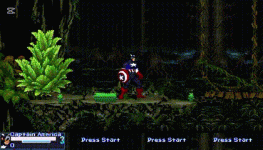
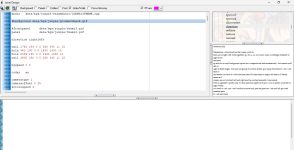
I've been trying to create this level for 4 days now and still can't seem to get it. What I'm I doing wrong? I've established the hole but character is not crouching he is only moving down.
 

Attachments

  • lv_0_20250731175514.gif
    lv_0_20250731175514.gif
    3.5 MB · Views: 13
  • openborstats 7_31_2025 5_46_48 PM.png
    openborstats 7_31_2025 5_46_48 PM.png
    114.1 KB · Views: 11
Solution
Why not simply add anim duck for your playable character and make your z limit to have the same numbers in levels.txt for a specific level? Anim duck only works if your level has the same number of parameters from its Z limit in levels.txt.

Example:

levels.txt:
Code:
set    Arcade_Mode
lives 10
#scoreformat 1
credits 10
#noshare 1
cansave 0
continuescore 1
disablehof 1
disablegameover 1
skipselect player1 player2
z    173 230 173
file    data/levels/charatest.txt # level 1

branch Arcade_Select
z    173 230 173
file    data/levels/charatest.txt # level 2
file    data/levels/return.txt # level 3
branch    Stage_Eagle
z    200 200 200 # <==== THIS ONE WITH FIRST TWO PARAMETERS ALONG WITH THIS LEVEL FILE. THIRD PARAMETER IS OPTIONAL
file...
Why not simply add anim duck for your playable character and make your z limit to have the same numbers in levels.txt for a specific level? Anim duck only works if your level has the same number of parameters from its Z limit in levels.txt.

Example:

levels.txt:
Code:
set    Arcade_Mode
lives 10
#scoreformat 1
credits 10
#noshare 1
cansave 0
continuescore 1
disablehof 1
disablegameover 1
skipselect player1 player2
z    173 230 173
file    data/levels/charatest.txt # level 1

branch Arcade_Select
z    173 230 173
file    data/levels/charatest.txt # level 2
file    data/levels/return.txt # level 3
branch    Stage_Eagle
z    200 200 200 # <==== THIS ONE WITH FIRST TWO PARAMETERS ALONG WITH THIS LEVEL FILE. THIRD PARAMETER IS OPTIONAL
file    data/levels/eagle.txt # level 4
branch    Stage_Ryu
z    227 227 227
file    data/levels/ryu_stage.txt # level 5
branch    Stage_Ken
z    227 227 227
file    data/levels/ken.txt # level 6
end

For spawning enemies, have it spawn at the same Z number as the one from levels.txt.

Code:
fglayer data/sprites/hud_base.png -1 1 0 3 3 1 1 1 1 1 0 0 0 0 0 0
fglayer data/sprites/hud.png -1 1 0 3 3 1 1 1 1 1 0 0 0 0 0 0


bglayer        data/bgs/eagle/1_0-0.png 0.085 0 0 -54 1 1 1 1 0 0
bglayer        data/bgs/eagle/1_1-0.png 0.17 0 453 -79 1 1 1 1 1 0
panel        data/bgs/eagle/1_2-0.png

direction        both
settime 0
notime 1
order        a
type 1

levelscript data/levels/levelfight.c

light    -256 -128
at    0

spawn empty 1
@script
void main(){
    setglobalvar("Return", "Stage_Eagle");
}
@end_script
coords 0 400
at 0

spawn    barricade 1
@script
void main(){
    changeentityproperty(getlocalvar("self"), "position", 381, 244, 0);
}
@end_script
coords    381 244
at    0

spawn   empty 1
@script
void main()
{
    int P1 = getplayerproperty(0, "entity"); //Calling player 1 entity
    int P2 = getplayerproperty(1, "entity"); //Calling player 2 entity

    //changelevelproperty("scrollspeed", 0);
    void self = getlocalvar("self"); //Get calling entity.
    int width = openborvariant("levelwidth");
    int half = width/2;
    int hres = openborvariant("hresolution");
    int xpos = openborvariant("xpos");

    if(P1){
      changeentityproperty(P1, "position", half-70, 200, 0); // Spawn player 1 in a specific position
      changeentityproperty(P1, "direction", 1); //Face left, direction 0 for left and 1 for right
    }
    if(P2){
      changeentityproperty(P2, "position", half+70, 200, 0); // Spawn player 2 in a specific position
      changeentityproperty(P2, "direction", 0); //Face left
//      changeentityproperty(P2, "health", 1);
    }
    changeopenborvariant("xpos", half+70); // Calling the x value point
}
@end_script
coords   0 200
at   0

spawn    camera 1
@script
void main(){
    void self = getlocalvar("self");
    int width = openborvariant("levelwidth")/2;
    changeentityproperty(self, "position",width, -5, 0);
}
@end_script
coords 0 200
at 0

spawn EagleE
@script
  #import "data/scripts/aimove.c"
  void main()
  {
    void self = getlocalvar("self");
    int P1 = getplayerproperty(0, "entity"); // Get player 1
    int P2 = getplayerproperty(1, "entity");
    int map = getentityproperty(self, "map");
    int x = getentityproperty(self, "x");
    int y = getentityproperty(self, "y");
    int PLAYS = openborvariant("count_players");
//    setglobalvar("Fighter1", P1); // fill Fighter1 variable with player 1
//    changeentityproperty(P1, "setlayer", 200);
//    setglobalvar("Fighter2", self); // fill Fighter2 variable with this enemy
    int width = openborvariant("levelwidth");
    int half = width/2;
    void e;
//    changelevelproperty("scrollspeed", 0);
    
//    setAIMove("nomove chase wander");
//    changeentityproperty(self, "animation", openborconstant("ANI_FOLLOW20"));
//    setidle(self, openborconstant("ANI_IDLE"),1);


    if(P1){
       setglobalvar("Fighter1", P1);
       changeentityproperty(P1, "position", half-70, 200, 0);
       changeentityproperty(P1, "direction", 1);
    //changeentityproperty(P1, "health", 1);
       setglobalvar("Fighter2", self);
       changeentityproperty(self, "position", half+70, 200, 0);
       changeentityproperty(self, "direction", 0);
       changeentityproperty(self, "animation", openborconstant("ANI_FOLLOW2")); // Eagle (enemy type)
    }
    if(P2){
       setglobalvar("Fighter2", P2);
       changeentityproperty(P2, "position", half+70, 200, 0);
       changeentityproperty(P2, "direction", 0);
       setglobalvar("Fighter1", self);
       changeentityproperty(self, "position", half-70, 200, 0);
       changeentityproperty(self, "direction", 1);
       changeentityproperty(self, "animation", openborconstant("ANI_FOLLOW2")); // Eagle (enemy type)
    }

    //changeopenborvariant("xpos", 300); // Calling the x value point
  }
@end_script
health 100
alias Eagle
coords    0 200 0
at    0

spawn   Rounds 1
@script
void main(){
    void self = getlocalvar("self");
    int zmin = openborvariant("player_min_z");
    int vres = openborvariant("vresolution");
    int ypos = openborvariant("ypos");
    int y = ypos+vres/2;
    int width = openborvariant("levelwidth")/2; //Levelwidth is full width of the level
    changeentityproperty(self, "position", width, zmin, y-26);
}
@end_script
coords  0 400 10
at    0

spawn RefPlays 1
health 10
coords 160 200
at 0

z {zmin} {zmax} {BGheight}

  • Changes the location of stage boundaries.
  • {xmin} is how high up entities can walk. It starts at the top and works down, so larger numbers mean less room. Defaults to 160.
  • {xmax} is how far down the character can walk. It also goes down from the top. Defaults to 232.
  • {BGheight} changes where the bottom of the background is drawn. Defaults to 160. By changing this value, you can make the background match an altered {xmin}.
  • This can be set once per level. You can change it between two stages. If you need to change it during a stage, you should combine it with the "wall" command in the stage itself.
  • You can spawn entities outside of this range, but once they enter the playing field they can't escape again.

Player type:
C:
anim    duck #Stand-to-crouch
@script
  void self = getlocalvar("self");
  void Fighter1 = getglobalvar("Fighter1");
  void Fighter2 = getglobalvar("Fighter2");

  void Fighter; float Fx; float x; int Dir;

  if(Fighter1 && Fighter2){
    if(Fighter1 == self){
      Fighter = Fighter2;
    } else {
      Fighter = Fighter1;
    }

    Fx = getentityproperty(Fighter, "x");
    x = getentityproperty(self, "x");
    Dir = getentityproperty(self, "direction");


    if(Fx >= x){
       if(Dir == 0){
    performattack(self, openborconstant("ANI_FOLLOW7")); //Crouch turning
       }
    } else {
       if(Dir == 1){
    performattack(self, openborconstant("ANI_FOLLOW7")); //Crouch turning
       }
    }

 }
    @end_script   
    loop    1 2
    bbox    4 0 46 95
    offset    24 91
    delay    3
    cancel    2 2 0 a freespecial30
    cancel    2 2 0 a2 freespecial6
    cancel    2 2 0 a3 freespecial7
    cancel    2 2 0 j freespecial8
    cancel    2 2 0 s freespecial9
    cancel    2 2 0 a4 freespecial10
    frame    data/chars/ryu/0001000000.gif
    bbox    3 1 49 75
    offset    22 72
    frame    data/chars/ryu/0001000001.gif
    bbox    3 0 49 73
    offset    23 66
    delay    3
    @cmd    keyint2 "ANI_FOLLOW6" 0 "D" 1
    @cmd    stop
    frame    data/chars/ryu/0001000002.gif

Note: You are not required to add unfamiliar scripts for this duck animation to be included at all. Just use anim duck and you're good to go.

You can also add animations duckrise and ducking for ducking transitions, along with anim duck, which now can be used as a static ducking animation.
DUCK {players, enemies}

  • Optional.
  • This will only play in a stage whose max and min 'z' are the same (In other words, a 2-D stage).
  • Plays when a player presses down. They can use this to duck under high attacks.
  • This animation is also played if player is under platform which is shorter than his/her height. However in this state, player is forced to play this animation instead. In this state, pressing left or right only changes direction.
  • While ducking, player can perform either SLIDE or DUCKATTACK (see below).
  • If DUCKING is present (see below), this animation will play after it.
  • For enemy that use DUCK you can use "range {min} {max}" animation command for custom DUCK when the entity is in that custom range.

DUCKING {players, enemies} (6330+)

  • Optional.
  • This animation occurs before the "DUCK" animation. In other words, it's a transition between the idle and the duck animation.
  • After this animation ends, the entity will go to DUCK if the hold button is held.
  • Same rules of DUCK appliess here.

DUCKRISE {players, enemies} (6330+)

  • Optional.
  • This animation occurs after the "DUCK" animation if the down button is not being held. In other words, it's a transition between the DUCK and the IDLE animation.
  • Same rules of DUCK appliess here.

For the holes, since you set the Z limit to the same numbers for the 2D plane level, it's best you put its z coords the same number as your Z limit for your specified level. I think you can put the same number of Z coord for the hole like the enemy has.

Example:

Code:
hole        1754 447 0 0 112 112 40
hole        2452 447 0 0 1236 1236 40
hole        4275 447 0 0 112 112 40

spawn enemy1
coords 500 412
at 1000

Keep in mind that if that enemy spawns at its Z coord of 348, you should check your levels.txt if it has the same number 348 of Z limit or vice versa as your given level for it to spawn. Do you know how to use walls?

hole {xpos} {zpos} {upperleft} {lowerleft} {upperright} {lowerright} {depth} {alt} {type}

  • A 4-sided invisible hole will be created at the specified point. OpenBoR won't draw a hole or anything there. If you want hole to be visible, use panels or entity.
  • In Beats of Rage, a hole with default size and special sprite is used. That sprite is hole.gif located in sprites folder. If you want to change the size and visual, you need to set this command AND replace that hole.gif with blank gif.
  • This is a bit complicated, so listen up! {xpos} and {zpos} are the x and z positions at which the hole is spawned (how far from the start of the stage, and how far from the top of the screen, respectively).
  • {lowerleft}, {upperleft}, {lowerright}, and {upperright} determine the x position of the four corners of the hole. These numbers are how far from the {xpos} the corners are, not how far from the start of the stage.
  • {depth} is the z depth of the hole: how far it stretches from the {zpos} to the top of the screen.
  • {alt} is used to control the height of the hole. (4287+)
  • {type} the type is a param useful for decide what type of terrain is that hole.
  • As an example, if you wanted to create a 10x40 parrallelagram ( /_/ ) hole at the bottom of the screen (256) at scroll position 500, you might put
    • hole 500 256 0 10 10 20 40
  • If you create a hole which is not at the bottom of the screen, entities will be visible as they fall off the stage. Probably bad. So place an entity with type none right below the bottom of the hole which resembles the floor. This will cover up almost any entities which fall in the hole.
  • If used in a stage which scrolls left, the holes will start at the left edge of the starting screen and move right from there. So only holes which would appear in the first 320 or so pixels of the screen will actually be visible, and they'll be at the start of the stage.
  • The default values are 240, 12, 1, 200, 287, and 45, respectively.
  • {alt} {type} are optional

In case you don't know what wall is, here's a level wall.
wall {xpos} {zpos} {upperleft} {lowerleft} {upperright} {lowerright} {depth} {alt} {type}

  • Creates a 4-sided invisible wall or platform at the specified point. OpenBoR won't draw a wall or anything there. If you want wall to be visible, use panels or entity.
  • All of the field except {alt} are the same as they are in holes.
  • {alt} is used to control the height of the platform. It's measured in pixels. So for a wall with 10 for it's {alt} value would be 10 pixels high, any entity on the platform would be displayed 10 pixels off the ground, and entities would need to jump at least 10 pixels off the ground to get on top of the wall.
  • {type} the type is a param useful for decide what type of terrain is that wall. Example I want to make a wall splat JUST on walls of type 1 and not type 0. (4287+)
  • If you want to make a wall which can't be jumped on, simply give it a {alt} value somewhere in the lower thousands. Very, very, VERY few entities should be able to jump on it.
  • In order for enemies to get on platforms higher than their current position, they need a JUMP animation with a range set for it, and/or an animation which lifts them off the ground.
  • {type} is optional

You don't read the manual? I encourage you to do so.

Are you trying to make a 2D platformer?
 
Solution
Why not simply add anim duck for your playable character and make your z limit to have the same numbers in levels.txt for a specific level? Anim duck only works if your level has the same number of parameters from its Z limit in levels.txt.

Example:

levels.txt:
Code:
set    Arcade_Mode
lives 10
#scoreformat 1
credits 10
#noshare 1
cansave 0
continuescore 1
disablehof 1
disablegameover 1
skipselect player1 player2
z    173 230 173
file    data/levels/charatest.txt # level 1

branch Arcade_Select
z    173 230 173
file    data/levels/charatest.txt # level 2
file    data/levels/return.txt # level 3
branch    Stage_Eagle
z    200 200 200 # <==== THIS ONE WITH FIRST TWO PARAMETERS ALONG WITH THIS LEVEL FILE. THIRD PARAMETER IS OPTIONAL
file    data/levels/eagle.txt # level 4
branch    Stage_Ryu
z    227 227 227
file    data/levels/ryu_stage.txt # level 5
branch    Stage_Ken
z    227 227 227
file    data/levels/ken.txt # level 6
end

For spawning enemies, have it spawn at the same Z number as the one from levels.txt.

Code:
fglayer data/sprites/hud_base.png -1 1 0 3 3 1 1 1 1 1 0 0 0 0 0 0
fglayer data/sprites/hud.png -1 1 0 3 3 1 1 1 1 1 0 0 0 0 0 0


bglayer        data/bgs/eagle/1_0-0.png 0.085 0 0 -54 1 1 1 1 0 0
bglayer        data/bgs/eagle/1_1-0.png 0.17 0 453 -79 1 1 1 1 1 0
panel        data/bgs/eagle/1_2-0.png

direction        both
settime 0
notime 1
order        a
type 1

levelscript data/levels/levelfight.c

light    -256 -128
at    0

spawn empty 1
@script
void main(){
    setglobalvar("Return", "Stage_Eagle");
}
@end_script
coords 0 400
at 0

spawn    barricade 1
@script
void main(){
    changeentityproperty(getlocalvar("self"), "position", 381, 244, 0);
}
@end_script
coords    381 244
at    0

spawn   empty 1
@script
void main()
{
    int P1 = getplayerproperty(0, "entity"); //Calling player 1 entity
    int P2 = getplayerproperty(1, "entity"); //Calling player 2 entity

    //changelevelproperty("scrollspeed", 0);
    void self = getlocalvar("self"); //Get calling entity.
    int width = openborvariant("levelwidth");
    int half = width/2;
    int hres = openborvariant("hresolution");
    int xpos = openborvariant("xpos");

    if(P1){
      changeentityproperty(P1, "position", half-70, 200, 0); // Spawn player 1 in a specific position
      changeentityproperty(P1, "direction", 1); //Face left, direction 0 for left and 1 for right
    }
    if(P2){
      changeentityproperty(P2, "position", half+70, 200, 0); // Spawn player 2 in a specific position
      changeentityproperty(P2, "direction", 0); //Face left
//      changeentityproperty(P2, "health", 1);
    }
    changeopenborvariant("xpos", half+70); // Calling the x value point
}
@end_script
coords   0 200
at   0

spawn    camera 1
@script
void main(){
    void self = getlocalvar("self");
    int width = openborvariant("levelwidth")/2;
    changeentityproperty(self, "position",width, -5, 0);
}
@end_script
coords 0 200
at 0

spawn EagleE
@script
  #import "data/scripts/aimove.c"
  void main()
  {
    void self = getlocalvar("self");
    int P1 = getplayerproperty(0, "entity"); // Get player 1
    int P2 = getplayerproperty(1, "entity");
    int map = getentityproperty(self, "map");
    int x = getentityproperty(self, "x");
    int y = getentityproperty(self, "y");
    int PLAYS = openborvariant("count_players");
//    setglobalvar("Fighter1", P1); // fill Fighter1 variable with player 1
//    changeentityproperty(P1, "setlayer", 200);
//    setglobalvar("Fighter2", self); // fill Fighter2 variable with this enemy
    int width = openborvariant("levelwidth");
    int half = width/2;
    void e;
//    changelevelproperty("scrollspeed", 0);
   
//    setAIMove("nomove chase wander");
//    changeentityproperty(self, "animation", openborconstant("ANI_FOLLOW20"));
//    setidle(self, openborconstant("ANI_IDLE"),1);


    if(P1){
       setglobalvar("Fighter1", P1);
       changeentityproperty(P1, "position", half-70, 200, 0);
       changeentityproperty(P1, "direction", 1);
    //changeentityproperty(P1, "health", 1);
       setglobalvar("Fighter2", self);
       changeentityproperty(self, "position", half+70, 200, 0);
       changeentityproperty(self, "direction", 0);
       changeentityproperty(self, "animation", openborconstant("ANI_FOLLOW2")); // Eagle (enemy type)
    }
    if(P2){
       setglobalvar("Fighter2", P2);
       changeentityproperty(P2, "position", half+70, 200, 0);
       changeentityproperty(P2, "direction", 0);
       setglobalvar("Fighter1", self);
       changeentityproperty(self, "position", half-70, 200, 0);
       changeentityproperty(self, "direction", 1);
       changeentityproperty(self, "animation", openborconstant("ANI_FOLLOW2")); // Eagle (enemy type)
    }

    //changeopenborvariant("xpos", 300); // Calling the x value point
  }
@end_script
health 100
alias Eagle
coords    0 200 0
at    0

spawn   Rounds 1
@script
void main(){
    void self = getlocalvar("self");
    int zmin = openborvariant("player_min_z");
    int vres = openborvariant("vresolution");
    int ypos = openborvariant("ypos");
    int y = ypos+vres/2;
    int width = openborvariant("levelwidth")/2; //Levelwidth is full width of the level
    changeentityproperty(self, "position", width, zmin, y-26);
}
@end_script
coords  0 400 10
at    0

spawn RefPlays 1
health 10
coords 160 200
at 0


Player type:
C:
anim    duck #Stand-to-crouch
@script
  void self = getlocalvar("self");
  void Fighter1 = getglobalvar("Fighter1");
  void Fighter2 = getglobalvar("Fighter2");

  void Fighter; float Fx; float x; int Dir;

  if(Fighter1 && Fighter2){
    if(Fighter1 == self){
      Fighter = Fighter2;
    } else {
      Fighter = Fighter1;
    }

    Fx = getentityproperty(Fighter, "x");
    x = getentityproperty(self, "x");
    Dir = getentityproperty(self, "direction");


    if(Fx >= x){
       if(Dir == 0){
    performattack(self, openborconstant("ANI_FOLLOW7")); //Crouch turning
       }
    } else {
       if(Dir == 1){
    performattack(self, openborconstant("ANI_FOLLOW7")); //Crouch turning
       }
    }

 }
    @end_script  
    loop    1 2
    bbox    4 0 46 95
    offset    24 91
    delay    3
    cancel    2 2 0 a freespecial30
    cancel    2 2 0 a2 freespecial6
    cancel    2 2 0 a3 freespecial7
    cancel    2 2 0 j freespecial8
    cancel    2 2 0 s freespecial9
    cancel    2 2 0 a4 freespecial10
    frame    data/chars/ryu/0001000000.gif
    bbox    3 1 49 75
    offset    22 72
    frame    data/chars/ryu/0001000001.gif
    bbox    3 0 49 73
    offset    23 66
    delay    3
    @cmd    keyint2 "ANI_FOLLOW6" 0 "D" 1
    @cmd    stop
    frame    data/chars/ryu/0001000002.gif

Note: You are not required to add unfamiliar scripts for this duck animation to be included at all. Just use anim duck and you're good to go.

You can also add animations duckrise and ducking for ducking transitions, along with anim duck, which now can be used as a static ducking animation.


For the holes, since you set the Z limit to the same numbers for the 2D plane level, it's best you put its z coords the same number as your Z limit for your specified level. I think you can put the same number of Z coord for the hole like the enemy has.

Example:

Code:
hole        1754 447 0 0 112 112 40
hole        2452 447 0 0 1236 1236 40
hole        4275 447 0 0 112 112 40

spawn enemy1
coords 500 412
at 1000

Keep in mind that if that enemy spawns at its Z coord of 348, you should check your levels.txt if it has the same number 348 of Z limit or vice versa as your given level for it to spawn. Do you know how to use walls?


In case you don't know what wall is, here's a level wall.


You don't read the manual? I encourage you to do so.

Are you trying to make a 2D platformer?
Hi thanks for the feedback I really appreciate it 🙏. I'm not making a 2d platformer. it's a beat em up but some sections like that bridge I wanted it to be platformer. I do read the manual from time to time but I'm not as tech savvy or understand code much. however, in most cases I learn better by doing due to time through trial and error and glad for people like you in this community who help me along the way. 🙏🙏. Regards
 
Why not simply add anim duck for your playable character and make your z limit to have the same numbers in levels.txt for a specific level? Anim duck only works if your level has the same number of parameters from its Z limit in levels.txt.

Example:

levels.txt:
Code:
set    Arcade_Mode
lives 10
#scoreformat 1
credits 10
#noshare 1
cansave 0
continuescore 1
disablehof 1
disablegameover 1
skipselect player1 player2
z    173 230 173
file    data/levels/charatest.txt # level 1

branch Arcade_Select
z    173 230 173
file    data/levels/charatest.txt # level 2
file    data/levels/return.txt # level 3
branch    Stage_Eagle
z    200 200 200 # <==== THIS ONE WITH FIRST TWO PARAMETERS ALONG WITH THIS LEVEL FILE. THIRD PARAMETER IS OPTIONAL
file    data/levels/eagle.txt # level 4
branch    Stage_Ryu
z    227 227 227
file    data/levels/ryu_stage.txt # level 5
branch    Stage_Ken
z    227 227 227
file    data/levels/ken.txt # level 6
end

For spawning enemies, have it spawn at the same Z number as the one from levels.txt.

Code:
fglayer data/sprites/hud_base.png -1 1 0 3 3 1 1 1 1 1 0 0 0 0 0 0
fglayer data/sprites/hud.png -1 1 0 3 3 1 1 1 1 1 0 0 0 0 0 0


bglayer        data/bgs/eagle/1_0-0.png 0.085 0 0 -54 1 1 1 1 0 0
bglayer        data/bgs/eagle/1_1-0.png 0.17 0 453 -79 1 1 1 1 1 0
panel        data/bgs/eagle/1_2-0.png

direction        both
settime 0
notime 1
order        a
type 1

levelscript data/levels/levelfight.c

light    -256 -128
at    0

spawn empty 1
@script
void main(){
    setglobalvar("Return", "Stage_Eagle");
}
@end_script
coords 0 400
at 0

spawn    barricade 1
@script
void main(){
    changeentityproperty(getlocalvar("self"), "position", 381, 244, 0);
}
@end_script
coords    381 244
at    0

spawn   empty 1
@script
void main()
{
    int P1 = getplayerproperty(0, "entity"); //Calling player 1 entity
    int P2 = getplayerproperty(1, "entity"); //Calling player 2 entity

    //changelevelproperty("scrollspeed", 0);
    void self = getlocalvar("self"); //Get calling entity.
    int width = openborvariant("levelwidth");
    int half = width/2;
    int hres = openborvariant("hresolution");
    int xpos = openborvariant("xpos");

    if(P1){
      changeentityproperty(P1, "position", half-70, 200, 0); // Spawn player 1 in a specific position
      changeentityproperty(P1, "direction", 1); //Face left, direction 0 for left and 1 for right
    }
    if(P2){
      changeentityproperty(P2, "position", half+70, 200, 0); // Spawn player 2 in a specific position
      changeentityproperty(P2, "direction", 0); //Face left
//      changeentityproperty(P2, "health", 1);
    }
    changeopenborvariant("xpos", half+70); // Calling the x value point
}
@end_script
coords   0 200
at   0

spawn    camera 1
@script
void main(){
    void self = getlocalvar("self");
    int width = openborvariant("levelwidth")/2;
    changeentityproperty(self, "position",width, -5, 0);
}
@end_script
coords 0 200
at 0

spawn EagleE
@script
  #import "data/scripts/aimove.c"
  void main()
  {
    void self = getlocalvar("self");
    int P1 = getplayerproperty(0, "entity"); // Get player 1
    int P2 = getplayerproperty(1, "entity");
    int map = getentityproperty(self, "map");
    int x = getentityproperty(self, "x");
    int y = getentityproperty(self, "y");
    int PLAYS = openborvariant("count_players");
//    setglobalvar("Fighter1", P1); // fill Fighter1 variable with player 1
//    changeentityproperty(P1, "setlayer", 200);
//    setglobalvar("Fighter2", self); // fill Fighter2 variable with this enemy
    int width = openborvariant("levelwidth");
    int half = width/2;
    void e;
//    changelevelproperty("scrollspeed", 0);
   
//    setAIMove("nomove chase wander");
//    changeentityproperty(self, "animation", openborconstant("ANI_FOLLOW20"));
//    setidle(self, openborconstant("ANI_IDLE"),1);


    if(P1){
       setglobalvar("Fighter1", P1);
       changeentityproperty(P1, "position", half-70, 200, 0);
       changeentityproperty(P1, "direction", 1);
    //changeentityproperty(P1, "health", 1);
       setglobalvar("Fighter2", self);
       changeentityproperty(self, "position", half+70, 200, 0);
       changeentityproperty(self, "direction", 0);
       changeentityproperty(self, "animation", openborconstant("ANI_FOLLOW2")); // Eagle (enemy type)
    }
    if(P2){
       setglobalvar("Fighter2", P2);
       changeentityproperty(P2, "position", half+70, 200, 0);
       changeentityproperty(P2, "direction", 0);
       setglobalvar("Fighter1", self);
       changeentityproperty(self, "position", half-70, 200, 0);
       changeentityproperty(self, "direction", 1);
       changeentityproperty(self, "animation", openborconstant("ANI_FOLLOW2")); // Eagle (enemy type)
    }

    //changeopenborvariant("xpos", 300); // Calling the x value point
  }
@end_script
health 100
alias Eagle
coords    0 200 0
at    0

spawn   Rounds 1
@script
void main(){
    void self = getlocalvar("self");
    int zmin = openborvariant("player_min_z");
    int vres = openborvariant("vresolution");
    int ypos = openborvariant("ypos");
    int y = ypos+vres/2;
    int width = openborvariant("levelwidth")/2; //Levelwidth is full width of the level
    changeentityproperty(self, "position", width, zmin, y-26);
}
@end_script
coords  0 400 10
at    0

spawn RefPlays 1
health 10
coords 160 200
at 0


Player type:
C:
anim    duck #Stand-to-crouch
@script
  void self = getlocalvar("self");
  void Fighter1 = getglobalvar("Fighter1");
  void Fighter2 = getglobalvar("Fighter2");

  void Fighter; float Fx; float x; int Dir;

  if(Fighter1 && Fighter2){
    if(Fighter1 == self){
      Fighter = Fighter2;
    } else {
      Fighter = Fighter1;
    }

    Fx = getentityproperty(Fighter, "x");
    x = getentityproperty(self, "x");
    Dir = getentityproperty(self, "direction");


    if(Fx >= x){
       if(Dir == 0){
    performattack(self, openborconstant("ANI_FOLLOW7")); //Crouch turning
       }
    } else {
       if(Dir == 1){
    performattack(self, openborconstant("ANI_FOLLOW7")); //Crouch turning
       }
    }

 }
    @end_script  
    loop    1 2
    bbox    4 0 46 95
    offset    24 91
    delay    3
    cancel    2 2 0 a freespecial30
    cancel    2 2 0 a2 freespecial6
    cancel    2 2 0 a3 freespecial7
    cancel    2 2 0 j freespecial8
    cancel    2 2 0 s freespecial9
    cancel    2 2 0 a4 freespecial10
    frame    data/chars/ryu/0001000000.gif
    bbox    3 1 49 75
    offset    22 72
    frame    data/chars/ryu/0001000001.gif
    bbox    3 0 49 73
    offset    23 66
    delay    3
    @cmd    keyint2 "ANI_FOLLOW6" 0 "D" 1
    @cmd    stop
    frame    data/chars/ryu/0001000002.gif

Note: You are not required to add unfamiliar scripts for this duck animation to be included at all. Just use anim duck and you're good to go.

You can also add animations duckrise and ducking for ducking transitions, along with anim duck, which now can be used as a static ducking animation.


For the holes, since you set the Z limit to the same numbers for the 2D plane level, it's best you put its z coords the same number as your Z limit for your specified level. I think you can put the same number of Z coord for the hole like the enemy has.

Example:

Code:
hole        1754 447 0 0 112 112 40
hole        2452 447 0 0 1236 1236 40
hole        4275 447 0 0 112 112 40

spawn enemy1
coords 500 412
at 1000

Keep in mind that if that enemy spawns at its Z coord of 348, you should check your levels.txt if it has the same number 348 of Z limit or vice versa as your given level for it to spawn. Do you know how to use walls?


In case you don't know what wall is, here's a level wall.


You don't read the manual? I encourage you to do so.

Are you trying to make a 2D platformer?
Hi thanks for the feedback I really appreciate it 🙏. I'm not making a 2d platformer. it's a beat em up but some sections like that bridge I wanted it to be platformer. I do read the manual from time to time but I'm not as tech savvy or understand code much. however, in most cases I learn better by doing due to time through trial and error and glad for people like you in this community who help me along the way. 🙏🙏. Regards
patch195 is my other account. I forgot my password and I can only access this account on pc. God bless. I was able to make it work 🙏🙏🙏🙏🙏🙏🙏🙏🙏
 
Back
Top Bottom