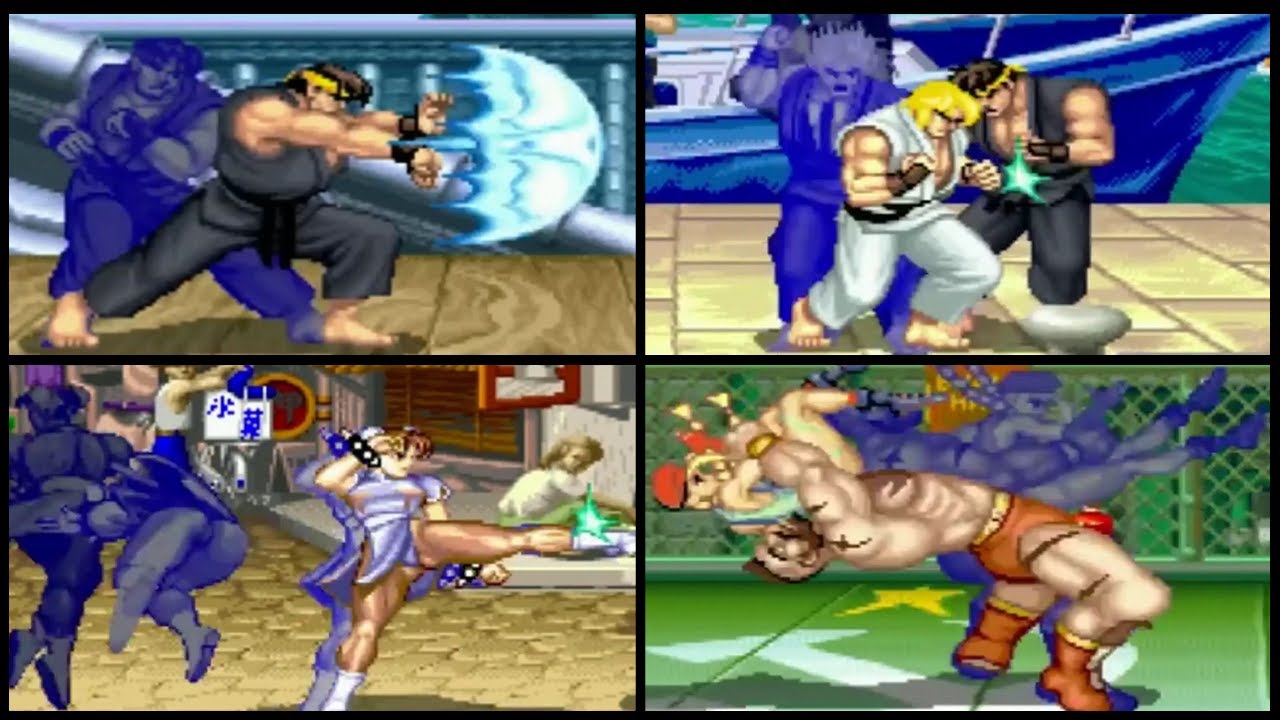
Shadow Trails Demo

Exhibition Shadow Trails 2017 - tech demo 3.0

No permission to download
Projects meant as a technical demonstrator or instructional tutorial.
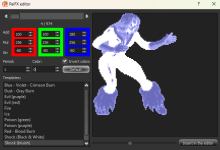
@DCurrent This topic reminded me of a minor issue (or maybe an intentional behaviour) I found in the drawmethod, for some reason I can't apply channel and tint functions together. In SORX shadow trails I want to apply a light blue tint effect similar to some fighting games but it will cancel the channel reduction.
I didn't look at the source code yet but maybe we could try to fix this in the v4.0.

You can only use RGB channels for tinting or for opacity, not both at the same time. You can still get the visual effect of tinted + fine control over opacity, but to do it you have to very carefully tune the RGB channels accordingly (ex. High R opacity, and low others to make a heavy red tint). Someone like @O Ilusionista who knows a lot more than me about color math could probably help you work it out.

You could potentially get even more control by generating an overlay or even a screen on your sprite, but at that point it's geting into some really complex tuning and I don't want to derail this topic that much.

DC
 
High R opacity, and low others to make a heavy red tint
Yeah, I already tried this method managing the rgb channel individually, it for some it works fine but sometimes doesn't look too good depending on the original sprite colors or the background behind.
It even works with fillcolor command but the character's sprite details disappear completely.
 
Thats neat Kratus , id like also have a velocity applied to trails when i want so id have to edit , not even sure if its going to looks right.

I remember in mugen it was silky smooth 60fps not frame based but not sure maybe its just my memory and it wasnt realy that great.

Ok yeah look how nice it follows when she jumps, defo time based, no fade out looks total crap runinig this effect tho
Its kinda like bind with delay

ok got it similar looking smothness with this in openbor , follows nicely when you jump

@cmd shadow 30 1 30 1 2 200 0 220
 
Last edited:
Thats neat Kratus , id like also have a velocity applied to trails when i want so id have to edit , not even sure if its going to looks right.

I remember in mugen it was silky smooth 60fps not frame based but not sure maybe its just my memory and it wasnt realy that great.

Ok yeah look how nice it follows when she jumps, defo time based, no fade out looks total crap runinig this effect tho
Its kinda like bind with delay

@bWWd,

The technique used in this exhibition is time based, not frame based. No reason at all you can't add smooth movement. It's really rare to make afterimages move though, because optically, you're already getting a movement effect. That would be a lot of added complexity for not much benefit.

DC
 
Last edited:
Thats neat Kratus , id like also have a velocity applied to trails when i want so id have to edit , not even sure if its going to looks right.

I remember in mugen it was silky smooth 60fps not frame based but not sure maybe its just my memory and it wasnt realy that great.

Ok yeah look how nice it follows when she jumps, defo time based, no fade out looks total crap runinig this effect tho
Its kinda like bind with delay
@O Ilusionista can explain better than me but according to what I know about the Mugen it works in a different way. Looks like the main character creates around 4 or 5 copies of the same entity and replicates all his exact movements. Indeed one day I will try it in OpenBOR but the current code I'm using is based on spawning multiple static entities getting the current main character moment/position, giving an impression of a movement instead of the real movement in Mugen.
 
Indeed one day I will try it in OpenBOR but the current code I'm using is based on spawning multiple static entities getting the current main character moment/position, giving an impression of a movement instead of the real movement in Mugen.

@Kratus

After the new year and 4.0 is out, I'll help you with this. Spawning entities is not necessary at all. You can direct draw sprites instead for a lot less cost, and use time based movement to make them just as smooth as Mugen (technically even smoother, but your eyes won't be able to see the difference). What you're describing is only needed when you want physical interaction with the afterimages.

DC
 
@Kratus

After the new year and 4.0 is out, I'll help you with this. Spawning entities is not necessary at all. You can direct draw sprites instead for a lot less cost, and use time based movement to make them just as smooth as Mugen (technically even smoother, but your eyes won't be able to see the difference). What you're describing is only needed when you want physical interaction with the afterimages.

DC
Thanks man, I would love to make it happen someday :)

The only problem with drawsprite for me is about the global drawmethod using the NULL() pointer, it will change everything that uses the NULL() reference like my HUD and other elements instead of changing only the shadow trails.

I tried to use the entityproperty "sprite" and it worked, but I can't change its channel using the "self" pointer (or maybe there's another pointer that I don't know yet).
 
Thanks man, I would love to make it happen someday :)

The only problem with drawsprite for me is about the global drawmethod using the NULL() pointer, it will change everything that uses the NULL() reference like my HUD and other elements instead of changing only the shadow trails.

I tried to use the entityproperty "sprite" and it worked, but I can't change its channel using the "self" pointer (or maybe there's another pointer that I don't know yet).

The way you handle that is just remembering to reset the drawmethod after each element. IIRC, there's a reset already, and the new one has it too. The new system also lets you read drawmethods, which is really handy when you only want to adjust one thing and not blow it all up at once.

DC
 
Ok ho to merge both together ?

Code:
void main()
{
    int i, j;
    void spr;
    int facing;
    float y, z, x;
    void self = getlocalvar("self"); // get caller
    int ani = getentityproperty(self, "animationid"); // current animation id
    int time = openborvariant("elapsed_time"); // current time in game
    int timer = getlocalvar("shadow." + self + ".timer"); // hold a variable for timer

    // recover all properties recovered from animation script
    int max = getentityvar(self, "shadow.max");
    int delay = getentityvar(self, "shadow.delay");
    int timeout = getentityvar(self, "shadow.timeout");
    int alpha = getentityvar(self, "shadow.alpha");
    int tintm = getentityvar(self, "shadow.tintm");
    int r = getentityvar(self, "shadow.r");
    int g = getentityvar(self, "shadow.g");
    int b = getentityvar(self, "shadow.b");
    int anim = getentityvar(self, "shadow.anim");

    if (timer == NULL())
    {
        setlocalvar("shadow." + self + ".timer", -1); // if timer has no value set timer -1
    }
    void table = getentityproperty(self, "colourmap");

    if (ani == anim && timer < time) // if the animation id from animation script matches the current animation id and timer below 0
    {
        spr = getentityproperty(self, "sprite"); // caller current sprite
        x = getentityproperty(self, "x");        // caller x position
        z = getentityproperty(self, "z");        // caller z position
        y = getentityproperty(self, "y");        // caller y position
        facing = !getentityproperty(self, "direction"); // caller facing direction

        for (i = 1; i <= max; i++) // find an empty shadow slot and store the current sprite with other details
        {
            if (getlocalvar("shadow." + self + "." + i + ".s") == NULL())
            {
                setlocalvar("shadow." + self + "." + i + ".s", spr);
                setlocalvar("shadow." + self + "." + i + ".x", x);
                setlocalvar("shadow." + self + "." + i + ".z", z);
                setlocalvar("shadow." + self + "." + i + ".y", y);
                setlocalvar("shadow." + self + "." + i + ".f", facing);
                setlocalvar("shadow." + self + "." + i + ".tm", tintm);
                setlocalvar("shadow." + self + "." + i + ".a", alpha);
                setlocalvar("shadow." + self + "." + i + ".r", r);
                setlocalvar("shadow." + self + "." + i + ".g", g);
                setlocalvar("shadow." + self + "." + i + ".b", b);
                setlocalvar("shadow." + self + "." + i + ".t", openborvariant("elapsed_time") + timeout);
                setlocalvar("shadow." + self + ".timer", openborvariant("elapsed_time") + delay); // set a delay before the next sprite can be recorded
                break;                                                                                    // stop the loop
            }
        }
    }

    for (j = 1; j <= max; j++) // show any stored shadows or if their time is up remove them
    {
        if (getlocalvar("shadow." + self + "." + j + ".t") != NULL())
        {
            // Apply channel reduction effect
            int shadowChannel = getlocalvar("shadow." + self + "." + j + ".channel");
            float channelReduce = 3;

            if (shadowChannel > 0)
            {
                setlocalvar("shadow." + self + "." + j + ".channel", shadowChannel - channelReduce);

                // Corrected draw method calls
                changedrawmethod(NULL(), "channelr", shadowChannel - channelReduce);
                changedrawmethod(NULL(), "channelg", shadowChannel - channelReduce);
                changedrawmethod(NULL(), "channelb", shadowChannel - channelReduce);
            }
            else
            {
                // Remove shadow if channel is zero or negative
                setlocalvar("shadow." + self + "." + j + ".s", NULL());
                setlocalvar("shadow." + self + "." + j + ".x", NULL());
                setlocalvar("shadow." + self + "." + j + ".z", NULL());
                setlocalvar("shadow." + self + "." + j + ".y", NULL());
                setlocalvar("shadow." + self + "." + j + ".f", NULL());
                setlocalvar("shadow." + self + "." + j + ".c", NULL());
                setlocalvar("shadow." + self + "." + j + ".t", NULL());
                setlocalvar("shadow." + self + "." + j + ".tm", NULL());
                setlocalvar("shadow." + self + "." + j + ".a", NULL());
                setlocalvar("shadow." + self + "." + j + ".r", NULL());
                setlocalvar("shadow." + self + "." + j + ".g", NULL());
                setlocalvar("shadow." + self + "." + j + ".b", NULL());
            }

            changedrawmethod(NULL(), "reset", 1);
            changedrawmethod(NULL(), "table", table);
            changedrawmethod(NULL(), "flipx", getlocalvar("shadow." + self + "." + j + ".f")); // face the same as caller
            changedrawmethod(NULL(), "alpha", getlocalvar("shadow." + self + "." + j + ".a")); // apply alpha effect
            changedrawmethod(NULL(), "tintmode", getlocalvar("shadow." + self + "." + j + ".tm")); // apply tint effect
            changedrawmethod(NULL(), "tintcolor", rgbcolor(getlocalvar("shadow." + self + "." + j + ".r"), getlocalvar("shadow." + self + "." + j + ".g"), getlocalvar("shadow." + self + "." + j + ".b"))); // set a tint
            drawsprite(getlocalvar("shadow." + self + "." + j + ".s"), getlocalvar("shadow." + self + "." + j + ".x") - openborvariant("xpos"), getlocalvar("shadow." + self + "." + j + ".z") - getlocalvar("shadow." + self + "." + j + ".y") - openborvariant("ypos") - 4, getlocalvar("shadow." + self + "." + j + ".z") - j);
            changedrawmethod(NULL(), "reset", 1);
        }
    }
}

 
Ok ho to merge both together ?

Code:
void main()
{
    int i, j;
    void spr;
    int facing;
    float y, z, x;
    void self = getlocalvar("self"); // get caller
    int ani = getentityproperty(self, "animationid"); // current animation id
    int time = openborvariant("elapsed_time"); // current time in game
    int timer = getlocalvar("shadow." + self + ".timer"); // hold a variable for timer

    // recover all properties recovered from animation script
    int max = getentityvar(self, "shadow.max");
    int delay = getentityvar(self, "shadow.delay");
    int timeout = getentityvar(self, "shadow.timeout");
    int alpha = getentityvar(self, "shadow.alpha");
    int tintm = getentityvar(self, "shadow.tintm");
    int r = getentityvar(self, "shadow.r");
    int g = getentityvar(self, "shadow.g");
    int b = getentityvar(self, "shadow.b");
    int anim = getentityvar(self, "shadow.anim");

    if (timer == NULL())
    {
        setlocalvar("shadow." + self + ".timer", -1); // if timer has no value set timer -1
    }
    void table = getentityproperty(self, "colourmap");

    if (ani == anim && timer < time) // if the animation id from animation script matches the current animation id and timer below 0
    {
        spr = getentityproperty(self, "sprite"); // caller current sprite
        x = getentityproperty(self, "x");        // caller x position
        z = getentityproperty(self, "z");        // caller z position
        y = getentityproperty(self, "y");        // caller y position
        facing = !getentityproperty(self, "direction"); // caller facing direction

        for (i = 1; i <= max; i++) // find an empty shadow slot and store the current sprite with other details
        {
            if (getlocalvar("shadow." + self + "." + i + ".s") == NULL())
            {
                setlocalvar("shadow." + self + "." + i + ".s", spr);
                setlocalvar("shadow." + self + "." + i + ".x", x);
                setlocalvar("shadow." + self + "." + i + ".z", z);
                setlocalvar("shadow." + self + "." + i + ".y", y);
                setlocalvar("shadow." + self + "." + i + ".f", facing);
                setlocalvar("shadow." + self + "." + i + ".tm", tintm);
                setlocalvar("shadow." + self + "." + i + ".a", alpha);
                setlocalvar("shadow." + self + "." + i + ".r", r);
                setlocalvar("shadow." + self + "." + i + ".g", g);
                setlocalvar("shadow." + self + "." + i + ".b", b);
                setlocalvar("shadow." + self + "." + i + ".t", openborvariant("elapsed_time") + timeout);
                setlocalvar("shadow." + self + ".timer", openborvariant("elapsed_time") + delay); // set a delay before the next sprite can be recorded
                break;                                                                                    // stop the loop
            }
        }
    }

    for (j = 1; j <= max; j++) // show any stored shadows or if their time is up remove them
    {
        if (getlocalvar("shadow." + self + "." + j + ".t") != NULL())
        {
            // Apply channel reduction effect
            int shadowChannel = getlocalvar("shadow." + self + "." + j + ".channel");
            float channelReduce = 3;

            if (shadowChannel > 0)
            {
                setlocalvar("shadow." + self + "." + j + ".channel", shadowChannel - channelReduce);

                // Corrected draw method calls
                changedrawmethod(NULL(), "channelr", shadowChannel - channelReduce);
                changedrawmethod(NULL(), "channelg", shadowChannel - channelReduce);
                changedrawmethod(NULL(), "channelb", shadowChannel - channelReduce);
            }
            else
            {
                // Remove shadow if channel is zero or negative
                setlocalvar("shadow." + self + "." + j + ".s", NULL());
                setlocalvar("shadow." + self + "." + j + ".x", NULL());
                setlocalvar("shadow." + self + "." + j + ".z", NULL());
                setlocalvar("shadow." + self + "." + j + ".y", NULL());
                setlocalvar("shadow." + self + "." + j + ".f", NULL());
                setlocalvar("shadow." + self + "." + j + ".c", NULL());
                setlocalvar("shadow." + self + "." + j + ".t", NULL());
                setlocalvar("shadow." + self + "." + j + ".tm", NULL());
                setlocalvar("shadow." + self + "." + j + ".a", NULL());
                setlocalvar("shadow." + self + "." + j + ".r", NULL());
                setlocalvar("shadow." + self + "." + j + ".g", NULL());
                setlocalvar("shadow." + self + "." + j + ".b", NULL());
            }

            changedrawmethod(NULL(), "reset", 1);
            changedrawmethod(NULL(), "table", table);
            changedrawmethod(NULL(), "flipx", getlocalvar("shadow." + self + "." + j + ".f")); // face the same as caller
            changedrawmethod(NULL(), "alpha", getlocalvar("shadow." + self + "." + j + ".a")); // apply alpha effect
            changedrawmethod(NULL(), "tintmode", getlocalvar("shadow." + self + "." + j + ".tm")); // apply tint effect
            changedrawmethod(NULL(), "tintcolor", rgbcolor(getlocalvar("shadow." + self + "." + j + ".r"), getlocalvar("shadow." + self + "." + j + ".g"), getlocalvar("shadow." + self + "." + j + ".b"))); // set a tint
            drawsprite(getlocalvar("shadow." + self + "." + j + ".s"), getlocalvar("shadow." + self + "." + j + ".x") - openborvariant("xpos"), getlocalvar("shadow." + self + "." + j + ".z") - getlocalvar("shadow." + self + "." + j + ".y") - openborvariant("ypos") - 4, getlocalvar("shadow." + self + "." + j + ".z") - j);
            changedrawmethod(NULL(), "reset", 1);
        }
    }
}
I see you are using tintmode/tintcolor, it will not work together with channel function.
 
yeah i use it for fire, need it red, also want to expand it to slightly vary tint from red to yellow ,orange and all so i need it...
 
yeah i use it for fire, need it red, also want to expand it to slightly vary tint from red to yellow ,orange and all so i need it...
Same as DC said you will have to manage every channel individually. As an example, putting blue/green to zero will make the sprite look red.

C:
changedrawmethod(self, "channelr", channel);
changedrawmethod(self, "channelg", 0);
changedrawmethod(self, "channelb", 0);
 
@O Ilusionista can explain better than me but according to what I know about the Mugen it works in a different way. Looks like the main character creates around 4 or 5 copies of the same entity and replicates all his exact movements.
Mugen, this is called Afterimage.
The way this works in Mugen is, initially, quite similar to the way it works in OpenBOR - it's not a copy/clone/entity (in Mugen terms, Helper) - it's just a copy of the image.

The difference is that you have much more control:
You can choose how many colors you want to work with out of the 255 in the palette, you can invert the colors, choose the time interval and frames, etc.

And like most things in Mugen, there is an "advantage" to how this works in OpenBOR: A time counter. We don't need to use a script that works all the time, I just need to say how many ticks I want it to work for.

For recreating the shadows used in super moves like MVC, it's perfect and works very well.

The only case in which you need to resort to using a copy is if you want to recreate the Custom Combo from Street Figther Alpha, where a copy is created that repeats the character's movements, with a delay, and CAN HIT THE ENEMY.

maxresdefault.jpg
 
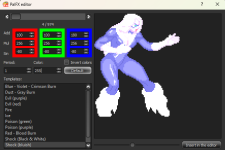
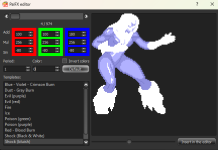
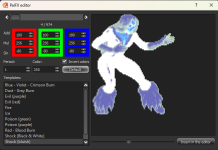
Some more examples about "control how much colors" and "invert colors"
(this was made to be use in PalFX - sprite tint in Mugen - but works here too)

Pay attention on how we can see her skin and eye colors using "color 255"
1702597943113.png

but now everything has blueish colors
1702598072703.png

If you use Invert Colors, its even more noticiable
1702598108750.png1702598121945.png
 
Some more examples about "control how much colors" and "invert colors"
(this was made to be use in PalFX - sprite tint in Mugen - but works here too)

Pay attention on how we can see her skin and eye colors using "color 255"
View attachment 6181

but now everything has blueish colors
View attachment 6182

If you use Invert Colors, its even more noticiable
View attachment 6183View attachment 6184

There's a very good reason this is not a native feature in OpenBOR. Having native afterimages is very cool, but you're really just obfuscating the "update script". It's still there in Mugen's source code, running on every single in game object at all times. Mugen can get away with that because you usually only have two main entities to worry about. OpenBOR can't - not without being a massive resource pig, so better to keep it in update scripts for the objects that need it. Yeah the setup takes more effort, but you have all the timing control Mugen allows and then whatever else you can think of on top of that.

That all said, one thing I really like from Mugen is direct control over individual palette entries. I've looked into adding that for OpenBOR, but it will represent a lot of work that would have pushed 4.0 back another six months, so right now its on the wish list. No matter how good you are with tints, scripts, etc., there's really no perfect way to desaturate, and no way at all I know of to invert colors.

DC
 
The way this works in Mugen is, initially, quite similar to the way it works in OpenBOR - it's not a copy/clone/entity (in Mugen terms, Helper) - it's just a copy of the image.
I'm wondering about how Mugen internally replicates the exact movement for all afterimages without creating a new entity, maybe I can try to translate it to OpenBOR scripts.

During some experiments the closest result I achieved was creating 3 copies of the main entity and forcing it to replicate the same moves during a special but delaying the frames a bit. My only problem in this format was that I can't replicate the hit-pause when the main entity hits the opponent, it's not available through scripts. So, depending on the movements the shadow trail will advance more frames than the main entity and will desync both.
 
I'm wondering about how Mugen internally replicates the exact movement for all afterimages without creating a new entity, maybe I can try to translate it to OpenBOR scripts.

During some experiments the closest result I achieved was creating 3 copies of the main entity and forcing it to replicate the same moves during a special but delaying the frames a bit. My only problem in this format was that I can't replicate the hit-pause when the main entity hits the opponent, it's not available through scripts. So, depending on the movements the shadow trail will advance more frames than the main entity and will desync both.

This is where multi-dimensional arrays come in handy. Let's assume all you want is to make a matched sprite with the main entity, but you want it to move and fade out. You set up a multi-dimensional array to store the properties of each after image. Not much different from how the demo already works.

I'm work-shopping this as I type, so I might think of a better way, but I am thinking you'd add floating point value position, and velocity for each axis. On each update, you record the main entity's velocity along with its position.

Now, in your drawing update, you use the velocity to update the position accordingly, matched to the engine's own formula (which I'd have to look up). Once that's done, you round to the nearest pixel to draw it on screen (also how the engine works). Now you have a direct draw, moving sprite every bit as smooth as the engine's native movement with no entity needed.

Of course you can always add more entries to the array for more complex behaviors. That's why multi-dimensional arrays are so handy. they are difficult to set up, but act like objects afterward and are brain dead easy to expend.

DC
 
This is where multi-dimensional arrays come in handy. Let's assume all you want is to make a matched sprite with the main entity, but you want it to move and fade out. You set up a multi-dimensional array to store the properties of each after image. Not much different from how the demo already works.

I'm work-shopping this as I type, so I might think of a better way, but I am thinking you'd add floating point value position, and velocity for each axis. On each update, you record the main entity's velocity along with its position.

Now, in your drawing update, you use the velocity to update the position accordingly, matched to the engine's own formula (which I'd have to look up). Once that's done, you round to the nearest pixel to draw it on screen (also how the engine works). Now you have a direct draw, moving sprite every bit as smooth as the engine's native movement with no entity needed.

Of course you can always add more entries to the array for more complex behaviors. That's why multi-dimensional arrays are so handy. they are difficult to set up, but act like objects afterward and are brain dead easy to expend.

DC
Sounds a good concept really, but maybe a bit more complex than spawning a few entities replicating the same movements, the only issue is related to the hit-pause detection. Another problem is related to "self" pointer which allows me to connect many events related to the shadow trails to the main entity. As an example, in my system using entities I can apply the same palette used in the main character to the shadow trails, but it's not present on the drawsprite function.

To speak the truth in SORX the cutscenes are drawn using drawsprite and in certain moments I even use linear movements by changing X/Y values gradually (the ending credits are done in this way). However, during a fight sometimes the entity move in different directions or velocities (like moving in a arc), plus adding the hit-pause or gravity to the formula randomly, it can be a bit hard to replicate without an entity.
 
Mugen can get away with that because you usually only have two main entities to worry about.
in fact, no. There are 2 players at least, but you can use helpers (entities) for anything like effects, projectiles and such. And all those entities can use it aswell.

Another cool thing is: being able to use Sin to control how the tint will work (thought not work on Afterimage, only on PalFX).
 
Sounds a good concept really, but maybe a bit more complex than spawning a few entities replicating the same movements, the only issue is related to the hit-pause detection. Another problem is related to "self" pointer which allows me to connect many events related to the shadow trails to the main entity. As an example, in my system using entities I can apply the same palette used in the main character to the shadow trails, but it's not present on the drawsprite function.

To speak the truth in SORX the cutscenes are drawn using drawsprite and in certain moments I even use linear movements by changing X/Y values gradually (the ending credits are done in this way). However, during a fight sometimes the entity move in different directions or velocities (like moving in a arc), plus adding the hit-pause or gravity to the formula randomly, it can be a bit hard to replicate without an entity.

It sounds more complex than it is. The benefit is it's less memory intensive and much more flexible to update than entities.

You only need entities for stuff that's really complex or interactive, like Ryu Hayabusa NG2 power ups or Rose's Soul Illusion.

At that point, there's a different technique involved.

DC
 
Back
Top Bottom