Chronocrash Modders Tools

ChronoCrash Modders Tools 0.7.9.10.1

No permission to download
@Piccolo I haven't tested 0.5.21 yet, but I found some weird issues

See this video - sometimes, when you right click something and choose DELETE, the tool throws you an error.
But when I move the entity...it works

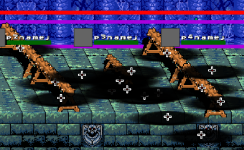
Also, there is a very annoying thing with selecting entities which have multiples instances on the screen: you never know which one you had selected.
Take a look at this picture, its hard to tell which one I selected and will be moved

1708015777441.png

I have two solutions for that:
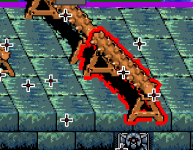
A - Add some visual aid when you select the entity - either by tinting it with another color or adding a stroke, like OBeditor does:
1708015878954.png
B- Make the tool ignore the transparent pixels of an entity, and use only the non-transparent ones.
You can see in the video above that although I had the cursor over a different entity, the tool ended removing the first one I selected, thanks to that.


In fact, the option A would be good to have even if you have option B
 
See this video - sometimes, when you right click something and choose DELETE, the tool throws you an error.
Probably related to what you mention at the end of your post. That is the clicked item is not what you think it is, something got the focus first (in this case I think it's the "screen" rectangle). Which is why if you move entity it works.

Implementing what you suggested at the end of your post should fix this also then.
 
@Piccolo I tried the latest version now, and had choosen some entities to delete. Got the same error.
But then I decided to hit SAVE after the warning...and every time I did this, the tool screwed up my file.

Take a look at this screenshot: It simply changed some entities to Amakusa (the stage boss), out of the blue.
1708019561941.png
... it puts everything at the end of the file:
1708019717149.png

... and simply wiped out the coords, spawn, at, map of every spawn on the stage
1708019743271.png
For sure, when I tried it in game, all the waits and groups are screwed up and I can simple walk until the end of the stage.

I will DM you the stage file, with a before and after.

It's not the first time I have an issue like this with CMT, so whenever you had a warning its better to simply closing the tool and opening it again.
Because saving after that will corrupt the file.
 
Piccolo updated Chronocrash Modders Tools with a new update entry:

Changelog 0.5.22

Level Editor :


- Entities can now only be selected by clicking opaque pixels, making selection a lot more precise and intuitive.

- Selected entity now have a red outline, making selection clearer

- Disabled right click menu on items that shouldn't have it (this prevent some errors)

- Adjusted the level rebuild process for entities that were deleted in visual editor, so that it removes their inline scripts too

@O Ilusionista

Read the rest of this update entry...
 
@Piccolo sorry to bring bad news but... yeah, deleting entities screws up the stage file entirely.

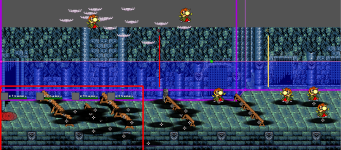
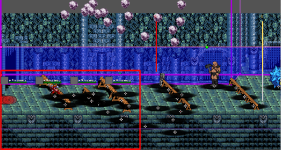
This is the original stage (pay attention to the big bald guy and the blue monster). I just clicked in some of those falling rocks and hit REMOVE:
1708028448246.png


... and it screws up the spawns in the stage entirely
1708028311646.png
 
@Piccolo sorry to bring bad news but... yeah, deleting entities screws up the stage file entirely.

This is the original stage (pay attention to the big bald guy and the blue monster). I just clicked in some of those falling rocks and hit REMOVE:
View attachment 7227


... and it screws up the spawns in the stage entirely
View attachment 7226
Oh well then it's linked to something else then. As I said I didn't test with your files yet. I'll look into it.

I don't have this issue with the files I tested (not your files), so the feature can work. It's probably related to some properties in the level. Can you send me the whole mod so I can test this ?
 
@O Ilusionista I read your files and I see that some wait don't have "at" set. My guess is that it's related to something like that. It's very important for the parser that "at" are not missed because it's basically the end delimiter to know if we are done with some functions. I'll try to add code so that it doesn't rely on "at" being present.

If "at" are not set then I must add checks everywhere to know if we are still in current block (entity, group, wait), or if it's a new block, and then adjust everything.
 
I read your files and I see that some wait don't have "at" set.
you mean here right?
1708029456553.png

That is the place where the spawn get bizarre, probably because something had deleted the "at" from that wait.
Recovering a file from early in this morning, I can see it was there

1708029553810.png

I can confirm that because I made this file months ago and that was the very first wait from the stage, and I never had any issue with it.
for now, I think I will avoid using "remove" and manually delete stuff.
 
you mean here right?
View attachment 7228

That is the place where the spawn get bizarre, probably because something had deleted the "at" from that wait.
Recovering a file from early in this morning, I can see it was there

View attachment 7229

I can confirm that because I made this file months ago and that was the very first wait from the stage, and I never had any issue with it.
for now, I think I will avoid using "remove" and manually delete stuff.
Yes that wait.

So that means the fix would have probably worked if your file hadn't been messed up this morning.

And yes it's always safer to delete things manually in the text. And it will always be due to the variability of OpenBOR levels.
 
@Piccolo I was experimenting with the p1spawn preview, but I think its wrong.

This is my stage setting:
spawn1 100 10 0
spawn2 90 20 0
spawn3 80 30 0
spawn4 70 40 0

And this is how the tool displays it:
1708120938371.png

But that is wrong. P1spawn doesn't conts from the top of the screen - instead, it counts from the "minz" of the stage.
So it should be using the orange line as a measure here.

This is how the engine shows it:
pdc - 0030.png
 
@Piccolo I was experimenting with the p1spawn preview, but I think its wrong.

This is my stage setting:


And this is how the tool displays it:
View attachment 7237

But that is wrong. P1spawn doesn't conts from the top of the screen - instead, it counts from the "minz" of the stage.
So it should be using the orange line as a measure here.

This is how the engine shows it:
View attachment 7238
Ok I missed that it was relative to min z will fix that in next release
 
Hi Piccolo. I have a proposal for creating a character template. I made this sprite from scratch for CMT. This sprite is incomplete and odd since I want it polished. But this could be useful for choosing any entity type as a template. I might/would consult with either @bWWd or @O Ilusionista on the design. Despite looking small, it would be useful for those who want to use small or big sprites. Would a single sprite like this suffice for any entity type creation? I'd like mine to have its file size smaller so that it would save capacity/space/room.

chartemp model.png

type

type {type}​


  • {type}
    player = The entity is a human-controlled player.
    enemy = The entity is a CPU controlled enemy or enemy projectile.
    npc = The entity is a CPU controlled ally that will seek out and attack enemies. The entity is otherwise functionally identical to enemy entities with the chase subtype. You can change the npc's allegiance via hostile setting. Npcs types do not count toward groups.
    item = The entity is a stationary item which can be picked up. Items can only give one bonus per item. In other words, you can't make one item that both gives 2000 points AND gives a 1-up.
    none = The entity is a useless decoration.
    steamer = The entity constantly spews the object called Steam upwards with alpha transparency.
    obstacle = The entity is a stationary blockade which can (normally) be destroyed.
    text = The entity is a message object. When spawned, it will freeze all objects in play and show it's IDLE animation, then dissapear. It can be sped up by pressing attack or jump. Can be used for level intros, mid-level cutscenes, etc.
    trap = The entity is an obstacle which cannot be attacked. It can be made to attack, though, and will hit both players and enemies. If a trap is not set up to knock the entity down, the trap will only damage the entity one time. To hit them again, the target entity must take damage from another entity.
    endlevel = The entity is an item which, when touched by a player, will end the stage. It can be given a score value to be awarded for level completion.
    pshot = Outdated and does nothing. You can still use it, but it's ignored.
    panel = The entity will scroll together with level. If the entity's speed is 10, entity will stay with panel. If the speed is 5, it will stay with background (for direction left, right and both). This type is used to make multiple layers.

If you're not going to bother adding the template sprite for creating a character template, could you add offset if a new animation block is added?

Would you add this for adding new entity with specific entity types and load method, and through models.txt similar to Stats? It can be different from Stats from the way with how each entity type or character template is created.
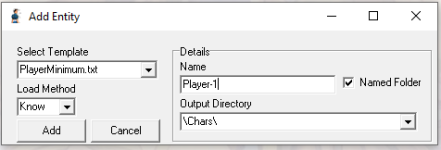
add entity.png

Let me give you the following animations for each entity type to be added as/for a template:
Player - idle, walk, attack, pain, fall, rise
Enemy - idle, walk, attack, pain, fall, rise
NPC - idle, walk, attack, jump, jumpattack, run, faint, freespecial, pain, fall, rise

But for the rest, including type obstacle, you can add only idle.

I will give you some specific details on the character headers for the entity types later.

I wouldn't mind having my proposed template sprite added or not, but it would be nice to see a character template created with a blank gif or whatever, along with offset added.

 
Hi, I think it's already possible to do that, with the "Add" button (green cross). But I don't remember exactly how it works.

I think you need to add your entity template as txt in [CMT root folter]/templates/entity

The path should already exist, you don't have to create the folders.
 
Back
Top Bottom