
You are using an out of date browser. It may not display this or other websites correctly.
You should upgrade or use an alternative browser.
You should upgrade or use an alternative browser.
A character that moves to a specified coordinate
- Thread starter DD Tokki
- Start date

View attachment 12875
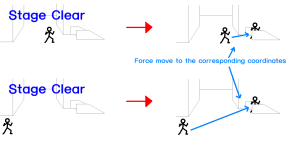
I think I've seen characters in Final Fight or Double Dragon openBoR games move to specific coordinates when clearing a stage. Is this implemented through scripting? I'd like to know how.
Double Dragon Reloaded does it through some slight of hand. What you see isn't the player, but an NPC swapped into the player's place and then given a hostile target to chase. Same thing happens when you start a stage. NPC spawns, moves to a target, then player swaps in. Golden Axe Remake just cuts player control and sets them to walk a static amount, with enough time provided to make the distance from any position. I don't know how Final Fight does it.
For me, I would use a hybrid solution. The Double Dragon one is pretty convoluted when you look at it, with a huge maintenance cost and a lot of tweaking to make it work. The Golden Axe one is too robotic. So I would have a set of waypoints that set when it's time to move. I would remove control, set the animation, and give them velocity to the waypoint, set new velocity to next waypoint, and so on until they reach destination. It sounds more complex, but the advantage is you only set it up once, then it works on every character.
DC

DD Tokki
Well-known member
Thanks. I'll have to look into the structure of both games.Double Dragon Reloaded does it through some slight of hand. What you see isn't the player, but an NPC swapped into the player's place and then given a hostile target to chase. Same thing happens when you start a stage. NPC spawns, moves to a target, then player swaps in. Golden Axe Remake just cuts player control and sets them to walk a static amount, with enough time provided to make the distance from any position. I don't know how Final Fight does it.
For me, I would use a hybrid solution. The Double Dragon one is pretty convoluted when you look at it, with a huge maintenance cost and a lot of tweaking to make it work. The Golden Axe one is too robotic. So I would have a set of waypoints that set when it's time to move. I would remove control, set the animation, and give them velocity to the waypoint, set new velocity to next waypoint, and so on until they reach destination. it sounds more complex, but the advantage is you only set it up once, then it works on every character.
DC
DD Tokki
Well-known member
In the games mentioned above, characters are shown moving to designated coordinates when clearing a stage. However, due to my limited skill, I'm having trouble figuring out where these coordinates actually move. I've tried searching to see if it's something built into the character itself or a specific stage (level), but I'm not sure if that's the right approach. If there's another way, I'd appreciate it.

maxman
Well-known member
Before finding a solution, go to Options, System Options, then go to Debug Settings and enable "Features" text so that all existing entities' names will be shown in the stage. That way, you will see certain entity names there.In the games mentioned above, characters are shown moving to designated coordinates when clearing a stage. However, due to my limited skill, I'm having trouble figuring out where these coordinates actually move. I've tried searching to see if it's something built into the character itself or a specific stage (level), but I'm not sure if that's the right approach. If there's another way, I'd appreciate it.
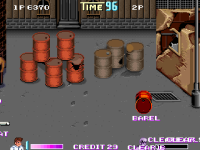
It's like what DC said. What you see walking is not a player-type entity, but an NPC one walking to the edge of the screen. Look at the specific model names carefully. Both Kunios don't have the same exact name in computer at all, or else it's gonna be confusing for the computer to understand. It's like declaring player Kunio (actualy player Kunio) and weapon Kunio (KWhip) as the exact same model name "Kunio" which cannot be possible or does not make sense. The NPC has a model name for Kunio. The player doesn't walk by itself after clearing a level.
DD Tokki
Well-known member
I think I need to learn this feature in detail.Before finding a solution, go to Options, System Options, then go to Debug Settings and enable "Features" text so that all existing entities' names will be shown in the stage. That way, you will see certain entity names there.
View attachment 12878
It's like what DC said. What you see walking is not a player-type entity, but an NPC one walking to the edge of the screen. Look at the specific model names carefully. Both Kunios don't have the same exact name in computer at all, or else it's gonna be confusing for the computer to understand. It's like declaring player Kunio (actualy player Kunio) and weapon Kunio (KWhip) as the exact same model name "Kunio" which cannot be possible or does not make sense. The NPC has a model name for Kunio. The player doesn't walk by itself after clearing a level.
I still don't understand where the NPC character that directs the player's movements receives the command to appear after clearing a stage.
I'm still not sure if the player's type has been transformed or if the NPC is summoned within the level.
Actually, after watching Double Dragon Reloaded, it's taking me a long time to understand its structure at my level.

I think I need to learn this feature in detail.
I still don't understand where the NPC character that directs the player's movements receives the command to appear after clearing a stage.
I'm still not sure if the player's type has been transformed or if the NPC is summoned within the level.
Actually, after watching Double Dragon Reloaded, it's taking me a long time to understand its structure at my level.
I explained that. There's no transformation. That wouldn't work anyway because player has no AI to move itself. The NPC is spawned right at player's position and player is removed from screen at exact same time. It looks like the player is moving, but it's all just the NPC.
DC

O Ilusionista
Captain 100K
I think the tricky part would be to wait for all the players to reach that point before making the stage transition, even more if they are things like FF3 elevators, where both players needs to be inside of it for the doors to close.For me, I would use a hybrid solution. The Double Dragon one is pretty convoluted when you look at it, with a huge maintenance cost and a lot of tweaking to make it work. The Golden Axe one is too robotic. So I would have a set of waypoints that set when it's time to move. I would remove control, set the animation, and give them velocity to the waypoint, set new velocity to next waypoint, and so on until they reach destination. It sounds more complex, but the advantage is you only set it up once, then it works on every character.
@DD Tokki on my project, I simply deactivate the player controls, make them to execute an specific animation and then make then to run off screen. But I can customize it to use move to certain places, I just haven't tried it yet. But my scrtipts let me customize the intros too, with no extra animation need like this:
That stage isn't available yet, but you can download the current version and check the shadaloo st3 stage to understand how I do it (at 34:40)
basically, I have an entity only for controlling the players (and npcs now).
maxman
Well-known member
I forgot to screenshot Kunio before and after the clearing the stage, and I was already late when I took a snapshot.
Hmm... there must be something that causes that NPC entity to move.
I must be missing or forgetting something. Let me check.
Have you tried pausing the game and then pressing F12 (screenshot button) for options? It's like going to options in the main menu screen.I think I need to learn this feature in detail.
It's better to try playing than just watching for your own experience. You will know better if you try.Actually, after watching Double Dragon Reloaded, it's taking me a long time to understand its structure at my level.
The trick is that the player type entity has an animation that uses spawnframe to spawn a certain entity, but it's used a blank gif. Have you seen or used the empty.gif image before, as well as the code?I'm still not sure if the player's type has been transformed or if the NPC is summoned within the level.
Hmm... there must be something that causes that NPC entity to move.
I must be missing or forgetting something. Let me check.
DD Tokki
Well-known member
Creating special movement for the player character seems to be the most challenging problem I've ever encountered.I think the tricky part would be to wait for all the players to reach that point before making the stage transition, even more if they are things like FF3 elevators, where both players needs to be inside of it for the doors to close.
@DD Tokki on my project, I simply deactivate the player controls, make them to execute an specific animation and then make then to run off screen. But I can customize it to use move to certain places, I just haven't tried it yet. But my scrtipts let me customize the intros too, with no extra animation need like this:
That stage isn't available yet, but you can download the current version and check the shadaloo st3 stage to understand how I do it (at 34:40)
basically, I have an entity only for controlling the players (and npcs now).
It's not yet solved, but I've been following along for a while and confirmed that my game's character can move.
But the problem is what happens after that, haha.

DD Tokki
Well-known member
It's fine to call up options from the pause menu. I'm impressed by the level of difficulty of the feature I'm currently building, and I want to learn it slowly.I forgot to screenshot Kunio before and after the clearing the stage, and I was already late when I took a snapshot.
Have you tried pausing the game and then pressing F12 (screenshot button) for options? It's like going to options in the main menu screen.
It's better to try playing than just watching for your own experience. You will know better if you try.
The trick is that the player type entity has an animation that uses spawnframe to spawn a certain entity, but it's used a blank gif. Have you seen or used the empty.gif image before, as well as the code?
Hmm... there must be something that causes that NPC entity to move.
I must be missing or forgetting something. Let me check.