
You are using an out of date browser. It may not display this or other websites correctly.
You should upgrade or use an alternative browser.
You should upgrade or use an alternative browser.
Backgrounds and inputing them into game
- Thread starter king21
- Start date

It depends on the level design. Usually I don't use the native backgrounds, I leave it with a blank image.Hello everyone. What's the best way to go about setting up backgrounds for openbor projects? I'm in the process of getting started on a project and wanted to know what's the easiest way to do this but correct way to accomplish this.
Instead, I prefer using bglayers when they are very simple but most times I use fglayers due to the freedom for the Z layer customization.
Here's an example for the SOR2 Bar in the SORX.
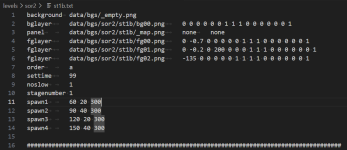
Here's the parameters in case you need it.


king21
Member
Thanks Alot. I needed this.It depends on the level design. Usually I don't use the native backgrounds, I leave it with a blank image.
Instead, I prefer using bglayers when they are very simple but most times I use fglayers due to the freedom for the Z layer customization.
Here's an example for the SOR2 Bar in the SORX.
View attachment 14140
Here's the parameters in case you need it.
View attachment 14141

O Ilusionista
Captain 100K
Yeah I just use native background when I want to use "neon" for quick animations. Other than that, I use fglayers for everything.
Despite the name, you can draw them whenever you want to, as they have z axis control.
Despite the name, you can draw them whenever you want to, as they have z axis control.
king21
Member
Thanks alot. I'm hoping to get things rolling at a faster pace. Being studying the software for awhile and working on something behind the scene, but hopefully soon I can show it off.Yeah I just use native background when I want to use "neon" for quick animations. Other than that, I use fglayers for everything.
Despite the name, you can draw them whenever you want to, as they have z axis control.
O Ilusionista
Captain 100K
Something that helps me a lot is adding a quick note above the fglayers to remind me what each thing does, like this:

FGLAYERS offers a lot of control and you can do interesting things with it. Some examples I've done in my games (just to illustrate):
- Layers that repeat only a certain number of times, instead of repeating forever. In the video below, around 1:00, you see that they go under a bridge, which darkens the screen. This only happens once during that level.
- A technique I use constantly: Using layers that animate (move) while everything else remains still. Here you need to use an fglayer instead of your BACKGROUND, because when you change the bgspeed, the background moves in that direction, but you can choose which layer reacts to the speed configured in BGSPEED. I used it on the vertical marquee right at the beginning of the level.
Another thing I use a lot is the old "neon," which works very well for simple animations - used in the "DOY DOY" sign - without needing separate entities (as is the case with the HOKARI SWEAT sign).
And, if you plan well, you can use more than one animation in the same neon - that's what I did with the DOY DOY and "Josie's" signs, around 0:10
- This is a level that I animated entirely using Neon and it uses another interesting technique: selective transparency (I wrote a tutorial here). But since this game simulates 8-bit, I can't use transparencies, so I replaced the transparent layer with a mesh (the same sprite but with a dotted transparent color)
- You can use the "Water" transformation to simulate a basic water animation (one of the coolest things about OpenBOR for me) using only a single image - around 0:30
- "Water" can also simulate parallax, which is what I used in the sea of this level, where it distorts as the sprite moves on the screen. At this same level, you can see another interesting thing - the fglayers can have different xratio/zratio values, which makes the clouds move at different speeds from each other (each cloud strip is a different sprite)
And they react according to the bgspeed: at this level, I reuse the same background images, but at a slower speed, and use "rock" to make the ship go up and down
- "Water" can not only simulate water, but also things swaying on the screen. Here, I used it on the beams of light that are in the foreground of the level - and notice that the level has two places that use "water", one in the background and the beams of light.
Here I used the same technique to simulate the ship's lights swaying, and this uses only one image.
In the Thor/Attuma level above, around 2:12, I used an entity to do a trick with the waterfalls - one of them appears randomly on the screen, in different positions and with a sound effect.
@DCurrent and @Kratus also use scripts to animate the levels, with incredible effects.
FGLAYERS offers a lot of control and you can do interesting things with it. Some examples I've done in my games (just to illustrate):
- Layers that repeat only a certain number of times, instead of repeating forever. In the video below, around 1:00, you see that they go under a bridge, which darkens the screen. This only happens once during that level.
- A technique I use constantly: Using layers that animate (move) while everything else remains still. Here you need to use an fglayer instead of your BACKGROUND, because when you change the bgspeed, the background moves in that direction, but you can choose which layer reacts to the speed configured in BGSPEED. I used it on the vertical marquee right at the beginning of the level.
Another thing I use a lot is the old "neon," which works very well for simple animations - used in the "DOY DOY" sign - without needing separate entities (as is the case with the HOKARI SWEAT sign).
And, if you plan well, you can use more than one animation in the same neon - that's what I did with the DOY DOY and "Josie's" signs, around 0:10
- This is a level that I animated entirely using Neon and it uses another interesting technique: selective transparency (I wrote a tutorial here). But since this game simulates 8-bit, I can't use transparencies, so I replaced the transparent layer with a mesh (the same sprite but with a dotted transparent color)
- You can use the "Water" transformation to simulate a basic water animation (one of the coolest things about OpenBOR for me) using only a single image - around 0:30
- "Water" can also simulate parallax, which is what I used in the sea of this level, where it distorts as the sprite moves on the screen. At this same level, you can see another interesting thing - the fglayers can have different xratio/zratio values, which makes the clouds move at different speeds from each other (each cloud strip is a different sprite)
And they react according to the bgspeed: at this level, I reuse the same background images, but at a slower speed, and use "rock" to make the ship go up and down
- "Water" can not only simulate water, but also things swaying on the screen. Here, I used it on the beams of light that are in the foreground of the level - and notice that the level has two places that use "water", one in the background and the beams of light.
Here I used the same technique to simulate the ship's lights swaying, and this uses only one image.
In the Thor/Attuma level above, around 2:12, I used an entity to do a trick with the waterfalls - one of them appears randomly on the screen, in different positions and with a sound effect.
@DCurrent and @Kratus also use scripts to animate the levels, with incredible effects.
Last edited:
king21
Member
@ O llusionista, thanks alot. Your example are very useful and they are gonna help me a lot with this project. I've been drawing art for this project for three years and studying this software for awhile with trail and error but I'm starting to learn more about it. The game I'm working on will be original in the aspect that they are custom sprites and stages. I see this engine is perfect for beat em ups. Thanks for all the examples once again. This have been a dream for me to create my very own beat em up game and I can say you have helped me with plenty of options and gave me new ideals in the process. One more question, would a mature rated beat em up be a bad thing like with blood and decapitation of some enemies and maybe one or two curse words in the story board writing?Yeah I just use native background when I want to use "neon" for quick animations. Other than that, I use fglayers for everything.
Despite the name, you can draw them whenever you want to, as they have z axis control.

@ O llusionista, thanks alot. Your example are very useful and they are gonna help me a lot with this project. I've been drawing art for this project for three years and studying this software for awhile with trail and error but I'm starting to learn more about it. The game I'm working on will be original in the aspect that they are custom sprites and stages. I see this engine is perfect for beat em ups. Thanks for all the examples once again. This have been a dream for me to create my very own beat em up game and I can say you have helped me with plenty of options and gave me new ideals in the process. One more question, would a mature rated beat em up be a bad thing like with blood and decapitation of some enemies and maybe one or two curse words in the story board writing?
Mature can work. Just depends on the concept. @Aerisetta has some mature OG projects with sexually explicit and erotic themes, so it's not unbroken ground.
DC
king21
Member
No sir not that mature lol. I can say though, .....@Aerisetta is very creative. my art isn't that good.Mature can work. Just depends on the concept. @Aerisetta has some mature OG projects with sexually explicit and erotic themes, so it's not unbroken ground.
DC
