Die_In_Fire
Well-known member
Ok I'm having a very basic question related to attack.
I have a very basic attack animation. It's a punch that when connected, will do another attack. (anim attack1 with followcond4). the problem is that it doesn't play the full anim attack animation before playing the anim follow4 animation.
I have done this countless times but only here it presents a problem. It's past 3am here so maybe it's my fault and I'm missing something.
here's both animations:
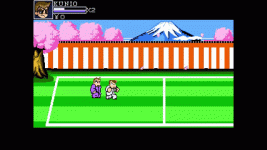
In the first part of the video you can see anim attack WITHOUT followanim active. Here the anim attack1 plays entirely.
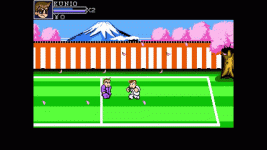
In the 2nd part of the video you can see anim attack WITH followanim active. Here the animation is cut. Doesnt play 56.gif and weirder than that, 56.gif is the only frame with attackbox, but it plays that attackbox at 53.gif, two frames earlier.
video:
I'm also uploading as gifs:
attack1..gif = anim attack WITHOUT followanim active
attack2.gif = anim attack WITH followanim active
I have a very basic attack animation. It's a punch that when connected, will do another attack. (anim attack1 with followcond4). the problem is that it doesn't play the full anim attack animation before playing the anim follow4 animation.
I have done this countless times but only here it presents a problem. It's past 3am here so maybe it's my fault and I'm missing something.
here's both animations:
Code:
anim attack1
range   0 25
    loop 0
    delay 10
   offset   43 75
   bbox   35 45 14 29
  followanim 4
  followcond 2
   frame   data/enemy/a2/27.gif
   frame   data/enemy/a2/52.gif
   frame   data/enemy/a2/53.gif
   frame   data/enemy/a2/53a.gif
   delay   15
    attack1  45  49  19  14  3  0 0 0 0 8
   frame   data/enemy/a2/56.gif
#        attack1 0
#   delay   8
#   frame   data/enemy/a2/54.gif


anim follow4
    range 0 25
    loop 0
    delay 10
    offset 43 75
    bbox  37  45  13  29
    jumpframe 2 0 1 0
    hitfx    data/sounds/kbeatko2.wav
    followanim 6
    followcond 2
    frame   data/enemy/a2/18.gif
    frame   data/enemy/a2/19.gif
    frame   data/enemy/a2/27.gif
    delay 20
        attack1 48  55  16  16  8  1 0 0 0 8
    frame   data/enemy/a2/28.gif
        attack1 0
    frame   data/enemy/a2/27.gif
In the first part of the video you can see anim attack WITHOUT followanim active. Here the anim attack1 plays entirely.
In the 2nd part of the video you can see anim attack WITH followanim active. Here the animation is cut. Doesnt play 56.gif and weirder than that, 56.gif is the only frame with attackbox, but it plays that attackbox at 53.gif, two frames earlier.
video:
I'm also uploading as gifs:
attack1..gif = anim attack WITHOUT followanim active
attack2.gif = anim attack WITH followanim active