Steven1985
Active member
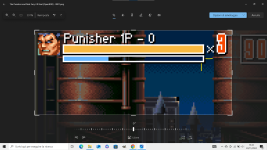
Hi, I'd like to know what the black bars near lbarsize and mpbarsize are, which I marked in yellow.
Thanks in advance.
Thanks in advance.


Hi, I'd like to know what the black bars near lbarsize and mpbarsize are, which I marked in yellow.
Thanks in advance.
View attachment 9713
I have already read all about it. I didn't understand how to eliminate the shadow.It's all listed here. Pay attention to noborder and Shadow.
DC

lbarsize {w} {h} {noborder} {type} {orientation} {border} {shadow} {graph} {backfill}
- Controls the size of lifebars.
- This applies to players, enemies, items, etc (their lifebar will all have the same width, height, etc). If 'olbarsize' is declared, this only applies to players.
- {w} is the maximum amount of health the bar can display. Defaults to 100.
- {h} is the height of the lifebar in pixels. Defaults to 5.
- {noborder} turns on or off the border and shadow around life bars. {0} means there is, {1} means no outline or shadow.
- {type} is a flag that sets how lifebar show health. 0 (default) means if an entity's health goes over width, the life bar will wrap around and 'double up' on top of itself (1 unit of health is 1 pixel long.). 1 means the lifebar is shown in percent based.
- {orientation} is a flag that sets lifebar's orientation.
- 0 (default) = horizontal orientation. Lifebar is filled from left to right in this mode.
- 1 = vertical orientation. Lifebar is filled from down to up in this mode.
- {border} sets layer adjustment of outer border. Default to 0.
- {shadow} sets layer adjustment of border shadow. Default to 0.
- {graph} sets layer adjustment of graph fill. Default to 0.
- {backfill} sets layer adjustment graph background. Default to 0.
- The last 4 variables can be used to place lifebar behind player 'icon' or 'bgicon'. To do that you need to give value like -300.
lbarsize 100 5 1 0 0 0 1 0 0I did as you said, but the white borders are also being removed. The white borders need to stay there.noborder highlighted in light blue below. Even shadow too.
Example:
Code:lbarsize 100 5 1 0 0 0 1 0 0
Just edit the shadow or border.
that is?so just have them with icon graphics