
You are using an out of date browser. It may not display this or other websites correctly.
You should upgrade or use an alternative browser.
You should upgrade or use an alternative browser.

ChronoCrash Modders Tools 0.7.9.10.1
No permission to download
- Thread starter Piccolo
- Start date

DJGameFreakTheIguana
Active member
Yo Piccolo, I just tried your tool and I turned on this time, and I gotta say, it looks pretty clean dude. ;D
One thing I have to say is that you should add the function most tools have after making changes, asking to save them or now once you exit out. Even though I usually hit ctrl-S, sometimes I may make changes and forget about it, and it reminds me to check over again. Of course, your tool is different from OBEditor so I may not do that, but it would be a good safety measure for others in the future.
After getting a feel for the tool, I started going through one of me characters from Cosmic Damage, Stealth Owl, and the tool crashed when I got to a certain animation. I'll paste it here:
I wondering if it's because of the 3 cmd's I have here, though the first freespecial had only 1 and didn't crash the tool.
x)
One thing I have to say is that you should add the function most tools have after making changes, asking to save them or now once you exit out. Even though I usually hit ctrl-S, sometimes I may make changes and forget about it, and it reminds me to check over again. Of course, your tool is different from OBEditor so I may not do that, but it would be a good safety measure for others in the future.
After getting a feel for the tool, I started going through one of me characters from Cosmic Damage, Stealth Owl, and the tool crashed when I got to a certain animation. I'll paste it here:
Code:
anim	Freespecial3
	delay	8
	offset	116 128
	bbox	0
	mpcost	20
	mponly	1
	@cmd	shoot "OwlB0" 0 0 0
	frame	data/chars/Owl/FSP3-0.gif
	frame	data/chars/Owl/FSP3-1.gif
	@cmd	shoot "OwlB0" 0 0 0
	frame	data/chars/Owl/FSP3-2.gif
	frame	data/chars/Owl/FSP3-3.gif
	@cmd	shoot "OwlB1" 0 0 0
	frame	data/chars/Owl/FSP3-0.gif
	frame	data/chars/Owl/FSP3-1.gif
I wondering if it's because of the 3 cmd's I have here, though the first freespecial had only 1 and didn't crash the tool.
x)
DJGameFreakTheIguana
Active member
Glad to help dude. 8)
I may test this on a copy of my Sega Brawlers mod since it's got way more material then most mods to test on.
EDIT:
Tested the tool, or CCMT, on one character in Sega Brawlers, Toejam. I had multiple crashes in the animations tab, but they were all with Bboxes with only one parameter. Each time it crashed, it looked up the animation in the text tab and corrected it, saved it, and now every animation loaded without fail.
On a side note, I like how you already added a find function to the bottom of the text tab window. Never new what those tabs down there at the bottom were for until I hit ctrl-f and my cursor snapped to that. 8)
x)
I may test this on a copy of my Sega Brawlers mod since it's got way more material then most mods to test on.
EDIT:
Tested the tool, or CCMT, on one character in Sega Brawlers, Toejam. I had multiple crashes in the animations tab, but they were all with Bboxes with only one parameter. Each time it crashed, it looked up the animation in the text tab and corrected it, saved it, and now every animation loaded without fail.
On a side note, I like how you already added a find function to the bottom of the text tab window. Never new what those tabs down there at the bottom were for until I hit ctrl-f and my cursor snapped to that. 8)
x)

maxman
Well-known member
Piccolo said:Was it an existing file ?
I made some changes, as there was a bug with new file.
Yep. I opened an existing file and tried saving it for setting a bbox.

Piccolo
Well-known member
DJGameFreakTheIguana said:On a side note, I like how you already added a find function to the bottom of the text tab window. Never new what those tabs down there at the bottom were for until I hit ctrl-f and my cursor snapped to that. 8)
Hehe and Ctrl + R if for replacement (the bottom input).
maxman said:Yep. I opened an existing file and tried saving it for setting a bbox.
Odd, was it a standard bbox with four paremeters (x, y, width, height) ?
I uploaded anoter minor update with the bbox 0 fix, maybe it'll solve you problem. This update also includes a session system, which allows to save/load lists of opened files.

NED
Well-known member
Impressive project.
-Will it allow custom slams "slamstart" script as a visual editor?
-Can be good if it's compatible with old mods (so they can be edited easily)?
-Also, what about some copy saving feature (I don't know, something creating a save temporary if engine crashes.)
-Will it allow custom slams "slamstart" script as a visual editor?
-Can be good if it's compatible with old mods (so they can be edited easily)?
-Also, what about some copy saving feature (I don't know, something creating a save temporary if engine crashes.)

aL BeasTie
Well-known member
I swear I tried that first, but it wasn't taking effect. :/Normal in [Default Item Styles] ;D
I was thinking the template thing could be very simple, in addition to "New File' we could have "New File From Template" then simply select a .txt file, the list could auto populate from a certain folder, like the themes list does.
So I worked out that this section is a search and replace feature, that is pretty nifty.


It would also be great to have typical shortcuts for this, CTRL+F for find, CTRL+H for find and replace etc. Highlighting and ctrl+f would search etc.
Bugs/Issues
- Clicking +Add then selecting cancel causes the program to close.
- Remove doesn't seem to work
- a few times I've seen it populate files from two different mods, not sure how/when this occurs, but I had closed the program and opened another mod. It loads the files from the new mod, but it still has the chars folder from the previous mod on the list. I think it might have something do to with trying to open the folder from the dropdown menu instead of clicking ADD when I first ran the program.
Questions.
- The Text | Text feature is nice.
 If we have two files loaded and hit save, are both files saved or only the one that is currently selected for editing?
- can we enable/disable displaying indents etc. ? This would be handy as a ON/OFF button eventually.
Code:
makeinv  	 2
atchain  	 1
death   	 1
Things Needed
- Create new animation function (from char edit/animation screen)
- duplicate animation function (from char edit/animation screen)
- single click to edit animations (could be optional)
- zoom function (for sprites/animations)
- Playing sounds in animation preview
Requests/Ideas
- WAV player (to preview sfx) (example highlight/click the line and the press play icon )
- OGG/BOR player, to preview music in stages etc.
- Internet Links - One click web links to openbor wiki and the manual on dcemulation
- text scaling (CTRL =/- and CTRL mousewheel to zoom/scale editor text)
- Tools menu, function to launch external programs/editors.
Basically these would custom set shortcuts to other programs, like PalApply, Photoshop, whatever you want. You could also get more advanced and allow opening files in external programs.
Hope this helps!

aL BeasTie
Well-known member
Full Topic here
http://www.chronocrash.com/forum/index.php?topic=1950.0
http://www.chronocrash.com/forum/index.php?topic=1950.0
Piccolo
Well-known member
NickyP said:I might be a little in the dark on this...
Is the Chronocrash engine going to use the same commands and functions as OpenBOR? Is it essentially to OpenBOR what OpenBOR was to the original BOR? Or is this an entirely original project?
This project contains the name "ChronoCrash" so as not to have to change in the future. Plus ChronoCrash also refers to the community. But right now, this project only supports OpenBOR engine.
BeasTie said:It would also be great to have typical shortcuts for this, CTRL+F for find, CTRL+H for find and replace etc. Highlighting and ctrl+f would search etc.
Well actually it's already in place (Ctrl+F to find, Ctrl+R to replace). But it didn't put the highlighted text in the search input. It will in the next update.
The Text | Text feature is nice.
Only the one that is currently selected for editing. I could add an option to enable/disable "both" saving, but I personally prefer it that way.
can we enable/disable displaying indents etc. ? This would be handy as a ON/OFF button eventually.
We can't right now but I'll add a button/shortcut for that.
- zoom function (for sprites/animations)
It's already here, you just have to scroll up/down on the frame widget

Other than that, great list of suggestions, it'll surely help me developping this, thanks.
Piccolo
Well-known member
maxman said:Every time I go with settings in either Session or Edit, I have to go with either you or Volcanic/CRxTRDude in Dialog Format. Also, when I'm in the dark theme while I'm in the settings, there's a white text next to "Dialog Format".
Yes those things are not finished :-[ The "Dialog Format" things refers to a dialog editor I built some time ago (compatible with Volcanic, CRxTRDude and my version of the script system), I'll include it in this later on.
nedflandeurse said:-Will it allow custom slams "slamstart" script as a visual editor?
-Can be good if it's compatible with old mods (so they can be edited easily)?
-Also, what about some copy saving feature (I don't know, something creating a save temporary if engine crashes.)
- Maybe, but this is not a priority.
- Should be compatible with old mods I guess
- you mean if the editing tool crash while you are editing ? If so then yes it would be a good thing to have this feature.

aL BeasTie
Well-known member
Cool np, just want to support the project. I'll try to post ideas/suggestion/requests as I think of them, I work multiple projects and use openborstats all the time, I have a few smaller projects I work on I don't mind risking to test this out. I'll start using this instead of stats and notepad for a couple of mods so I can test it properly. There's probably a lot of little things I will think of/remember from using other programs for years.
I agree too what O Ilusionista said, you should checkout FighterFactory. Particulary how it handles sprites and palettes etc. - It has an awesome onion skinning tool among other things. Which gives me another idea/request.
- Function to HIDE the background colour on sprites
- function to display grid background behind sprites (like fighter factory)
- custom Reticule(s)
FF background and Reticule
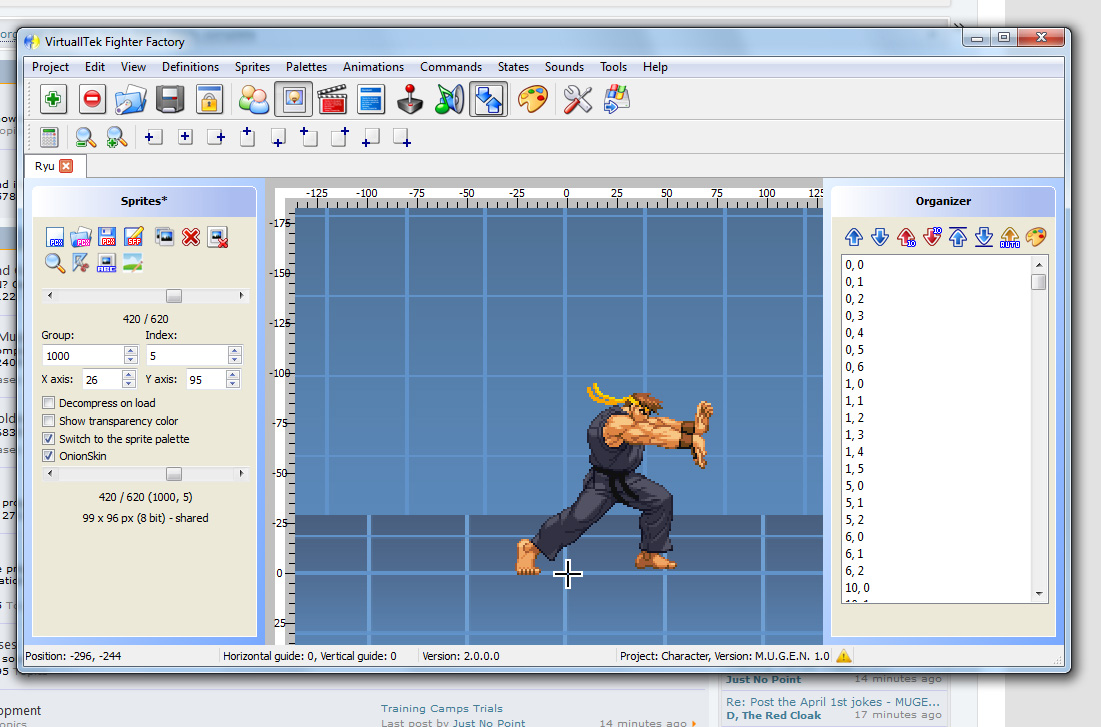
FF style onion skinning

I agree too what O Ilusionista said, you should checkout FighterFactory. Particulary how it handles sprites and palettes etc. - It has an awesome onion skinning tool among other things. Which gives me another idea/request.
- Function to HIDE the background colour on sprites
- function to display grid background behind sprites (like fighter factory)
- custom Reticule(s)
FF background and Reticule
FF style onion skinning
Piccolo
Well-known member
Great
The list is starting to get long, so I think I'll dig for my old online todo list module for this, it will be better to organize future requests/development.
EDIT : Ok so for future requests, please use this page.
You'll need to register here to use this (the form is in french but it's just a simple login/mail/captcha form). Then when you are registered go here to login with the password that were emailed to you. After that you're done and can use the todo list page.
The list is starting to get long, so I think I'll dig for my old online todo list module for this, it will be better to organize future requests/development.
EDIT : Ok so for future requests, please use this page.
You'll need to register here to use this (the form is in french but it's just a simple login/mail/captcha form). Then when you are registered go here to login with the password that were emailed to you. After that you're done and can use the todo list page.
Piccolo
Well-known member
Download ChronoCrash Modders Tools v0.2
Updated with various new features (quick access to OpenBOR log, visual wall editing, onion skin, create file from template, editors' font selection, and plenty other little things here and there).
I also updated the tips from the first post :
- double-clicking on a word will highlight its occurrences in the whole text
- If you place the mouse cursor over a "frame data/chars/..." line in the main editor, a tooltip will show a preview of this frame and the number of this frame in the animation (very useful to set landframe, quakeframe and such)
- If you select several lines in the main editor, the overing tooltip will indicate the number of frames contained within
- F2 key is a shortcut for searching a file in the File Selector (on the left)
- Ctrl+D allows you to comment the selected lines (uncomment => Shift+Ctrl+D)
- you can expand/collapse treeview nodes by middle-clicking them.
- if you put a comment next to the start of an anim block (e.g. "anim attack1 # Light punch") this comment will be processed and appear as the animation "Label"
Updated with various new features (quick access to OpenBOR log, visual wall editing, onion skin, create file from template, editors' font selection, and plenty other little things here and there).
I also updated the tips from the first post :
- double-clicking on a word will highlight its occurrences in the whole text
- If you place the mouse cursor over a "frame data/chars/..." line in the main editor, a tooltip will show a preview of this frame and the number of this frame in the animation (very useful to set landframe, quakeframe and such)
- If you select several lines in the main editor, the overing tooltip will indicate the number of frames contained within
- F2 key is a shortcut for searching a file in the File Selector (on the left)
- Ctrl+D allows you to comment the selected lines (uncomment => Shift+Ctrl+D)
- you can expand/collapse treeview nodes by middle-clicking them.
- if you put a comment next to the start of an anim block (e.g. "anim attack1 # Light punch") this comment will be processed and appear as the animation "Label"
maxman
Well-known member
Thanks for the updates, Piccolo! ;D
I found something strange that when I go to "Todo" or "Log" after clicking on the character txt, the "Animation" text isn't highlighted and selected (becomes gray for no selection) at all unless I open a different character txt and that's when "Animation" text returns.
I found something strange that when I go to "Todo" or "Log" after clicking on the character txt, the "Animation" text isn't highlighted and selected (becomes gray for no selection) at all unless I open a different character txt and that's when "Animation" text returns.
Piccolo
Well-known member
Thanks for the report, this is fixed.
Note that the selectable views (text, animation, level) depend on the current file category (generic file, entity, level) and that you can change this category with the combobox on the top left corner of the editor.
Files opened through the library are set in the right category by default, but if you open a file directly you have to manually tell in which category it is (default to generic file).
Note that the selectable views (text, animation, level) depend on the current file category (generic file, entity, level) and that you can change this category with the combobox on the top left corner of the editor.
Files opened through the library are set in the right category by default, but if you open a file directly you have to manually tell in which category it is (default to generic file).
maxman
Well-known member
I have some requests now if you have time to make some changes.
- How about adding holes in levels? That's because every time I add a hole, the hole block doesn't appear, not like wall which gets built/created.
- About wall, I see corner points are very big circles. Plus the lines of the sides look thick. Maybe you can make the lines thinner but you can make options for how big/small the lines of sides and the circular corners are. It could be in a similar way as openborstats.
- I noticed when I put less than 8 parameters for wall, the engine (Chrono Tools) crashes.
- A Refresh option would be good to go for refreshing the levels you work on similar to the way Stats is.
- How about adding holes in levels? That's because every time I add a hole, the hole block doesn't appear, not like wall which gets built/created.
- About wall, I see corner points are very big circles. Plus the lines of the sides look thick. Maybe you can make the lines thinner but you can make options for how big/small the lines of sides and the circular corners are. It could be in a similar way as openborstats.
- I noticed when I put less than 8 parameters for wall, the engine (Chrono Tools) crashes.
- A Refresh option would be good to go for refreshing the levels you work on similar to the way Stats is.