Chronocrash Modders Tools

ChronoCrash Modders Tools 0.7.9.10.1

No permission to download
I've been trying to modify this existing game to make it my own and also learning about the openbor engine.
So it could just their level.txt is not properly declared for CMT to recognize.
I'm just so busy with alot of things in life. I'll send you the data folder when I get a chance. How can I send it to you privately?
If it's an existing game, you can tell me which one it is and I'll download it myself. Or else you can upload your data anywhere you want and send me the link in private ( https://www.chronocrash.com/forum/conversations/add?to=Piccolo ).

Haven't said that your software is so genius... make it easier for us, especially newbie like me..be able to drag and drop is just so nice,
Thank you so much for hard work.
Let me know if you accept donation from us for your hard work!
I always wanted to make video games. Fortunely, this openbor engine is powerful and not too difficult to learn either, especially with this helpful forum.
Thank you so much and god less you
Thanks ! All donation is welcome. I put the related info in the spoiler below

You can send me a donation through PayPal using my personal mail which is :

Bertrand [DOT] Coulombel [AT] gmail [DOT] com (just replace "[DOT]" with "." and "[AT]" with "@").

If you are not sure to get the mail right, you can also use this link : Pay Fondation MAGister
 
Ok I fixed it in the code, it will be good in the next release.

As for testing, I'm not currently adding new functionalities on my own, so there is nothing in need for testing right now (other than what's already there ofc). Though as I said I'm open to requests for fixes and new features (provided said requests are very clearly specified).
@Piccolo
Thanks! About the tests, you can use this unpacked version of the SOR2X to replicate the latest issues I reported (the "hole" bug and the unloaded "sets" too).

 
If it's an existing game, you can tell me which one it is and I'll download it myself. Or else you can upload your data anywhere you want and send me the link in private ( https://www.chronocrash.com/forum/conversations/add?to=Piccolo ).


Thanks ! All donation is welcome. I put the related info in the spoiler below

You can send me a donation through PayPal using my personal mail which is :

Bertrand [DOT] Coulombel [AT] gmail [DOT] com (just replace "[DOT]" with "." and "[AT]" with "@").

If you are not sure to get the mail right, you can also use this link : Pay Fondation MAGister

The existing game is Final Fight LNS Ultimate. I know you guys don't support this game and I can see the game has alot of copycat scripts from this forum, but I really love this kind of games.....
I have already spent alot of hours to modify thousands of files to double up its resolution, so that my characters can look like nice, and later I can add better looking backgrounds and enemies.
I've also added more ideas such as air combos and finisher, more combos, summons, etc... this is more like private modification. Of course I'll also share it with others to whoever wants to help me modify it as long as they don't violate Final Fight LNS Ultimate policy.
I hope you are ok to look into it.

I just sent you a small donation to support your hard work. I normally don't pay that much for any software.
Please keep up with the good work!
 
I don't know this game but I personally don't have any problem to look into it for the purpose of fixing the issue with Modders Tools. I'll look into it tomorrow 😉

And thanks for the donation, I appreciate it 🙏
You are welcome and Thank you.
I hope everyone else please also support this software and this forum.
alot of small donations can make the difference.


This is my mod so far:


I'm working on FFX Auron right now.
I need to add Cloud Strife to tag team with him.
I just added summoms for him and thanks to Bloodbane for his help on this.
I have alot of ideas in mind, just no time to do it.

Edit:
and thanks to msmalik681 for his SP script
 
So basically the problem with entities not showing up in level editors is really simple. OpenBOR is case insensitive and Modders Tools is currently not. So if you declare an entity as "Joe" in models.txt and then in some level file you try to spawn it as "spawn joe" it's not considered to be the same entity. And there is no model corresponding (hence why it doesn't show up).

I'll add a middle layer to convert everything to lower case under the hood so that everything works anyway, but still I'd say it's a general malpractice to reference the same "object" without keeping the same formatting throughout.


EDIT : As I was using the mod mentioned by Bruce with around ~4000 lines of models, it became very obvious that some things needed to be cached so that loading a mod with a very high number of models only take a long time the first time you load it.
 
Last edited:
Piccolo updated Chronocrash Modders Tools with a new update entry:

Minor features update

- Entities will now show up in level editor even when their spawn point is not formatted the same way as in models.txt (now "Joe" = "joe" = "JOE"). This previously caused some users to report that all entities were not loaded (@Bruce ).
- Level editor will now warn you if a spawn point has no "coords" or "at" set (@maxman )
- Added a cache so that loading a large project (with lots of entities) will now be significantly faster after the first time you load it

Read the rest of this update entry...
 
Wow, that's awesome, thank you so much.
I just tested it but it opened up the software then immediately shut down.
Can you please check it?
Thanks a lot!
My bad I forgot to add some important files in the last release, will update it immediately.
 
While I was searching for an old problem to solve which was already solved, I discovered a new problem when I was looking at the visual level editor. I find that all entities are on the specific Z ground since 2D is used. If I want to make a 2D sidescroller or platformer, could you give the spawned entities that are above the Z axis ground to "stand" since the altitude of coords is already set? They don't need to have shadow, I think.

Code:
spawn Enemy
coords 123 211 54 # Third for altitude, 54 is altitude
at 500


But for 3D sidescroller which allows Z axis, could you add some shadow under a spawned entity's feet since they could be spawned above the ground and the altitude is used?

Could you add the boundaries for scrollx and scrollz? Scrollx would be quite helpful in making the scrolling wait-like just like other Capcom brawlers.

scrollx {min} {max}

  • Scrollx defines how far to the left and right player can scroll (allows you to precisely set the X scrolling limit within your panel area). To be detailed, parameters defines min scrollpos and max scrollpos. For instance, scrollx 50 600 will allow player to scroll left to scrollpos 50 and scroll right to scrollpos 600. It's easier to understand with direction both set.
  • Maximum X scroll area of a level is still limited by panels. You can set scrollX to whatever value you like, but OpenBOR will not allow you to scroll beyond the panel area.
  • It must be followed by 'at'.

scrollz {min} {max}

  • ScrollZ enables vertical scrolling in response to player movement along the Y or Z axis, and controls how far. There's potential to make 3D scrolling stages, but the main use of this is to enable vertical scrolling when players jump. Unlike ScrollX, ScrollZ does allow you to go scroll beyond the panel area, so if you don't set up panels and layers to accommodate you can scroll yourself right out the visual design of a level. Also note that entities are still confined to the level's Z boundaries. That's a good thing, since it means you could set up large ScrollZ values for vertically oriented scrolling but still keep Z movement limited within a defined area.
  • Obviously {min} is the minimum limit and {max} is the maximum limit.
  • This command only works in levels with direction left/right/both/leftright or rightleft.
  • Like other level objects, this command must be followed by 'at' (see above) and also counted by 'group'.
  • It must be followed by 'at'.
 
Awesome, it is working now and I am about to cry.
I always wanted to have a software like this to make my life easier.
It is like a dream comes true!
What a neat software, thank you!

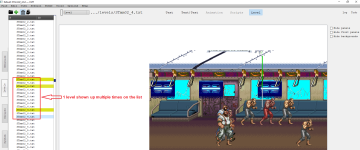
I found a minor bug which is not a big deal, but it does cause the list to be longer as 1 level file shown up multiple times on the list.
I can live with it though. This will be my last report because I need to study for my classes :-(
I will be on and off but no time to do anything until April.

Again, anyone who can, please support this software and the site, thank you all!

Thank you for all your hard work, Piccolo
 

Attachments

  • 1 Level Shown Up Multiple Times.png
    1 Level Shown Up Multiple Times.png
    107.6 KB · Views: 7
Awesome, it is working now and I am about to cry.
I always wanted to have a software like this to make my life easier.
It is like a dream comes true!
What a neat software, thank you!


Thank you for all your hard work, Piccolo
:) (y)

I found a minor bug which is not a big deal, but it does cause the list to be longer as 1 level file shown up multiple times on the list.
I can live with it though.
I see, that one is not really a bug, it's just that levels are added for each branch, and this mod has a lot of branches. But I guess either I display branches and keep the duplicates, or I don't display branches and don't keep the duplicates. For now I'll probably hide the duplicates, but if anyone think there is some benefit to show branches, let me know.
 
Ok I'll probably add "y" support in the next few days.

"scrollx" and "scrollz" later, I need to figure out how it would work visually. Because you want something visual for that right ? If you already have a visual idea in your mind for that, try to describe it. Do you also want to be able to edit them visually ?

I ask that because if I understood correctly you can dynamically change scrollx and scrollz multiple times with "at". So I'm trying to think how it would look like with three or four in one level.
 
@Piccolo

A suggestion that came to my mind and could be useful for big games is a option to maintain all sets and entities categories collapsed/expanded by default.
Everytime we back to the main list we need to colapse every category manually.

 
@Piccolo

A suggestion that came to my mind and could be useful for big games is a option to maintain all sets and entities categories collapsed/expanded by default.
Everytime we back to the main list we need to colapse every category manually.

Yeah at the beginning of this project I set it up like this, but it caused various problems which is why I forced the expanded state. But I agree that it is a good option, I'll try to tackle it again and figure out what was the issue (y)

EDIT : Ok I figured it out. The problem was with the search/filter function, it messed up with the expanded/collapsed state, because I needed to expand collapsed nodes that had children matching the filter and then when you reverted back to the general view without filters the nodes opened by the filtering stayed opened, and that was confusing. But now the program keep two states for this (one for the view without filter, and one when filtering) and it seems to work great thus far. Will be rolled in next release.
 
Last edited:
Back
Top Bottom