Enemy Throwing the Player in the Wrong Direction

ModdingGuy

New member
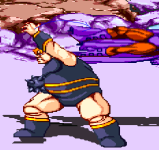
Could anyone offer any advice for getting an enemy to throw the player character in the same direction as the enemy is facing? The problem is that the enemy throws the player character the wrong way, i.e., if the enemy is facing to the left, and the player is facing to the right, the enemy will throw the player to the right, while facing the left. Please see the attached screenshots for details. Thanks in advance!
1769481961904.png1769481977287.png1769482001780.png
 
Default throw that this enemy is using will always throw to the back of enemy.
If you want enemy to throw to his/her front, you should not use THROW animation and instead use GRAB animation with attackbox + dropv +damageonlanding for the throw mechanic.
 
First of all, you could replace THROW animation with other grab animation like this:
Code:
anim    grabbackward
    offset    190 225
    delay    6
    frame    data/chars/donovan/throw1.png
    hitfx    data/sounds/silent.wav
    attack    190 125 60 100 0 100 1 1
    dropv    4.5 2 0
    forcedirection 1
    damageonlanding 20 1
    frame    data/chars/donovan/throw2.png
    attack    0
    frame    data/chars/donovan/throw3.png
    frame    data/chars/donovan/throw4B.png
    delay    15
    frame    data/chars/donovan/throw5B.png
    delay    8
    frame    data/chars/donovan/throw6.png
    frame    data/chars/donovan/throw7.png
    frame    data/chars/donovan/throw8.png

You could replace enemy's THROW with similar animation. But instead of GRABBACKWARD, enemy should use GRAB animation.
 
Thanks! I will try that out.

Also, if I have a unique "throwing" animation for the enemy (that differs from the normal "fall" animation), how would I map that to the player's grab/throw? I assume the same concept would apply to "attack2" / "pain2"? Any guidance is helpful, thanks!
 
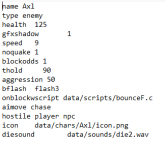
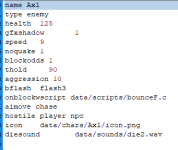
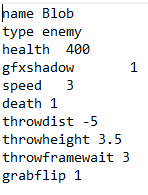
Hey, one other question: I'm trying to get my "Axl" (from "Final Fight") character to block, but it's just not happening. Please see how I've aligned his stats:1770753852813.png

Any assistance is greatly appreciated.
 
First of all, enemies (and NPCs too) are less likely to block with high aggression like that.

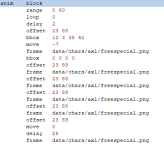
As for blocking, try declaring range in his BLOCK animation.
 
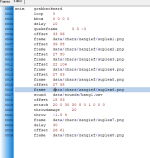
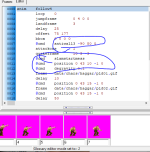
@Bloodbane Hey there, I'm trying to recreate a German suplex-style move similar to Haggar's from Final Fight. I'm using OpenBoR v4.0 Build 7735. I've reviewed how other modders have created this move, but the "@cmd" syntax seems to crash OpenBOR when I try to use it in the suplex's animation block. The suplex animation block's code is attached, along with a screenshot of the animations themselves. Any assistance is greatly appreciated. Please note that I have zero scripting experience, so I don't know how to do any of that. Thanks in advance. 1773413294250.png1773413306417.png
 
but the "@cmd" syntax seems to crash OpenBOR when I try to use it in the suplex's animation block.

@cmd calls a function. If the function doesn't exist, the game will crash. For slam scripts, modders usually declare the animationscript which stores slam functions that can be called by @cmd. I can't suggest the correct animationscript cause it depends on which scripts you have.
My suggestion is to find a game with working slams, copy animation script used by characters which perform slams to your game, preferably to same folder (usually data/scripts folder) then declare same animationscript from those character's text to your Zangief.

That is the first step though. You'd still need to declare the functions in proper order, set proper parameters to all functions and set decent slammed/grabbed/thrown frames for enemies.
 
Also, I've considered following your logic regarding matching up the called script, but I'm not sure I can locate said scripts in the "scripts" folder. Please see the screenshot. The scripts in question are not easily located in the "scripts" folder. Are they located somewhere else, perhaps? Please let me know. 1773502752029.png
 
Is there a way to achieve slams without scripting?

Sadly no. The workaround trick leaves much to be desired. Even if I shared how, you'd be asking how to modify it just like your first question above.

Are they located somewhere else, perhaps?

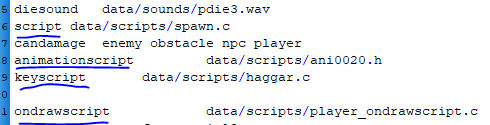
You should read slammer character text and search his/her header text for animationscript . This command defines which script this character is using.
Your Haggar must be using certain animationscript, you should search it in his header text.
 
Okay, thanks. I've done what you've suggested, and I've located each script mentioned in the character's heading (this example is from the "Final Fight and Cadillacs" mod). 1773589526216.png

Do you happen to know which scripts apply to Haggar's slam moves (German suplex, piledriver), or should I just copy everything into my Zangief character's heading just to be safe and transfer all the scripts to the "scripts" folder?
 
Back
Top Bottom