
You are using an out of date browser. It may not display this or other websites correctly.
You should upgrade or use an alternative browser.
You should upgrade or use an alternative browser.

Complete Golden Axe Remake 1.5
No permission to download
- Thread starter Sindor
- Start date
-
- Tags
- golden axe
Project is completed.

O Ilusionista
Captain 100K
That is not the case, there is no limitation about how small a delay should be (unless its zero).Line 205 is 'delay 1'. I think having delay 1 is way too fast for just a single frame of animation before the delay 20. Try increasing to delay 2 or 3 and see if it helps.
its related with scripts.
That's going to be hard to pin down then as there isn't much else to go off of.That is not the case, there is no limitation about how small a delay should be (unless its zero).
its related with scripts.
O Ilusionista
Captain 100K
Not really, since its related to scripts. There were some chances between OpenBOR version 3 and 4 and this should be the case here.That's going to be hard to pin down then as there isn't much else to go off of.
I will try to take a look at it once I have time.

kimono
Well-known member
Thanks mate: I found what was preventing this entity from loading.Not really, since its related to scripts. There were some chances between OpenBOR version 3 and 4 and this should be the case here.
I will try to take a look at it once I have time.
Code:
@cmd playsample data/sounds/punch.wav 0 50 50 100 0Thanks @shirakani for looking into it and for the help with the character settings

Thanks mate: I found what was preventing this entity from loading.
is not supported in 7735. It's a shame that Openborlog.txt doesn't point to this exact part but to a line of text that has nothing to do with it.Code:@cmd playsample data/sounds/punch.wav 0 50 50 100 0
Thanks @shirakani for looking into it and for the help with the character settings
Ah shit, should have caught that considering I spent all day adding 'sound' and 'hitfx'...

O Ilusionista
Captain 100K
care to post your "playsample" function here?is not supported in 7735.
kimono
Well-known member
No problem, so I modified his death animation as follows:
Glad to have successfully upgraded to 4.0! It's now possible to install a cleaner game build
Code:
anim death
    offset    90 266
@script
    int s = getindexedvar(9010);
    if(!s){
        s = loadsample("data/sounds/punch.wav");
        setindexedvar(9010, s);
    }
@end_script
    delay    12
    move -4
@script
    playsample(getindexedvar(9010), 0, 40, 40, 100, 0);
@end_script
    frame    data/chars/adder/death/dief1.png
    frame    data/chars/adder/death/dief2.png
    frame    data/chars/adder/death/dief3.png
@script
    playsample(getindexedvar(9010), 0, 60, 60, 100, 0);
@end_script
    frame    data/chars/adder/death/dief4.png
    frame    data/chars/adder/death/dief5.png
    frame    data/chars/adder/death/dief6.png
@script
    playsample(getindexedvar(9010), 0, 80, 80, 100, 0);
@end_script
    frame    data/chars/adder/death/dief7.png
    frame    data/chars/adder/death/dief8.png
    frame    data/chars/adder/death/dief9.png
@script
    playsample(getindexedvar(9010), 0, 80, 80, 100, 0);
@end_script
    frame    data/chars/adder/death/dief10.png
    frame    data/chars/adder/death/dief11.png
    frame    data/chars/adder/death/dief12.png
@script
    playsample(getindexedvar(9010), 0, 80, 80, 100, 0);
@end_script
    frame    data/chars/adder/death/dief13.png
    frame    data/chars/adder/death/dief14.png
    frame    data/chars/adder/death/dief15.png
@script
    playsample(getindexedvar(9010), 0, 50, 50, 100, 0);
@end_script
    frame    data/chars/adder/death/dief16.png
    move 0
    sound    data/sounds/damn.wav
    frame    data/chars/adder/death/die.png
    delay    100
    frame    data/chars/adder/death/die.png
Glad to have successfully upgraded to 4.0! It's now possible to install a cleaner game build

Thanks mate: I found what was preventing this entity from loading.
@cmd playsample data/sounds/punch.wav 0 50 50 100 0is not supported in 7735.
That's not supported in ANY version. Playsample requires an indexed sound ID, which only exists if the sound file is loaded in memory. You could technically get away with this:
Code:
@cmd playsample loadsample("data/sounds/punch.wav") 0 50 50 100 0And in this particular case it would work because punch is preloaded anyway, but if it was any sound that isn't, the engine would have to find that file and load it on the spot, which could cause a frame skip or two depending on your drive speed. IOW, don't do it. If you want to use Playsample, make sure the sounds are loaded first, and and cache them as an ID.
DC
kimono
Well-known member
@DCurrent : Thanks Damon, I'll be careful when using this function so I don't get stuck.
Currently, I can't finish level 1 in version 4.0 7735 (nor can I exit the game via the menu): is this due to the "boss 1" function on both Bad Brothers?
All the bosses are dead, but I can't progress to the next level. How can I find out what's causing this?
I've attached the level.
Currently, I can't finish level 1 in version 4.0 7735 (nor can I exit the game via the menu): is this due to the "boss 1" function on both Bad Brothers?
All the bosses are dead, but I can't progress to the next level. How can I find out what's causing this?
I've attached the level.
Attachments
kimono
Well-known member
It appears that assigning the boss 1 flag to multiple entities is blocking the game in 4.0.
My allied NPC becomes permanently blocked when facing a wall, which can slow progress if he is subject to screen.
The GA3 characters are currently being reworked and Sara, Kain, and Chronos will be able to ride dragons.

My allied NPC becomes permanently blocked when facing a wall, which can slow progress if he is subject to screen.
The GA3 characters are currently being reworked and Sara, Kain, and Chronos will be able to ride dragons.
kimono
Well-known member
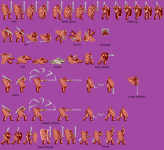
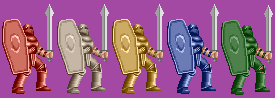
Lieutenant Bitter now has the minimum moves: a dodge, jump, attack combo, and a portrait.I'd like to know what you think of the new interface and if you like this streamlined design?

One of the biggest fixes coming in 1.5 is mobs will no longer be able to break out of hitstun/pain animation. It's one of the reasons the game is far harder than it should be. Golden Axe has never ever had 'combo breaking' allowed so... yeah, this will be addressed. I'm actually amazed nobody pointed it out until now, heh.
kimono
Well-known member
Code:
name    Meat
health    32
type    item
subtype touch
gfxshadow 1
nameposition 999 999


anim idle
    delay    30
    offset    16 9
    bbox    0 0 32 16
    frame    data/chars/misc/meat/meat.png
I'm having trouble with this healing item in version 4.0 7735. The game crashes without any mention in the Openborlog.txt file.
Has anything changed in this version?
I've identified the following issues:
Solved by @Kratus: nameposition must come with lifebarstatus and lifebarposition.
This animation is no longer supported in 4.0.
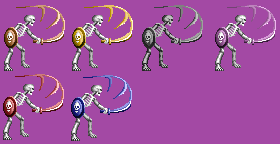
3) Enemies and NPCs can no longer jump over walls or platforms. I'll have to look into adjusting the jump range.
Last edited:

kimono
Well-known member
Some of you have asked about the NPC Menu: it's being revised for the upcoming version.
This is a good opportunity to show you my work on the character facesets, each one using only its default color palette.
Can you recognize them?
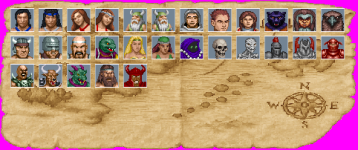
In the meantime, I'm trying to replace the victory animation from update.c with a freespecial animation, but it doesn't seem to trigger:
This is a good opportunity to show you my work on the character facesets, each one using only its default color palette.
Can you recognize them?
In the meantime, I'm trying to replace the victory animation from update.c with a freespecial animation, but it doesn't seem to trigger:
Code:
void victory_check()
{
    int i;
    int enemies = 0;
    int max = openborvariant("count_entities");
    for(i = 0; i < max; i++)
    {
        void e = getentity(i);
        if(e)
        {
            if(getentityproperty(e, "exists") && getentityproperty(e, "type") == openborconstant("TYPE_ENEMY"))
            {
                enemies++;
            }
        }
    }
    if(enemies == 0)
    {
        void p = getplayerproperty(0, "entity");
        if(p && getentityproperty(p, "animation") != openborconstant("ANI_FREESPECIAL5"))
        {
            changeentityproperty(p, "animation", openborconstant("ANI_FREESPECIAL5"));
            changeentityproperty(p, "animpos", 0);
        }
    }
}
Last edited:
kimono
Well-known member
Welcome LK, and thank you for your feedback.Golden Axe?
That's cool.
Could you make the HUD more traditional to the original? Feels off.
The 3 block bar from Altered Beast, E-Swat and other classic games are part of the GA house style.
Maybe use the Revenge of Death Adder as an inspiration?
I'll look into these health bars in the next section and how to integrate them nicely into the game interface. There are three of them (up to five to adjust the difficulty in the console versions).
One health bar is equivalent to 16 HP.
- A standard sword attack removes 4 HP and stuns the target.
- A kick or run attack removes 8 HP.
- A throw or jump attack removes 16 HP.
- A diving jump attack removes 32 HP.
- A boss attack also removes 32 HP.
I will also look into expanding the tutorial section on hit information and regarding these bars, I will save this for once update 1.5 is complete.
The damage is definitely going to change for 1.5.... Jump attacks do way too much. A lot of mobs currently only have 32 HP total which is definitely not right... mobs will get a balancing pass which significantly increases their HP. Early game mobs should be able to survive one full attack+headknock+kick combo.... late game mobs generally feel tanky and can survive 4-5... the way it is right now, bosses feel like normal mobs.
Before anyone asks, yes, I am helping with development.
Before anyone asks, yes, I am helping with development.