
You are using an out of date browser. It may not display this or other websites correctly.
You should upgrade or use an alternative browser.
You should upgrade or use an alternative browser.
Solved HP question.
- Thread starter DD Tokki
- Start date
Question that is answered or resolved.

maxman
Well-known member
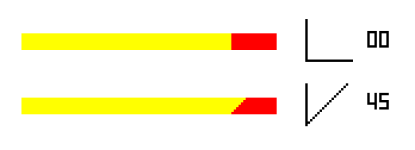
drawline and/or drawdot? drawline points out from one point to the end in one line, either you line it straight or curved. drawdot places a small dot anywhere. That's it. How will the health be registered to drawline?
I failed to point out on the x position of drawbox (because I didn't have time), but Kratus's example of the slanted lifebar (like XvSF) shows what I was going/trying to point out.
If you want your lifebar to be decreased in a slanted way, do you want it to decrease all the way to the very end or do you want it to change the way it's slanted for the curved edges from one start point to an end point, based on your lifebar concept? The former seems to be easier to do with Kratus's example.
drawline(x1,y1,x2,y2,z,color,alpha)
drawdot(x, y, z,color,alpha)
- draw a line from (x1, y1) to (x2, y2)
- x1, y1: position values of the start point.
- x2, y2: position values of the end point.
- z: depth value, similar to setlayer command or entities, check it for details.
- color: color index in palette, check you palette.
- alpha: alpha blending effect from 1 to 6, this parameter is optional.
- return: none
- draw a dot at (x, y)
- x, y: position values of the dot.
- z: depth value, similar to setlayer command or entities, check it for details.
- color: color index in palette, check you palette.
- alpha: alpha blending effect from 1 to 6, this parameter is optional.
I failed to point out on the x position of drawbox (because I didn't have time), but Kratus's example of the slanted lifebar (like XvSF) shows what I was going/trying to point out.
If you want your lifebar to be decreased in a slanted way, do you want it to decrease all the way to the very end or do you want it to change the way it's slanted for the curved edges from one start point to an end point, based on your lifebar concept? The former seems to be easier to do with Kratus's example.

either you line it straight or curved
Drawline is is never curved. Ever.
If you need to direct draw a curved shape of any kind, you must draw it pixel by pixel with drawdot.
DC

DD Tokki
Well-known member
I'm currently using the default lifebar.@DD Tokki
Is your life bar in percentage mode or in the native mode (multi-color bar)? The code is not too complicated, like @DCurrent said there's a lot of ways to do it but before posting more details about my current life bar code I would like to know which mode you are using.
This is the code I used in the video, I prefer to use the drawbox in this case because just attaching the health amount to the width is enough to make it work properly.
C://YELLOW BAR, LIFE REMAINING if(pLife > 0){ drawbox(xPos+xAdd+4, yPos, pLife, ySize, layer2, healthColor); //LINE 1 drawbox(xPos+xAdd+3, yPos+1, pLife, ySize, layer2, healthColor); //LINE 2 drawbox(xPos+xAdd+2, yPos+2, pLife, ySize, layer2, healthColor); //LINE 3 drawbox(xPos+xAdd+1, yPos+3, pLife, ySize, layer2, healthColor); //LINE 4 drawbox(xPos+xAdd, yPos+4, pLife, ySize, layer2, healthColor); //LINE 5 }

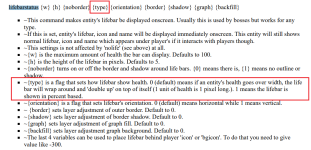
The default life bar has two types, which one are you using?I'm currently using the default lifebar.
maxman
Well-known member
What I mean is this. Look at the blue line here.Drawline is is never curved. Ever.
C:
drawline(150, 30, 176, 40, 3100, rgbcolor(0,0,255), 0);
When I mentioned a curve, I don't mean like it's bent into a V-shaped line. I should've mentioned "diagonal" instead of "curved". I meant to say it's diagonal. I know drawline is all about having only a straight line.
DD Tokki
Well-known member
lifebarstatus is a command I have never written in my game. The type is number 1 according to the description.
This will be not applied in enemies, only for players, right?lifebarstatus is a command I have never written in my game. The type is number 1 according to the description.
EDIT: Put the script below in your updated.c. You will need to make several adaptations to work on your HUD, but the basic structure is working.
C:
void main()
{//Draw custom life bars based on percentage
    void player1 = getplayerproperty(0, "entity");
    void player2 = getplayerproperty(1, "entity");
    void player3 = getplayerproperty(2, "entity");
    void player4 = getplayerproperty(3, "entity");

    if(openborvariant("in_level") && !openborvariant("pause")){
        LifeBarFunction(player1, 0);
        LifeBarFunction(player2, 1);
        LifeBarFunction(player3, 2);
        LifeBarFunction(player4, 3);
    }
}

void LifeBarFunction(void player, int pIndex)
{//Script used to reduce code size

    //USED FOR PLAYERS ALREADY IN-GAME
    if(player != NULL()){
        void type    = getentityproperty(player, "type");
        int exists    = getentityproperty(player, "exists");

        //DETECTS IF THE DEFINED PLAYER IS IN-GAME AND ALIVE
        if(exists){
            void target        = getentityproperty(player, "opponent");
            int maxPLife    = getentityproperty(player, "maxhealth");
            //int pLife        = get_entity_property(player, openborconstant("ENTITY_PROPERTY_HP_OLD"));
            int pLife        = getentityproperty(player, "health");
            int xPos        = 50;
            int xDif        = 120;
            int xAdd        = xDif*pIndex;
            int xSize        = 100;
            int xNum        = 20;
            int yPos        = 200;
            int yAdd        = 26;
            int yDif        = 4;
            int ySize        = 1;
            int yLine        = 1;
            int yNum        = -20;
            int layer1        = 40000;
            int layer2        = 50000;
            int white        = rgbcolor(255,255,255);
            int black        = rgbcolor(0,0,0);
            int red            = rgbcolor(255,0,0);
            int yellow        = rgbcolor(255,255,0);
            int mode        = 1; //1 = PERCENTAGE 2 = NORMAL
            int backFill;
            int healthColor    = yellow;
            int alpha        = 2;

            //PLAYER LIFE BAR IN PERCENTAGE
            if(mode == 1){

                //CALCULATE REMAINING LIFE BAR SIZE
                pLife        = (pLife*xSize)/(maxPLife);

                //CALCULATE MAX LIFE BAR SIZE
                maxPLife    = (maxPLife*xSize)/(maxPLife);

                //YELLOW BAR, LIFE REMAINING
                if(pLife > 0){
                    drawbox(xPos+xAdd+4, yPos, pLife, ySize, layer2, healthColor);
                    drawbox(xPos+xAdd+3, yPos+1, pLife, ySize, layer2, healthColor);
                    drawbox(xPos+xAdd+2, yPos+2, pLife, ySize, layer2, healthColor);
                    drawbox(xPos+xAdd+1, yPos+3, pLife, ySize, layer2, healthColor);
                    drawbox(xPos+xAdd, yPos+4, pLife, ySize, layer2, healthColor);
                }

                //BACK FILL
                backFill    = black;
                drawbox(xPos+xAdd+4, yPos, xSize, ySize, layer1, backFill);
                drawbox(xPos+xAdd+3, yPos+1, xSize, ySize, layer1, backFill);
                drawbox(xPos+xAdd+2, yPos+2, xSize, ySize, layer1, backFill);
                drawbox(xPos+xAdd+1, yPos+3, xSize, ySize, layer1, backFill);
                drawbox(xPos+xAdd, yPos+4, xSize, ySize, layer1, backFill);
            }
        }
    }
}
Last edited:
DD Tokki
Well-known member
This will be not applied in enemies, only for players, right?

For Enemy, it doesn't matter if it doesn't apply because a mini life bar appears on the main body, but for players and bosses, it would be nice if a life bar appears and applies to bosses as well, but for now, I hope it applies to players.
I suggest making it work for players first, and after everything is correct then we can proceed to bosses. I edited my previous post with the codes.For Enemy, it doesn't matter if it doesn't apply because a mini life bar appears on the main body, but for players and bosses, it would be nice if a life bar appears and applies to bosses as well, but for now, I hope it applies to players.

You can remove the native life bar by simply changing its position to a very high value, like this.You have to remove the existing life bar and adjust the position of the life bar created with the script
C:
p1life            999 999 #0   19
p2life            999 999 #120 19
p3life            999 999 #240 19
p4life            999 999 #360 19
EDIT: I added some comments to guide you.

Last edited:
DD Tokki
Well-known member
You can remove the native life bar by simply changing its position to a very high value, like this.
C:p1life 999 999 #0 19 p2life 999 999 #120 19 p3life 999 999 #240 19 p4life 999 999 #360 19
View attachment 7284
EDIT: I added some comments to guide you.
View attachment 7286
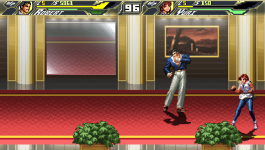
The 1P and 2P script settings have been adjusted, and stamina decreases diagonally. It has become the shape I wanted.
Now, all you have to do is set MP and boss life bar, and the life bar setting is complete.
GreatThe 1P and 2P script settings have been adjusted, and stamina decreases diagonally. It has become the shape I wanted.

First proceed to mp, we can use the same health script but replaced by mp values instead. You can mix both in the same updated.c and you look like the code below.Now, all you have to do is set MP and boss life bar, and the life bar setting is complete.
I strongly suggest cleaning the script from the variables not used in your game, like the property "opponent". We even could mix both in the same script to reduce its size but let's treat them separated to avoid confusion.
C:
void main()
{//Draw custom life bars based on percentage
    void player1 = getplayerproperty(0, "entity");
    void player2 = getplayerproperty(1, "entity");
    void player3 = getplayerproperty(2, "entity");
    void player4 = getplayerproperty(3, "entity");

    if(openborvariant("in_level") && !openborvariant("pause")){
        LifeBarFunction(player1, 0);
        LifeBarFunction(player2, 1);
        LifeBarFunction(player3, 2);
        LifeBarFunction(player4, 3);
        mpBarFunction(player1, 0);
        mpBarFunction(player2, 0);
        mpBarFunction(player3, 0);
        mpBarFunction(player4, 0);
    }
}

void mpBarFunction(void player, int pIndex)
{//Script used to reduce code size

    //USED FOR PLAYERS ALREADY IN-GAME
    if(player != NULL()){
        void type    = getentityproperty(player, "type");
        int exists    = getentityproperty(player, "exists");

        //DETECTS IF THE DEFINED PLAYER IS IN-GAME AND ALIVE
        if(exists){
            int maxMp    = getentityproperty(player, "maxmp");
            //int pLife        = get_entity_property(player, openborconstant("ENTITY_PROPERTY_HP_OLD"));
            int pLife        = getentityproperty(player, "health");
            int mp        = getentityproperty(player, "mp");
            int xPos        = 50;
            int xDif        = 120;
            int xAdd        = xDif*pIndex;
            int xSize        = 100;
            int xNum        = 20;
            int yPos        = 200;
            int yAdd        = 26;
            int yDif        = 4;
            int ySize        = 1;
            int yLine        = 1;
            int yNum        = -20;
            int layer1        = 40000;
            int layer2        = 50000;
            int white        = rgbcolor(255,255,255);
            int black        = rgbcolor(0,0,0);
            int red            = rgbcolor(255,0,0);
            int yellow        = rgbcolor(255,255,0);
            int mode        = 1; //1 = PERCENTAGE 2 = NORMAL
            int backFill;
            int mpColor    = red;
            int alpha        = 2;

            //PLAYER LIFE BAR IN PERCENTAGE
            if(mode == 1){

                //CALCULATE REMAINING LIFE BAR SIZE
                mp        = (mp*xSize)/(maxMp);

                //CALCULATE MAX LIFE BAR SIZE
                maxMp    = (maxMp*xSize)/(maxMp);

                //YELLOW BAR, LIFE REMAINING
                if(pLife > 0 && mp > 0){
                    drawbox(xPos+xAdd+4, yPos, mp, ySize, layer2, mpColor);
                    drawbox(xPos+xAdd+3, yPos+1, mp, ySize, layer2, mpColor);
                    drawbox(xPos+xAdd+2, yPos+2, mp, ySize, layer2, mpColor);
                    drawbox(xPos+xAdd+1, yPos+3, mp, ySize, layer2, mpColor);
                    drawbox(xPos+xAdd, yPos+4, mp, ySize, layer2, mpColor);
                }

                //BACK FILL
                backFill    = black;
                drawbox(xPos+xAdd+4, yPos, xSize, ySize, layer1, backFill);
                drawbox(xPos+xAdd+3, yPos+1, xSize, ySize, layer1, backFill);
                drawbox(xPos+xAdd+2, yPos+2, xSize, ySize, layer1, backFill);
                drawbox(xPos+xAdd+1, yPos+3, xSize, ySize, layer1, backFill);
                drawbox(xPos+xAdd, yPos+4, xSize, ySize, layer1, backFill);
            }
        }
    }
}
Last edited:
And here's the script used by bosses. This one works different, you need to put in the ondrawscript event and call it at every boss header, like the example below.
Here's the code.
I believe you already did it due to the enemy life bar system you are currently using, but just to remember you need to deactivate the boss native life bar using the "nolife" command.

ondrawscript data/scripts/ondraw.c
Here's the code.
C:
void main()
{//Script used to reduce code size
    void self        = getlocalvar("self");
    int maxLife        = getentityproperty(self, "maxhealth");
    int life        = getentityproperty(self, "health");
    int xPos        = 50;
    int xSize        = 100;
    int yPos        = 200;
    int ySize        = 1;
    int yLine        = 1;
    int layer1        = 40000;
    int layer2        = 50000;
    int white        = rgbcolor(255,255,255);
    int black        = rgbcolor(0,0,0);
    int red            = rgbcolor(255,0,0);
    int yellow        = rgbcolor(255,255,0);
    int backFill;
    int healthColor    = yellow;


    //CALCULATE REMAINING LIFE BAR SIZE
    life    = (life*xSize)/(maxLife);

    //CALCULATE MAX LIFE BAR SIZE
    maxLife    = (maxLife*xSize)/(maxLife);

    //YELLOW BAR, LIFE REMAINING
    if(life > 0){
        drawbox(xPos+4, yPos, life, ySize, layer2, healthColor);
        drawbox(xPos+3, yPos+1, life, ySize, layer2, healthColor);
        drawbox(xPos+2, yPos+2, life, ySize, layer2, healthColor);
        drawbox(xPos+1, yPos+3, life, ySize, layer2, healthColor);
        drawbox(xPos, yPos+4, life, ySize, layer2, healthColor);
    }

    //BACK FILL
    backFill    = black;
    drawbox(xPos+4, yPos, xSize, ySize, layer1, backFill);
    drawbox(xPos+3, yPos+1, xSize, ySize, layer1, backFill);
    drawbox(xPos+2, yPos+2, xSize, ySize, layer1, backFill);
    drawbox(xPos+1, yPos+3, xSize, ySize, layer1, backFill);
    drawbox(xPos, yPos+4, xSize, ySize, layer1, backFill);
}
I believe you already did it due to the enemy life bar system you are currently using, but just to remember you need to deactivate the boss native life bar using the "nolife" command.