Just spawn an image without an object

Aerisetta

Active member
Here's the case

I want to create an image gallery

there's 100 images per gallery page

I want to spawn all the images in a 8 wide x 12 height grid

each image has it's own color profile so they cannot exist all inside a single object

I have the grid setup, but because i have several hundred images and want to keep adding, i can't create an object per image.

The gallery looks like this but image if each arrow was a different image
I attached the gallery.txt and the level file as well.
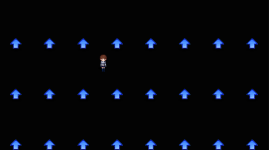
1690435622874.png
 

Attachments

Last edited:
I noticed that image entity has various FOLLOWs, each for one image but they are accessed from PAIN.

So do you want this expand this gallery to be able to access hundreds of images? OR do you want fixed size gallery but the content could be altered to say page 2 to access the second page of the images?
 
I noticed that image entity has various FOLLOWs, each for one image but they are accessed from PAIN.

So do you want this expand this gallery to be able to access hundreds of images? OR do you want fixed size gallery but the content could be altered to say page 2 to access the second page of the images?
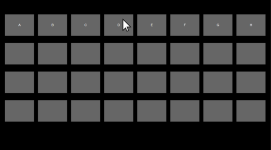
Essentially I want the gallery to look like this and be very easy to add new pics

Example below

A, B, C, D, E etc is all different pictures

When the cursor (which moves like a character) attacks the image D, it will go into follow4 which does @cmd spawnA story D. and shows the image/diallogue of D.

The cursor is free movement and the page can keep extending down (just a very long stage background)

1690495892845.png
 
each image has it's own color profile so they cannot exist all inside a single object
You can use the drawsprite script function instead of the entity frame in order to show different images with individual palettes in the same character.
I suggest using the ondrawscript event for this purpose, and then you can detect any condition to show the corresponding image.

Example:
C:
void main()
{
    void self = getlocalvar("self");
    void anim = getentityproperty(self, "animationID");
    
    //DRAW THE IMAGE 1
    if(anim == openborconstant("ANI_PAIN"))
    {
        //SAVE THE IMAGE INTO A VARIABLE IF NULL
        if(getglobalvar("image1") == NULL())
        {
            setglobalvar("image1", loadsprite("data/sprites/image1.png"));
        }
        
        //DEFINE POSITION AND LAYER
        int xPosition = 0;
        int yPosition = 0;
        int zLayer = 0;
        
        //DRAW THE SPRITE
        drawsprite(getglobalvar("image1"), xPosition, yPosition, zLayer);
    }
    
    //DRAW THE IMAGE 2
    if(anim == openborconstant("ANI_PAIN2"))
    {
        //SAVE THE IMAGE INTO A VARIABLE IF NULL
        if(getglobalvar("image2") == NULL())
        {
            setglobalvar("image2", loadsprite("data/sprites/image2.png"));
        }
        
        //DEFINE POSITION AND LAYER
        int xPosition = 0;
        int yPosition = 0;
        int zLayer = 0;
        
        //DRAW THE SPRITE
        drawsprite(getglobalvar("image2"), xPosition, yPosition, zLayer);
    }
}
 
Can you see why this error is happening? @Kratus
maxidles is set to 99 and can load up without the script

********** An Error Occurred **********
* Shutting Down *

Unable to load ondrawscript 'data/scripts/Thumbnails.c' in file 'data/chars/gallery/Varina_Gallery.txt'.
 

Attachments

Can you see why this error is happening? @Kratus
maxidles is set to 99 and can load up without the script

********** An Error Occurred **********
* Shutting Down *

Unable to load ondrawscript 'data/scripts/Thumbnails.c' in file 'data/chars/gallery/Varina_Gallery.txt'.
@Aerisetta
Tested the script alone in another game and works fine, probably an issue with the entity related to another script or some error in the images used by the drawsprite function.
Even if the drawsprite uses individual images, you still need to create a paletted image. In case you are trying to use 24-bit png images with no palettes, it will cause the engine to crash.

Please, can you post the full log content? Maybe it can point to where the error is.
 
@Aerisetta
Tested the script alone in another game and works fine, probably an issue with the entity related to another script or some error in the images used by the drawsprite function.
Even if the drawsprite uses individual images, you still need to create a paletted image. In case you are trying to use 24-bit png images with no palettes, it will cause the engine to crash.

Please, can you post the full log content? Maybe it can point to where the error is.
I finally got it to work

can you also tell me how to get it to draw at 10% scale in the script?

Thanks!
 
Hmmmm @Kratus you showed me that drawing sprite without tying to a object palette does work, but the script does not do what I am looking for, i messaged you on discord the detail, thanks!
 
Back
Top Bottom