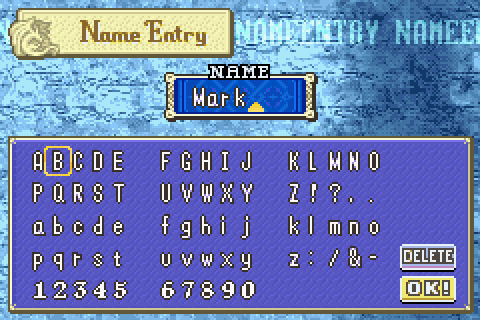
So after reading the Assigning any name to a character in-engine post by mishadude, I really liked the idea, but think it could be done more eloquently.
My idea is to place the character set into an array, and then draw them to the screen directly using a grid. Then capture the player key and get character based on their location within the grid. The advantage over your entity per character method is it will be far simpler and less resource intensive, plus you can replace characters on the fly and don't need to worry at all about arranging spawns.
First draft is underway - the visual display. This script accepts the X/Y sector size and Left/right/Top/Bottom margins. It then builds a grid, and prints the number of each sector. The next step will be to pull in characters from an array instead of the sector number. Then I'll work on detection. Note the checkerboard grid won't be visible when complete, it's just there to debug right now.

Once that's done it can be made more organic than a straight up grid. I already have a script that when given a set of margins and text, will auto line break and individually center each row. The cool part is it automatically adapts to the letter size of whatever font you are using (OpenBOR is aware of font size and it's available to script). It's how the name displays work in my Fatal Fury project. Shouldn't be too hard to implement in the letter entry system.

DC
My idea is to place the character set into an array, and then draw them to the screen directly using a grid. Then capture the player key and get character based on their location within the grid. The advantage over your entity per character method is it will be far simpler and less resource intensive, plus you can replace characters on the fly and don't need to worry at all about arranging spawns.
First draft is underway - the visual display. This script accepts the X/Y sector size and Left/right/Top/Bottom margins. It then builds a grid, and prints the number of each sector. The next step will be to pull in characters from an array instead of the sector number. Then I'll work on detection. Note the checkerboard grid won't be visible when complete, it's just there to debug right now.
C:
void dc_grid_spawn()
{
	#define FONT		1
	#define ALPHA		6
	#define COLOR		1 // Color index for line.
	#define LAYER_FRONT openborconstant("FRONTPANEL_Z") + 20000
	#define MARGIN_LEFT 50
	#define MARGIN_RIGHT 50
	#define	MARGIN_TOP 50
	#define MARGIN_BOTTOM 100
	#define DEFAULT_SECTOR_SIZE_X 25
	#define DEFAULT_SECTOR_SIZE_Y 25

	// Size of each grid portion.
	int sector_size_y = DEFAULT_SECTOR_SIZE_Y;
	int sector_size_x = DEFAULT_SECTOR_SIZE_X;

	int scroll_min_z;
	int scroll_max_z;

	// Loop cursors.
	int cursor_x;
	int cursor_y;
	int count;
	int count_row;
	int count_col;

	// Grid debug
	int color;
	char grid_text;

	if (!openborvariant("in_level"))
	{
		return;
	}

	float pos_x_start	= 0.0 + MARGIN_LEFT;
	float pos_x_end		= openborvariant("hresolution") - (MARGIN_RIGHT + sector_size_x);
	float pos_y_start = openborvariant("scrollminz") + MARGIN_TOP;
	float pos_y_end = openborvariant("scrollmaxz") - MARGIN_BOTTOM;

	// Reset counters.
	count_row = 0;
	count_col = 0;
	count = 0;

	// Loop rows.
	for (cursor_y = pos_y_start; cursor_y < pos_y_end; cursor_y += sector_size_y)
	{
		count_row++;

		// Loop columns.
		for (cursor_x = pos_x_start; cursor_x < pos_x_end; cursor_x += sector_size_x)
		{
			count_col++;

			count++;

			// Alternate the color sector count is even/odd.
			if (count_row % 2 == count_col % 2)
			{
				color = rgbcolor(255, 0, 0);
			}
			else
			{
				color = rgbcolor(0, 0, 255);
			}

			// Draw grid and text.
			drawstring(cursor_x + (sector_size_x * 0.1), cursor_y + (sector_size_y / 2), FONT, count);
			drawbox(cursor_x, cursor_y, sector_size_x, sector_size_y, LAYER_FRONT, color, ALPHA);
		}
	}

	#undef FONT
	#undef ALPHA
	#undef COLOR
	#undef LAYER_FRONT
}
Once that's done it can be made more organic than a straight up grid. I already have a script that when given a set of margins and text, will auto line break and individually center each row. The cool part is it automatically adapts to the letter size of whatever font you are using (OpenBOR is aware of font size and it's available to script). It's how the name displays work in my Fatal Fury project. Shouldn't be too hard to implement in the letter entry system.
C:
// Caskey, Damon V.
// 2019-02-22
//
// Draws names of characters during select screen.
void dc_draw_select_names()
{
	// Don't waste any more cycles if we aren't
	// in select screen.
	if (!openborvariant("in_selectscreen"))
	{
		return;
	}

	int i;
	int maxplayers;
	char name_full;
	char name_last;
	char name_first;

	int font;
	int x_base;
	int x_pos;
	int y_pos;
	int string_width;

	int section_size;
	int section_half;

	int elapsed_time;
	int select_time;

	void screen;

	int screen_scale_x;
	int screen_scale_y;

	int scale_add;

	int screen_width;
	int screen_height;


	elapsed_time = openborvariant("elapsed_time");
	maxplayers = openborvariant("maxplayers");

	// Divide up the screen into even sections for each player.
	section_size = openborvariant("hresolution") / maxplayers;
	section_half = section_size / 2;

	for (i = 0; i < maxplayers; i++)
	{
		// Get to start of our section, and add half to find the center.
		x_base = (dc_player_multiplier(i) * section_size) + section_half;

		name_full = getplayerproperty(i, "name");
		name_last = strinfirst(name_full, SPACE_CHAR);

		// No last name?
		if (name_last == -1)
		{
			x_pos = dc_center_string_x(x_base, name_full, WAIT_NAME_FONT);
			y_pos = dc_center_string_y(SELECT_Y_BASE, name_full, FONT_Y);

			screen_width = strwidth(name_full, WAIT_NAME_FONT);
			screen_height = FONT_Y;

			drawstring(x_pos, y_pos, WAIT_NAME_FONT, name_full);
			//drawstringtoscreen(screen, x_pos, y_pos, WAIT_NAME_FONT, name_full);
		}
		else
		{
			// Get a Y center based on two lines (first name, last name).
			y_pos = dc_center_string_y(SELECT_Y_BASE, name_last, FONT_Y * 2);

			// Get first name string and center x position.
			name_first = strleft(name_full, strlength(name_full) - strlength(name_last));
			x_pos = dc_center_string_x(x_base, name_first, WAIT_NAME_FONT);

			drawstring(x_pos, y_pos, WAIT_NAME_FONT, name_first);
			//drawstringtoscreen(screen, x_pos, y_pos, WAIT_NAME_FONT, name_first);

			// Remove sapce character from last name.
			name_last = strright(name_last, 1);

			x_pos = dc_center_string_x(x_base, name_last, WAIT_NAME_FONT);

			// Add vertical font space.
			y_pos += FONT_Y;

			drawstring(x_pos, y_pos, WAIT_NAME_FONT, name_last);
			//drawstringtoscreen(screen, x_pos, y_pos, WAIT_NAME_FONT, name_last);

			screen_width = strwidth(name_first, WAIT_NAME_FONT);
			screen_height = FONT_Y;
		}

		//string_width = 20;
		//log("\n str w(" + i +"): +" + screen_width);
		//screen = dc_get_screen(i, screen_width, screen_height);
		//dc_draw_text_screen(screen, screen_scale_x, screen_scale_y);
	}

#undef SELECT_NAME_FONT
#undef SELECT_NAME_FONT_Y
#undef SELECT_Y_BASE
}
DC
Last edited:


/Update%2064/7-capture_008_17072012_205130.png)