Solved Multiple transparency colors?

Question that is answered or resolved.

Okamijoe

Member
Hi,

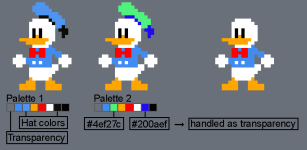
I was playing around with color palettes and was wondering if it's possible to declare more than one transparency color in an entity's color table.
You may be asking what in the world would I need that for?

Here's my idea:
By default, the very first color in the sprite's color table is being used as transparency color.
But what if you could somehow declare multiple specific color IDs to be handled as transparency as well, with the only difference being, that the color position in the table does not matter, as long as it's not the first one.
donald.png
As you can see in my example, if you could tell the engine to display color ID #4ef27c (green) and #200aef (dark blue) as transparency, palettes could be used to change the shape of your sprite for some costume variation.

Is something like that doable with the current engine?
 
Last edited:
I see, so you don't have to load a separate model, I know OpenBor engine 4 has much more direct control over palettes but to what degree I'm not sure, tagging @DCurrent
Exactly! It may require a bit more time to organize the entity's color table, but I think it would be the most efficient method to keep the pak size small. Plus, you don't have to deal with multiple different sprite sets of the same character if there's something to edit later on.
 
@Okamijoe and @danno,

What you're talking about is not a new idea by any stretch. It's just another form of smart palette application. To put it simply, you cannot define more than one transparent color. However, the functionality you want does exist. You just have to do a bit of pre-planning.

Step 0 (and this should be step 0 no matter what you're doing or what engine you're working with), is eliminate all instances of RGB 0 0 0 in your sprites. Replace them with RGB 1 1 1. Human eyes can't see the difference, even side by side.

Screenshot 2024-02-10 115137.png

Why? Because in reality, OpenBOR replaces color 0 with RGB 0,0,0 on load anyway, and for certain objects (animated .gifs and through sub-screens), RGB 0,0,0 is transparent. So basically, you filter your object through a sub-screen, and then any RGB 0,0,0 pixels are transparent. This has incredible potential beyond smart palettes if you know what you're doing. All this is available for years.

Future

I can't make any promises, but I am researching a functionality that goes well beyond just "making more than one color transparent". I don't want to talk details for now, but if it works, you'll be able to do some incredible things for very little development time.

DC
 
Last edited:
@Okamijoe and @danno,

What you're talking about is not a new idea by any stretch. It's just another form of smart palette application. To put it simply, you cannot define more than one transparent color. However, the functionality you want does exist. You just have to do a bit of pre-planning.

Step 0 (and this should be step 0 no matter what you're doing or what engine you're working with), is eliminate all instances of RGB 0 0 0 in your sprites. Replace them with RGB 1 1 1. Human eyes can't see the difference, even side by side.

View attachment 7182

Why? Because in reality, OpenBOR replaces color 0 with RGB 0,0,0 on load anyway, and for certain objects (animated .gifs and through sub-screens), RGB 0,0,0 is transparent. So basically, you filter your object through a sub-screen, and then any RGB 0,0,0 pixels are transparent. This has incredible potential beyond smart palettes if you know what you're doing. All this is available for years.

Future

I can't make any promises, but I am researching a functionality that goes well beyond just "making more than one color transparent". I don't want to talk details for now, but if it works, you be able to do some incredible things for very little development time.

DC
Wow, thank you, that's some helpful information!

I'm gonna update my color palettes accordingly, I have a few questions though:
- do you mean only the RGB 0,0,0 color - or should I change possible variations like RGB 0,1,0 or RGB 1,1,0 to RGB 1,1,1 as well?
Or did you mean that a RGB value of 0 in any color is a bad thing to have in general?
- are there other instances of RGB combinations that should be avoided, such as maybe RGB 255,255,255?
I'm grateful for any information on optimization.
 
do you mean only the RGB 0,0,0 color - or should I change possible variations like RGB 0,1,0 or RGB 1,1,0 to RGB 1,1,1 as well?

Just for my own posterity I prefer to never go below RGB 1,1,1, but technically only RGB 0,0,0 matters. The others are fine.

are there other instances of RGB combinations that should be avoided, such as maybe RGB 255,255,255?

In general, it's a good idea to avoid pure border colors, but for OpenBOR in particular, only RGB 0,0,0 has meaning.

DC
 
Just for my own posterity I prefer to never go below RGB 1,1,1, but technically only RGB 0,0,0 matters. The others are fine.


In general, it's a good idea to avoid pure border colors, but for OpenBOR in particular, only RGB 0,0,0 has meaning.

DC
Thank you for your time!
I hope your future functionality will come to fruition some day :D
 
Back
Top Bottom