New to OpenBOR

Misto Stylo

New member
Hello. My name is Cordova Man. I am new to not only OpenBOR developer, but a Game Designer in general. My GitHub account is CordovaMan, and I just wanted to make a game, but I do not have enough knowledge of coding well. So I need your help to help me with more things about OpenBOR and how do I get started. Thanks. ;)
 
@Cordova Man welcome to the forum, I moved your original post as it was in the wrong section, please study the tutorials O illusionista posted, feel free to use the search section of the forum and if you become stuck please don't hesitate to ask questions.
 
Hi!!!

I always recommend to do this:
1. Download the “blank mod”.
2. Read the manual and experiment how to create stages, playing with different values on that level .txt file. Try doffeeent kind of stages: regular, “vehicle” stages, elevator stage.
3. Open a player character and see what is the meaning of the commands by reading the manual, then you can start adding a new character based on the one you are studying. Most important aspects are the palette of the character and the offset parameter.
After you success on adding a new player, if you are a pixel artist you can start adding your own content, but I always recommend studying the essentials by adding an already existing sprite set into a new character.
4. Have fun!
 
Thanks guys. I think I might be able to make the game. However, I do need questions about the sprite editing.

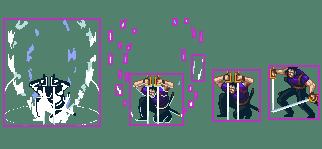
I recently downloaded ASU Version 17 just now, and I have been using Roomi sprites to have her a playable character soon. However, when I used it, the white box frames are already surrounded not just Roomi, but other words and effect lights too. Am I doing something wrong? Or is it already finished?
 
@Cordova Man I've complied many informations on the same topic to be easier to find where to start: How the start on OpenBOR

However, when I used it, the white box frames are already surrounded not just Roomi, but other words and effect lights too. Am I doing something wrong? Or is it already finished?
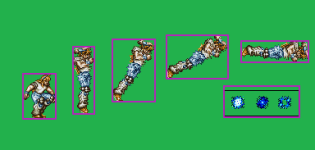
ASU is a great tool to cut sprites, but it will cut the sprites into tiny pieces if there is any empty space on it
1700937386482.png

or will group many sprites as one image if there isn't enough space between them (see the blue effect):
1700937110472.png

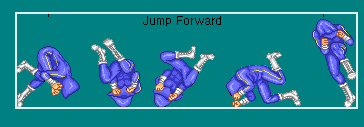
Another case of not enough empty space around the sprites (the text above it will glue everything togheter, and the last frame will affect it too)
1700937165686.png

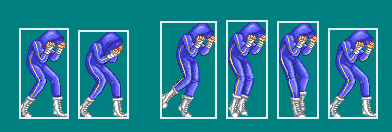
This is how it should be:
1700937218233.png

Keep in mind that, after you use this tool, it will crop each image to a different size and this will give you a lot more work when programming, as you will have to provide an axis (offset) for each frame.

It is recommended to use a single image size and align all frames within that image. With this, you can reuse the offset and bbox in other frames of the same character (or others).

 
The OpenBOR Template doesn't work on my computer because the window count not automatically detect it's proxy settings. What am I supposed to do now?
 
I wanted to make a beat-em-up game where the heroes from different beating-em-up games were brainwashed, and cloned by the person behind this. That's a great concept of a story.
 
@Cordova Man I've complied many informations on the same topic to be easier to find where to start: How the start on OpenBOR


ASU is a great tool to cut sprites, but it will cut the sprites into tiny pieces if there is any empty space on it
View attachment 5823

or will group many sprites as one image if there isn't enough space between them (see the blue effect):
View attachment 5820

Another case of not enough empty space around the sprites (the text above it will glue everything togheter, and the last frame will affect it too)
View attachment 5821

This is how it should be:
View attachment 5822

Keep in mind that, after you use this tool, it will crop each image to a different size and this will give you a lot more work when programming, as you will have to provide an axis (offset) for each frame.

It is recommended to use a single image size and align all frames within that image. With this, you can reuse the offset and bbox in other frames of the same character (or others).
To be honest I should use a single image but I don't mind the mess of cutting out sprites and setting up the offsets.
How does one go about using single frame though, I'm curious
 
How does one go about using single frame though, I'm curious
I mean using one single image to align all the frames - for example, using one 200x200px image and align all the images right in photoshop, so you save all frames as 200x200px images but they are already aligned and you can use just one offset per animation.
 
I mean using one single image to align all the frames - for example, using one 200x200px image and align all the images right in photoshop, so you save all frames as 200x200px images but they are already aligned and you can use just one offset per animation.
I think I'll skip this method and go about it like I been doing since I'm happy with the results.
It's a mess but it works
 
I think I'll skip this method and go about it like I been doing since I'm happy with the results.
It's a mess but it works

The results are the same either way... one (cutting sprites individually) just happens to take a LOT more time than the other. You are literally giving yourself extra work for absolutely nothing. Why would you want to do that?

DC
 
The results are the same either way... one (cutting sprites individually) just happens to take a LOT more time than the other. You are literally giving yourself extra work for absolutely nothing. Why would you want to do that?

DC
ASU_19 works well for me honestly ,I look forward to your opinion of my experiment that is World Warrior...then you can see how I went about making a player and enemy.
Aside from the extra offsets I'm cool with it
 
Back
Top Bottom