Openbor Sailormoon

Canceled Openbor Sailormoon 2022.06.24

No permission to download
Project is halted prior to completion and will not receive further updates.
The Super Famicom pole sprites are too small.

I might encounter problems editing it. I need the exact arcade sprites to reduce errors.

Rosa also has an animation for the construction steel column too.
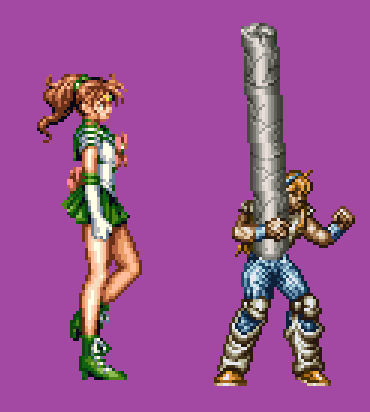
pole.png


Jupiter is getting revamped as well since she's 4 pixels shorter and planning on adding more grappling moves to add variety to the sailors. Feels like she was rushed out of all the sailors in the arcade.

I suggest working on Venus first if you haven't already started and put Jupiter on hold.
 
I have Jupiter ripped.  Im wrapping up with the puppet.

I would suggest just adding the new moves instead of the 4 pixels.  Perhaps it would be better to create Sailor Uranus.  Since I have Sailor Neptune, Pluto and Saturn.
Then all we would need is Sailor Chibi moon.
 
You can grab Kyulene from Sailormoon. 
As for Pinocchio,  I’m missing the a few sprites.
I tried the mugen cheat and I was unsuccessful.
I’ll have to try again.  Once he’s programmed and installed in the next update Of Sailormoon, feel free to use him.  I want Pinocchio to make an official appearance in my amusement park stage.
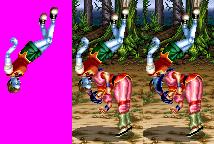
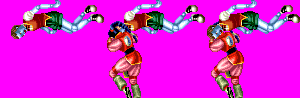
Would be great if I had those 2 missing thrown animations and the box animation.....
 
i'll see if i can find those sprites, if not, let's think of a "superior Box" or an upgrade to this spawn animation to make up for it,

the only other option is to make "textures" out of the visible sides & warp them/mirror with gimp to create the 2 or 3 missing frames

i really can't figure out why the colors are so messed up in the MAME sprite sheets, & that makes it harder to identify the missing pieces
 
oldyz said:
i'll see if i can find those sprites, if not, let's think of a "superior Box" or an upgrade to this spawn animation to make up for it,

the only other option is to make "textures" out of the visible sides & warp them/mirror with gimp to create the 2 or 3 missing frames

i really can't figure out why the colors are so messed up in the MAME sprite sheets, & that makes it harder to identify the missing pieces

The important sprites are the first 2 toss animations.
 
I got Yer ToSsses Right HEEre...  https://www.mediafire.com/file/d0im8wjdq4gexq8/0_pinnocc.rar/file


i share them like this to show you how i did it.

turns out you use the "focus grid" layer to do a magic wand select, then you copy the visible content & then you paste it as a new layer & add it to the group, after - you erase the content of the "pinnoccio tile set" layer - this istructions are for the Gimp file, but it should work well for the Photoshop file too....


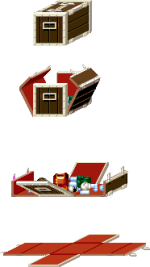
The box seems to recycle some tiles, i placed one layer on top of the other...
 
oldyz said:
I got Yer ToSsses Right HEEre...  https://www.mediafire.com/file/d0im8wjdq4gexq8/0_pinnocc.rar/file


i share them like this to show you how i did it.

turns out you use the "focus grid" layer to do a magic wand select, then you copy the visible content & then you paste it as a new layer & add it to the group, after - you erase the content of the "pinnoccio tile set" layer - this istructions are for the Gimp file, but it should work well for the Photoshop file too....


The box seems to recycle some tiles, i placed one layer on top of the other...

Ok, since you got the boxes,  I'll upload the entire sprite sheet as soon as I find the last 2 pieces for the toss animation. 
If you happen to find find the last 2 animations of the toss, it would save me sometime.  I can spend the energy into
adding the frames into the  PSD with the correct axis.

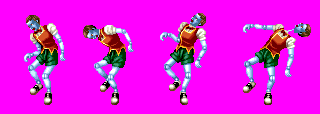
Here a preview of other frames that I've ripped.

I've spent about 2 months on this project of Pinocchio ripping, cleaning the sprites and securing the correct axis. 
It's great to see that this character is almost completed.


Attachments

  • All Painb.png
    All Painb.png
    10.2 KB · Views: 18
the last 2 toss animations are right there too,

i still don't know or cant find the  pattern, this game seems to put some pieces amongst others & that makes it a bit difficult , that is why during the process i eliminated the tiles after....

the toss frame layers are right over their corresponding samples from your MIA file , which is another layer.

OOoooops, thurns out i turned off their visibility before saving, that is why you did not see them.

edit:

i'm curious, does the exported .psd file respect the layer names & grouping?
 
Just a  thought, i don't know if you have noticed, but i have seen that zoom has a filter that replaces backgrounds.

in this forest fight with Igor, for example - i was wondering it  using this filter can automatically remove most of not all of the background & just leave the characters.

of course your replacement background would be a green screen or magenta, & the game footage would have to be rezised 2 times or more to make the filter more effective.

 
oldyz said:
Just a  thought, i don't know if you have noticed, but i have seen that zoom has a filter that replaces backgrounds.

in this forest fight with Igor, for example - i was wondering it  using this filter can automatically remove most of not all of the background & just leave the characters.

of course your replacement background would be a green screen or magenta, & the game footage would have to be rezised 2 times or more to make the filter more effective.

Hmm, it’s my first time hearing about Zoom.  Last night I started piecing together the missing animations.
It’s coming alone. 
 
I'm starting to enjoy the puzzle aspect of sprites.  You really have to appreciate the effort BonusJZ went threw to put together all of the sprites from Night Slasher.

As of right now, I only need one more throw animation to complete!

Here's the result of the other one I completed.
 

Attachments

  • Demo toss.png
    Demo toss.png
    16.5 KB · Views: 17
MMMMmmm,

they where already done  :'(,
all you had to do is copy the layer group as visible & paste as a  new layer.... & magic erase the grey tones

hehe, its ok, I don't know how BonusJZ did it, because at the time i don't think there was any automated tool to cut up the sprites into, & also the useof layers & magic wands was not that dynamic as far as i remember....

i hope you keep the file, i think that grid i made for the magic wand is very good for those weird tile sets that have odd organizing...

 
oldyz  Thanks for you help.  Here's the final box. 

I'll upload the completed sprite sheet soon.

It would be great to have him uploaded to Nightslasher X.
 

Attachments

  • Boxes done clear.png
    Boxes done clear.png
    7.8 KB · Views: 6
Hi all,

Just purchased a refurbished lab.  My old labtop was dying.  Luckily i backed up and transfer all of my files to this one.  Been really busy at work.  Can’t wait to dive in to the world of Sailormoon.

 
I’ve been watching way too much news.  All of the riots and protesters in Los Angeles.  Not to mention most of the people are not wearing a mask.  Well, I did install everything in my labtop.  My my Sailormoon arcade primmed with the cheat code.  Now I’m going to be diving to see if there more extra animations or stages.

 
Back
Top Bottom