Steven1985
Active member
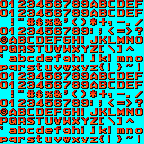
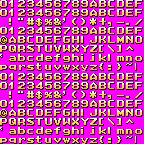
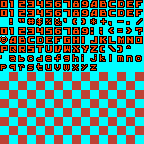
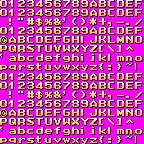
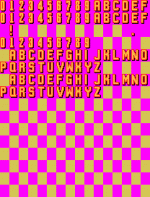
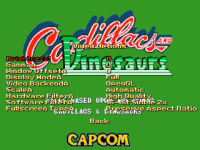
Using these fonts what is happening is that to some of the options items, when they are not highlighted, an A comes out next to them.
Thank you in advance.
Thank you in advance.


@Steven1985 There's a "A" character instead of the ":"Using these fonts what is happening is that to some of the options items, when they are not highlighted, an A comes out next to them.
Thank you in advance.
View attachment 6486View attachment 6487View attachment 6489View attachment 6491
View attachment 6492

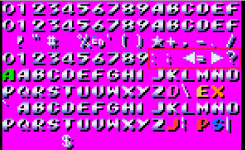

Kratus showed on his attached fonts where’s the mistake check the RED rectangle he marked.@Kratus So what have I to do?

nope, or he will see an empty character (and AFAIK, some characters are needed or the engine closes, like the numbers)There’s an extra A you need to replace with : or maybe just leave it blank
In that case he only needs to put : in that space squarenope, or he will see an empty character (and AFAIK, some characters are needed or the engine closes, like the numbers)
@Steven1985 To solve this, you have to put the right character in the right place. Download the default template and see who the characters are displaced
not really, take a look at the images Kratus posted above - there are other wrong chracters, like "?"In that case he only needs to put : in that space square
Yes as Kratus marked in red, there’s 6 characters wrong. He needs to replace his ABCDEF in the red rectangle for : ; < = > ?not really, take a look at the images Kratus posted above - there are other wrong chracters, like "?"
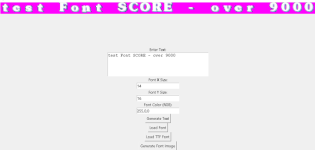
oh that is nice! I've tested many BMP font writer over the years but nothing really worked for me.boot this font, it has more trouble built in than its worth it, pick some other font, i made a gui to generate fonts from trueype with one click btw

I will , It needs some more work, ultimately id like it to be included in tools , sometimes some symbols are strang and have bigger size than others and i had to write some exceptions, i think i will expose the exceptions to the gui so we can type in the letters so it knows which ones to size down (like Q or g )to shift ( i,,I and l ) etc... and scale them so we can decide ourselves, have to think about whats the best way... cause it want it to be perfect and super customisable.
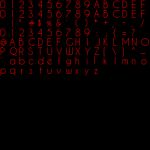
You can see that Q is smaller than O but not sure if i should scale x and y or just y...
For now it works kinda great, and it defo saves time.
The body of both letters must be the same, but the tail of the "q" should go lower than the base wordYou can see that Q is smaller than O but not sure if i should scale x and y or just y...


Is there a program that allows to transform a font image used in Openbor, to text you can write using the keyboard?
to write tutorials, cutscenes etc with the game font would be easy to do if that’s possible.
CMT let you do this too, but there is an issue with character kerning for now.Is there a program that allows to transform a font image used in Openbor, to text you can write using the keyboard?
to write tutorials, cutscenes etc with the game font would be easy to do if that’s possible.