Resident Evil: Survive

In Progress Resident Evil: Survive (OPENBOR Game) 3

No permission to download
The project is currently under development.
I did a playthrough of the new update :) Also why did you comment on my video @Chris Monvel being butt hert by the tumbnail? You should be happy i even showcased your game on my channel i will not be playing the next update if this is your attitude. I dont do drama so i removed your comment from my video.
 
Last edited:
I did a playthrough of the new update :) Also why did you comment on my video @Chris Monvel being butt hert by the tumbnail? You should be happy i even showcased your game on my channel i will not be playing the next update if this is your attitude. I dont do drama so i removed your comment from my video.
Right. You say you don't want to make any drama, yet you come here to the forums and make it loud for everyone to see it, and of course with no evidence. You seem to be actually pretty butt hurted by simply getting a notification of a wrong thumbnail.

I'm going to reply you the same way you did back then: I DON'T CARE 🙂
 
Right. You say you don't want to make any drama, yet you come here to the forums and make it loud for everyone to see it, and of course with no evidence. You seem to be actually pretty butt hurted by simply getting a notification of a wrong thumbnail.

I'm going to reply you the same way you did back then: I DON'T CARE 🙂
Hahaha im not the one that cryed over a thumbnail on my channel twice. I DON'T CARE either lol. No drama buddy. Water under the bridge :)
 
Hey guys. I've ran into a basic trouble. Can't make the freeze remap work on player characters. I got it right long time ago but can't remember how I did it. I've made a Tomichin enemy entity to test all attack reactions on players. There's the burn, shock, bpain, spain, and stun, but I've tested the freeze attack and players won't switch to their ice palette:

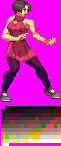
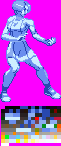
Here's player base palette and the ice palette. Here's the entity header with both palettes set:
remap data/chars/Ada/palette_01.gif data/chars/Ada/palette_10.gif
fmap 1

This is Tomichin's freeze attack:
anim attack4
hitflash flash2
delay 30
offset 11 48
freeze 58 17 92 35 8 2 0 0 0 0
frame data/chars/Tomichin/attack.gif
 

Attachments

  • palette_01.gif
    palette_01.gif
    3.2 KB · Views: 7
  • palette_10.gif
    palette_10.gif
    3.2 KB · Views: 7
I've checked the palette of both images and they are different. That means you can't use remap command and instead you should use alternatepal command.
 
And you should be using alternatepal anyway - remap is very old and its there just for backward compability.
Also, why your palette has so much colors for that type of sprite?
1770902159009.png
 
I've checked the palette of both images and they are different. That means you can't use remap command and instead you should use alternatepal command.
Yes it's the same palette for both sprites as seen below the character. The ice palette was created after the original sprite so it's pretty much the same picture, recolored. I don't want to use alternatepal, otherwise the freeze palette will be displayed in select screen.

Manual states that a freeze palette can be used with remap and fmap. The problem is that it's not clear about the use of "int". "Freeze" animation is not clear either about the use of this palette
fmap {int}

  • {int} determines which remap to use by the entity if it gets frozen by an freeze attack (See ‘freeze’ for more info about freeze attack).
  • You have to declare that remap with ‘remap’ before using this obviously.
  • If hero has ‘fmap’ set, the respective remap can’t be selected at select screen and continue option.
 
I don't want to use alternatepal, otherwise the freeze palette will be displayed in select screen.
Does she have some alternate palettes other than the freeze palette you have or just only one in the list? Could you please show what your character header is like for how many alternate palettes?

I mean like these.
Code:
palette data/chars/eagle/default.png
alternatepal data/chars/eagle/cvs2-2.png
alternatepal data/chars/eagle/02-mrbig.png
alternatepal data/chars/eagle/01-billykane.png
alternatepal data/chars/eagle/03-sf1-eagle.png
alternatepal data/chars/eagle/03-demitri.png

Code:
palette       data/chars/emma_frost/pal1.gif
alternatepal  data/chars/emma_frost/pal2.gif
alternatepal  data/chars/emma_frost/pal3.gif
alternatepal  data/chars/emma_frost/pal4.gif
alternatepal  data/chars/emma_frost/pal5.gif
alternatepal  data/chars/emma_frost/pal6.gif
alternatepal data/chars/emma_frost/freeze.gif
alternatepal data/chars/emma_frost/venon.gif
fmap 6
hmap 7 7

fmap {int}

  • {int} determines which remap to use by the entity if it gets frozen by an freeze attack (See 'freeze' for more info about freeze attack).
  • You have to declare that remap with 'remap' before using this obviously.
  • If hero has 'fmap' set, the respective remap can't be selected at select screen and continue option.
  • If enemy has 'fmap' set, the respective remap can be used in levels. You might want to avoid using the remap unless you want to see Icemen on your levels.
This means you cannot use remap. You should use alternatepal instead.

alternatepal {path}

  • This is to set alternate palette for this entity. ONLY compatible with truecolor mode (see video.txt above)!.
  • {path} is the location of the image whose palette will be used as alternate palette. The {path} is relative to OpenBoR.
  • Used in conjunction with 'pallette' above.
Don't worry about declaring it in video.txt unless you are using an old version that is older than ones circa year 2017. Check it in the logs (logs folder) to see what version you are currently using if you don't know.

I tested your images as a char. Therefore, I completely agree with @O Ilusionista on using alternatepal and it works exactly like he says. Please avoid using remap. Check how many alternate palettes and let us/me know.

Just a little basic I added. You cannot toggle up/down for an alternate palette in the select screen. This only leaves you a declared default palette you have.
Code:
name testerini
type player
health 100
speed 10
atchain 1

palette data/chars/tester/palette_01.gif
alternatepal data/chars/tester/palette_10.gif
fmap 1

 
Code:
Code:
palette       data/chars/emma_frost/pal1.gif
alternatepal  data/chars/emma_frost/pal2.gif
alternatepal  data/chars/emma_frost/pal3.gif
alternatepal  data/chars/emma_frost/pal4.gif
alternatepal  data/chars/emma_frost/pal5.gif
alternatepal  data/chars/emma_frost/pal6.gif
alternatepal data/chars/emma_frost/freeze.gif
alternatepal data/chars/emma_frost/venon.gif
fmap 6
hmap 7 7
See that is my Emma Frost coding. Fmap is set as 6 and I am hiding the venom palette (7).
Note that I don't need to hide palette 6... Because it's hidden by default when setting the fmap
 
Note that I don't need to hide palette 6... Because it's hidden by default when setting the fmap
Yes. I think I know about hmap, but for fmap, I realized it late right after I tested it with fmap. I admit that I haven't used fmap before or maybe I don't remember using it myself.
 
Does she have some alternate palettes other than the freeze palette you have or just only one in the list? Could you please show what your character header is like for how many alternate palettes?

I mean like these.
Code:
palette data/chars/eagle/default.png
alternatepal data/chars/eagle/cvs2-2.png
alternatepal data/chars/eagle/02-mrbig.png
alternatepal data/chars/eagle/01-billykane.png
alternatepal data/chars/eagle/03-sf1-eagle.png
alternatepal data/chars/eagle/03-demitri.png

Code:
palette       data/chars/emma_frost/pal1.gif
alternatepal  data/chars/emma_frost/pal2.gif
alternatepal  data/chars/emma_frost/pal3.gif
alternatepal  data/chars/emma_frost/pal4.gif
alternatepal  data/chars/emma_frost/pal5.gif
alternatepal  data/chars/emma_frost/pal6.gif
alternatepal data/chars/emma_frost/freeze.gif
alternatepal data/chars/emma_frost/venon.gif
fmap 6
hmap 7 7


This means you cannot use remap. You should use alternatepal instead.


Don't worry about declaring it in video.txt unless you are using an old version that is older than ones circa year 2017. Check it in the logs (logs folder) to see what version you are currently using if you don't know.

I tested your images as a char. Therefore, I completely agree with @O Ilusionista on using alternatepal and it works exactly like he says. Please avoid using remap. Check how many alternate palettes and let us/me know.

Just a little basic I added. You cannot toggle up/down for an alternate palette in the select screen. This only leaves you a declared default palette you have.
Code:
name testerini
type player
health 100
speed 10
atchain 1

palette data/chars/tester/palette_01.gif
alternatepal data/chars/tester/palette_10.gif
fmap 1

DAMN! It worked! I removed the remap and fmap from character's header:
remap data/chars/Ada/palette_01.gif data/chars/Ada/palette_10.gif
fmap 1

And set it like this instead, just like you did. The alternate palettes were already set like that, just had to declare the freeze palette (palette_10.gif) and set the fmap and hmap the same way you did

palette data/chars/Ada/palette_01.gif
alternatepal data/chars/Ada/palette_02.gif
alternatepal data/chars/Ada/palette_03.gif
alternatepal data/chars/Ada/palette_04.gif
alternatepal data/chars/Ada/palette_05.gif
alternatepal data/chars/Ada/palette_10.gif
fmap 5
hmap 6 6
I'm genuinely surprised because I never knew about this function until now! I guess I learned something new today! Thanks guys!
 

Attachments

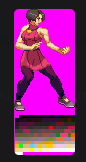
  • Resident Evil Survive - 0000.png
    Resident Evil Survive - 0000.png
    9.4 KB · Views: 3
palette data/chars/Ada/palette_01.gif
alternatepal data/chars/Ada/palette_02.gif
alternatepal data/chars/Ada/palette_03.gif
alternatepal data/chars/Ada/palette_04.gif
alternatepal data/chars/Ada/palette_05.gif
alternatepal data/chars/Ada/palette_10.gif
fmap 5
hmap 6 6
In your case, fmap is 5 and you don't have a palette with index 6 (remember that palette indexes starts at zero).
You don't need to use hmap if you don't have any extra palettes
 
In your case, fmap is 5 and you don't have a palette with index 6 (remember that palette indexes starts at zero).
You don't need to use hmap if you don't have any extra palettes
so fmap and hmap can use the same value? In this case 5? I thought hmap counted from the first alternatepal, not default palette

BTW guys, do you mind if I share my Tomichin for the community? It might result handy for some newbies to understand the different attack reactions on entities. I personally feel overwhelmed at times when trying t use them all.
 
so fmap and hmap can use the same value? In this case 5? I thought hmap counted from the first alternatepal, not default palette
nope. fmap and hmap are different things and indexes are meant to be unique.
If you set something as fmpa, that map is automatically hidden on select screen

hmap is used when you want to have extra maps for certain things (like I do for poison effects) but don't want them to be selectable.
 
so fmap and hmap can use the same value? In this case 5? I thought hmap counted from the first alternatepal, not default palette
No. It's for hiding specified/indexed palettes you declare from selecting a specified palette. Let's say you try declaring like this with some extra palettes. What you don't want is to select a palette that you're not going to use in the select screen. But they can be used for effects.

Code:
palette data/chars/Ada/palette_01.gif
alternatepal data/chars/Ada/palette_02.gif #1
alternatepal data/chars/Ada/palette_03.gif #2
alternatepal data/chars/Ada/palette_04.gif #3
alternatepal data/chars/Ada/palette_05.gif #4
alternatepal data/chars/Ada/palette_10.gif #5
alternatepal data/chars/Ada/poison.gif #6
alternatepal data/chars/Ada/curse.gif #7
alternatepal data/chars/Ada/statue.gif #8
fmap 5
hmap 6 8

This means you are hiding 6th, 7th, and 8th remap(s) in yours. hmap and fmap are never the same. They're different from each other. fmap automatically hides an indexed remap, while hmap allows you to hide certain index of palette from choosing in the select screen.

It's better to read the manual than just guessing the meaning of the terminology.

hmap {a} {b}

  • Hides entity's remap from being selected (in select screen for players). The remaps can still be used with other features, like forcemap or script.
  • Hidden remaps are from ath remap to bth remap.
  • For example 'hmap 3 6', hides 3th, 4th, 5th and 6th remap.
 
I'm still testing the game.
I like the diversity of characters.
Jill from RE3 is my fav. You did soem very decent work with the custom sprite. Including the melee "flip kick" from RE4.
Would you consider adding her "head grab" move from RE4 ?

OTG attacks would be great for all characters. (taken directly from the melee attacks)
Not hard to code actually.

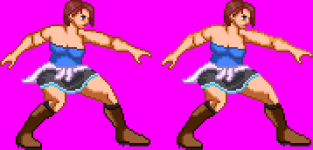
A suggestions to upgrade easily your custom sprites.
Darker outlines can be a bit lighter on areas exposed to light. (upper areas)
I did some very fast and lazy edit in one of your custom sprites. (arms, legs, boots, blue top upper area)
Hope it can help.

1770990213644.png
 
No. It's for hiding specified/indexed palettes you declare from selecting a specified palette. Let's say you try declaring like this with some extra palettes. What you don't want is to select a palette that you're not going to use in the select screen. But they can be used for effects.

Code:
palette data/chars/Ada/palette_01.gif
alternatepal data/chars/Ada/palette_02.gif #1
alternatepal data/chars/Ada/palette_03.gif #2
alternatepal data/chars/Ada/palette_04.gif #3
alternatepal data/chars/Ada/palette_05.gif #4
alternatepal data/chars/Ada/palette_10.gif #5
alternatepal data/chars/Ada/poison.gif #6
alternatepal data/chars/Ada/curse.gif #7
alternatepal data/chars/Ada/statue.gif #8
fmap 5
hmap 6 8

This means you are hiding 6th, 7th, and 8th remap(s) in yours. hmap and fmap are never the same. They're different from each other. fmap automatically hides an indexed remap, while hmap allows you to hide certain index of palette from choosing in the select screen.

It's better to read the manual than just guessing the meaning of the terminology.
This is so interesting! I'd like to learn more about these if you don't mind. I'm not planning to use poison or statue palettes yet but I might in the future. Curse palette also got my interest. Would you like to please explain me how to trigger these palettes inside enemies' attack animations lines?
 
Back
Top Bottom