
Spawn text after taking an item

Already posted them here

Scripts library
I was able to mix the scripts by just importing the didhit.c content to the animation.c file. This way you will be able to use the spawnToss function throught @cmd.
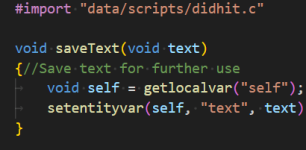
1765075630384.png

And I erased one of the two spawn01 functions because once imported, both will be a part of the same library.
I attached both files for you in case you want to see how it will look. No need to make changes in the text.c file.

This is the result, both item/attack texts working together.
 

Attachments

I think you've mistaken the text items. I said the text entity as in

I asume it won't work because you just adapted it for the apple text.
 
I think you've mistaken the text items. I said the text entity as in

I asume it won't work because you just adapted it for the apple text.
Sorry friend, I'm not understanding what you really need. You mentioned the floating text before, I thought you wanted it on both item/attack.
I made a very small change in your scripts, I think it didn't break your already existing features.
 
Sorry friend, I'm not understanding what you really need. You mentioned the floating text before, I thought you wanted it on both item/attack.
I made a very small change in your scripts, I think it didn't break your already existing features.
Yeah i wanted both text entity script and floating text working together
 
Sorry friend, I'm not understanding what you really need. You mentioned the floating text before, I thought you wanted it on both item/attack.
I made a very small change in your scripts, I think it didn't break your already existing features.
It crashed my game when trying to play the animation. Honestly I don't feel safe installing a script made for a different purpose
 
It crashed my game when trying to play the animation. Honestly I don't feel safe installing a script made for a different purpose
Maybe there's a wrong procedure when transferring the changes. They are working fine in my game file, like the video shows.
Mixing script libraries is a very common practice, there's no need to worry about it.
 
Maybe there's a wrong procedure when transferring the changes. They are working fine in my game file, like the video shows.
Mixing script libraries is a very common practice, there's no need to worry about it.
Well it didn't work in my case. Honestly using scripts is so damn terrifying for me I try to avoid using them like a plague
 
Good :)


It will depend on how your scripts are organized. You can add it to your library by renaming the files I sent and using the #import command.
Or in case all your script files are exactly the same, just copy/paste overwriting everything. I used the same files you sent previously as reference to make less changes possible.
Well that makes sense. As long as the new files don't overwrite the originals I'm ok! How can I add the @cmd to the character's animation?
 
Hello @Chris Monvel

I have some tools that may help you. The video explains how to apply the script to spawn text entities during item pickup, and you can download all files below.
I hope it can be useful :)

Spawn Text.zip

brother what if i want the items picked up to also show up on certain sections in the menu screen. like if i pick up a picture or a letter i want it to appear in the menu for later purposes instead of it only appearing in the game when i pick it up?
 
Do you want something like inventory system or unlockables system?
Yes I do brother. Mostly unlockables that can be accessed in the menu. Like if I picked up an item or a file or a picture I can find it unlocked in the menu or certain section in the menu.
 
@Bloodbane can you also tell me or explain how I can enable a character to spawn like 20 npcs or enemies in different locations without having to create 20 different txt files. Regards 🙏🙏
 
Back
Top Bottom