
UI Transparency (or extra transparent layer?)

Liraro

New member
I'm currently using this as my icon.gif for my player characters, which gives them a pretty okay looking health bar:
1716386626078.png


I'd really like to add some extra shading, like so - the top is what the game currently gives me, but I'd like to add some partial transparency to hearts at some fixed locations:
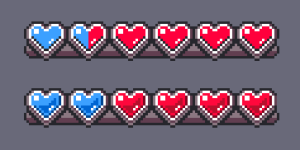
1716386701515.png

Is there any support for a "fixed transparency" layer, or some way to just add transparency to the existing image I can use like this?

Converting the image to .png causes a crash on boot, so it seems like there's no native support that way; I saw shadows, but it seems like I can't apply that to the UI element, so I hit a roadblock.
 
Is there any support for a "fixed transparency" layer, or some way to just add transparency to the existing image I can use like this?

OpenBOR supports more transparency and blending methods than you can shake a stick at. There are several stock blending modes you can apply, and also full alpha channel support. IIRC though, not using the old icon function. You'll need to script some of your HUD components.

@Kratus's Streets of Rage games have a very nice gradient effect on their life-bars you can use as an example in your project.

Converting the image to .png causes a crash on boot, so it seems like there's no native support that way

OpenBOR does support .png, and in fact it's the recommended format - stop using .gif files. The reason yours did not work is you tried to save them in 24bit format. 8bit is required for sprites. The alpha channel you want is supported using a separate image that controls the opacity of each pixel. Before we get into those details though, I again think it best you take a look at @Kratus's games and see how he's doing it. He's also a very helpful community member here, so will likely be glad to answer specific questions.

DC
 
Thanks -- I haven't delved into OpenBoR scripting yet, so I was seeing how far I could get with editing the baseline stuff.

I'll start with porting everything over to 8-bit PNGs, and see if I can find any examples in Kratus' stuff. :)
 
Seeing the same issue with .PNG that I had previously. Enemies and objects work just fine, and I've converted all of those over (with a legacy .pal)

But if I change "icon.gif" to "icon.png", even as a blank 8-bit image, the game is right back to crashing on boot.

1716391997333.png
 
Seeing the same issue with .PNG that I had previously. Enemies and objects work just fine, and I've converted all of those over (with a legacy .pal)

But if I change "icon.gif" to "icon.png", even as a blank 8-bit image, the game is right back to crashing on boot.

View attachment 8034

That's odd. Since icon is really old.. as in dates all the way back to the original BOR engine old, maybe we overlooked it when we added .png support (itself over 10 years ago). I'll look into it. In the meantime, there are plenty of ways to get the blending you want. To the point it sometimes just comes down to how you feel the most comfortable. For instance, you could set a blend mode of 1 (standard alpha where lighter is more opaque) and configure your image pixels/colors to act accordingly, or you could use an alpha mask and do it manually. There are many other examples too.

DC
 
Back
Top Bottom