Z vs. Panel Interaction

ModdingGuy

New member
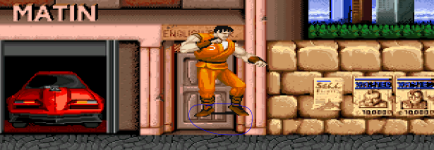
Hey, is there a way to avoid players/enemies interacting with the panel art?1771765070703.png

I have the lateral axis ("Z") set to "z 200 280 200" in the stage's .txt file, but nothing works. No values do, actually. Any suggestions?
 
This is configured in levels.txt where you set your zmin and zmax which will define your floor.
An example:
Code:
z       146 240
file    data/levels/ravaged/ravaged.txt
 
Since the author of that program is no longer around for updating Stats, have you ever tried ChronoCrash Modders Tools? You just have to insert a code of a visible wall block first before you drag for sizes or whatever.


You don't use the image program for measuring or looking at pixel points on any image? What's the pixel size of an image as your current stage? Do you read the manual?

Don't make guesses on the number of pixel points on the image. Do you know what using z in levels.txt is for?

z {zmin} {zmax} {BGheight}

  • Changes the location of stage boundaries.
  • {xmin} is how high up entities can walk. It starts at the top and works down, so larger numbers mean less room. Defaults to 160.
  • {xmax} is how far down the character can walk. It also goes down from the top. Defaults to 232.
  • {BGheight} changes where the bottom of the background is drawn. Defaults to 160. By changing this value, you can make the background match an altered {xmin}.
  • This can be set once per level. You can change it between two stages. If you need to change it during a stage, you should combine it with the "wall" command in the stage itself.
  • You can spawn entities outside of this range, but once they enter the playing field they can't escape again.
 
Thanks for the information. Yes, I have briefly glanced at the Chronocrash Modders Tools interface, and it's a bit confusing compared to OpenBOR Stats. I'm not really sure how to use it. Other than loading up my current mod, I'm a bit lost. Is there a guide on how to use it?

Yes, I've glanced at the Legacy Manual, and while I'm sure there's a multitude of helpful information there, it's a bit awkward to read due to an obvious language barrier that exists (I think the author or authors don't speak English natively). No disrespect intended, just stating the facts.

I'm an absolute beginner when it comes to this stuff, but I have the basics down. My main issues are creating stages with walls, platforms, and holes (pits). Creating basic characters and enemies isn't terribly difficult, although I have no clue how to do any scripting; I've been able to use commands like "jumpframe" to emulate some moves from Final Fight, and I've learned how to make projectiles.

Do you happen to know if there are any step-by-step tutorials on how to build a basic stage? The one in question (from my earlier post) is 240 X 1200, if that helps. I'm good with creating palettes with GIMP. Thanks in advance for any assistance.

 
Thanks for the information. Yes, I have briefly glanced at the Chronocrash Modders Tools interface, and it's a bit confusing compared to OpenBOR Stats. I'm not really sure how to use it. Other than loading up my current mod, I'm a bit lost. Is there a guide on how to use it?
Believe me: It might feel strange at first, but once you get used to it, you won't want to look at Stats anymore (with all due respect to the author). For example, finding entities is incredibly easier in CMT.

Yes, I've glanced at the Legacy Manual, and while I'm sure there's a multitude of helpful information there, it's a bit awkward to read due to an obvious language barrier that exists (I think the author or authors don't speak English natively). No disrespect intended, just stating the facts.
I'm not the author, but I'm the person who usually updates it, and yes, I'm not a native English speaker, sorry. But what exactly was your question?

Okay, I'm not sure I understand how to do that.
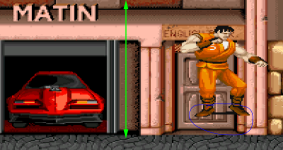
Open your image in any graphics editor and measure the distance from the top of the image to the area where you think the characters can walk.

For example, using the original image as a base:
1771871995500.png
it would be
z 194 249 160

Is it possible to draw holes/walls using your mouse in OpenBOR Stats?
I can't remember if stats let you add those on the fly (by drawing them), but you can copy this info from any other stage and paste the code in CMT (text mode) and visually change it

wall -585 245 1575 1655 1626 1706 79 22

Also, Stats doesn't works with Basemap, while CMT does.
 
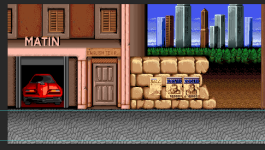
Keep in mind that some Double Dragon levels can be quite challenging to convert, especially if you want a level that contains all the levels in one place, like in the arcade version.

DoubleDragon-NewYork199X.png

Oh, and btw, if you want someone specific to reply your message, tag that person by using @ and typing his name, without space between the @ and the name.
Or just quote his post.
 
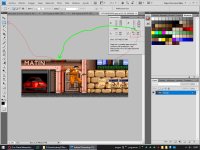
use selection tool on ps or other graphic sofware to mesure the image like this.. the number of vertical pixels from top of your image to the edge of the floor should be your zmin value in level txt

ScreenShot001.jpgps: openborstats is an awsome tool.. just use it to navigate, acces and edit any txt file of you entitys nothing else.. levels and anything else do manually on the txt..
 
Back
Top Bottom