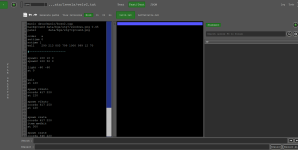
Chronocrash Modders Tools

ChronoCrash Modders Tools 0.7.9.12

No permission to download
that was a bit useless to me but hey :)

Talking about real useful updates, do you think it would be able to add an option to still display the walls when you are editing a stage, but locking their positions?
If we could lock then case by case it would be even better. Think when you want to move a wall that was placed above other wall and you want to move it - you need to comment the other wall code. Or when you want to move some entity while still seeing the walls, to avoid placing them inside walls.

I even have a specific case - can't post a pic here - when we have a wall on the lower part of the stage (so its placed between the viewer and the characters) and you want to move any entity, you end moving that wall.
 

Attachments

  • Untitled.png
    Untitled.png
    53.3 KB · Views: 3
Thank you so much for quick update.
Can you please check it?
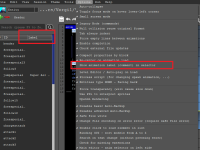
I unchecked the label option and restarted the app, but the label tab is still there.
Please see the attachment,
I can not live without your app because it saves me a lot of time!
thanks again for your awesome work.
Yeah I checked before uploading and checked again now, it works. Try restarting the app once again to make sure, even though it shoudn't be needed. If it doesn't work then it means there must be an interference with some other setting. I'll check but I need to be really sure it's not working for nobody (me excepted).

EDIT : ok, got it, it doesn't work when using settings from mod location.
 
Last edited:
that was a bit useless to me but hey :)

Talking about real useful updates, do you think it would be able to add an option to still display the walls when you are editing a stage, but locking their positions?
If we could lock then case by case it would be even better. Think when you want to move a wall that was placed above other wall and you want to move it - you need to comment the other wall code. Or when you want to move some entity while still seeing the walls, to avoid placing them inside walls.

I even have a specific case - can't post a pic here - when we have a wall on the lower part of the stage (so its placed between the viewer and the characters) and you want to move any entity, you end moving that wall.
Yeah I remember vaguely, it's from a time when I had no time to handle requests, so there's a bunch that are not processed.

I can do that one
 
Piccolo updated Chronocrash Modders Tools with a new update entry:

Changelog 0.7.9.11

- Text and Animation editor : New option to hide animation labels in selector didn't work when using local settings (settings loaded from game folder). Now fixed @Bruce

- Level Editor : added checkbox to lock geometry and checkbox to lock entities @O Ilusionista

Note : I know there is a minor bug in the right panel when those checkboxes are on and you "select" walls/entities, but it's nothing serious, you can bypass it by changing tab. I tried to fix it...

Read the rest of this update entry...
 
@Piccolo question: is there is a way to turn off the transparency - mainly in gif exports?
I would like to export some animations but the way the tool outputs it is stacking the frames above each other
or make it to remove the previous frame when displaying a new one?
yono_freespecial2.gif
 
Last edited:
@Piccolo question: is there is a way to turn off the transparency - mainly in gif exports?
I would like to export some animations but the way the tool outputs it is stacking the frames above each other
View attachment 13583
Sure, but before can you try setting a palette (using the control next to the export) then exporting the animation as gif ? I just checked the code and it seems when a palette is set, the export does exactly this (setting transparency as the classical pink).

If you don't have a palette for this entity just declare one using any sprite. It's just to confirm if it does work like that already or not. If it does then I can add an option to choose the transparency color before the export.
 
Sure, but before can you try setting a palette (using the control next to the export) then exporting the animation as gif ? I just checked the code and it seems when a palette is set, the export does exactly this (setting transparency as the classical pink).
Yep, that did the job!
yono_freespecial2b.gif
Thanks :)
 
Hello! I've been having some great success with this software ever since I started using it!

However, a unique error has popped up for me.

For one of my newest levels, this error shows when I try to load it up:
Code:
Traceback (most recent call last):
  File "gui\main\__init__.py", line 477, in <lambda>
  File "gui\main\__init__.py", line 344, in setView
  File "gui\level\__init__.py", line 285, in loadLines
  File "gui\level\__init__.py", line 1400, in loadLines
TypeError: int() argument must be a string, a bytes-like object or a real number, not 'NoneType'

This is doesn't happen with any of the other levels and I'm not sure what's causing this.


The level file itself works just fine in-game though.
 
Hello! I've been having some great success with this software ever since I started using it!

However, a unique error has popped up for me.

For one of my newest levels, this error shows when I try to load it up:
Code:
Traceback (most recent call last):
  File "gui\main\__init__.py", line 477, in <lambda>
  File "gui\main\__init__.py", line 344, in setView
  File "gui\level\__init__.py", line 285, in loadLines
  File "gui\level\__init__.py", line 1400, in loadLines
TypeError: int() argument must be a string, a bytes-like object or a real number, not 'NoneType'

This is doesn't happen with any of the other levels and I'm not sure what's causing this.


The level file itself works just fine in-game though.
Hello, seems like you're not using the last version right ? Can't seem to match the error lines.

Anyway can you send me the file so that I can look into it. From the log of the error, it's probably related to a missing argument. You must have a "coords" or a "at" (or something like that) that is missing parameters in this level.
 
Hello, seems like you're not using the last version right ? Can't seem to match the error lines.

Anyway can you send me the file so that I can look into it. From the log of the error, it's probably related to a missing argument. You must have a "coords" or a "at" (or something like that) that is missing parameters in this level.
I just updated to the most recent one, however some new things for me have just drastically changed, I can't even find the animation/level tab to view the sprites/graphics of levels or entities for some reason.

1770927994606.png

Here is the file in question:
Code:
music data/music/boss2.ogg
background data/bgs/stg7/windows.png 0.45
panel        data/bgs/stg7/ground.png

order    a
settime 0
notime 1
wall    290 213 803 799 1000 999 12 70

#---------------------

spawn1 100 10 0
spawn2 100 50 0

light -60 -60
at 0


wait
at 120

spawn vikuto
coords 617 220
at 120

spawn vikuto
coords 617 250
at 120


spawn crate
coords 617 220
item medkit
at 300

spawn crate
coords 546 220
2pitem medkit
at 300


spawn AltVelvette
alias Velvette
health 100
boss 1
coords 600 273
at 1050
 
I just updated to the most recent one, however some new things for me have just drastically changed, I can't even find the animation/level tab to view the sprites/graphics of levels or entities for some reason.

View attachment 13612

Here is the file in question:
Code:
music data/music/boss2.ogg
background data/bgs/stg7/windows.png 0.45
panel        data/bgs/stg7/ground.png

order    a
settime 0
notime 1
wall    290 213 803 799 1000 999 12 70

#---------------------

spawn1 100 10 0
spawn2 100 50 0

light -60 -60
at 0


wait
at 120

spawn vikuto
coords 617 220
at 120

spawn vikuto
coords 617 250
at 120


spawn crate
coords 617 220
item medkit
at 300

spawn crate
coords 546 220
2pitem medkit
at 300


spawn AltVelvette
alias Velvette
health 100
boss 1
coords 600 273
at 1050
When you start CMT, in the project list, right click your game and make sure "OpenBOR" is checked. Should be checked by default but it seems it isn't in your case. Probably because you had a very old build of CMT before.

EDIT : I test your level, no issue on my end, so probably related to you having an old version of CMT.
 
When you start CMT, in the project list, right click your game and make sure "OpenBOR" is checked. Should be checked by default but it seems it isn't in your case. Probably because you had a very old build of CMT before.

EDIT : I test your level, no issue on my end, so probably related to you having an old version of CMT.

Ah ok, thank you! I was fortunate enough to do the same. Although a new problem has arisen for me now.

When I click on an enemy/object in the level section, I get this error:

Code:
Traceback (most recent call last):
  File "gui\level\__init__.py", line 487, in selectionChanged
AttributeError: 'WallControlWidget' object has no attribute 'lockEntitiesState'
 
Ah ok, thank you! I was fortunate enough to do the same. Although a new problem has arisen for me now.

When I click on an enemy/object in the level section, I get this error:

Code:
Traceback (most recent call last):
  File "gui\level\__init__.py", line 487, in selectionChanged
AttributeError: 'WallControlWidget' object has no attribute 'lockEntitiesState'
Hum this is an issue with a recent change, I must have forgot something, will upload an update in a few minutes
 
Back
Top Bottom