
You are using an out of date browser. It may not display this or other websites correctly.
You should upgrade or use an alternative browser.
You should upgrade or use an alternative browser.
My sprite animation reel
- Thread starter ABK
- Start date

 .
.
Miru
Well-known member
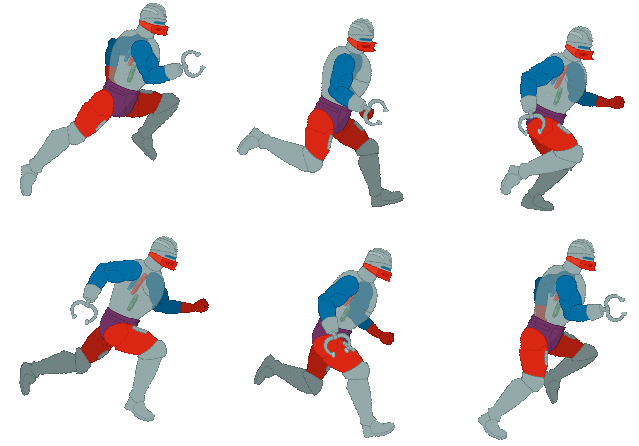
bWWd said:I updated it with axel, i was playing kratus sor and i got irritated how choppy walkcycles were, these are most important animations cause are played most of the time so should have at least 10 frames.
I agree it would be nice if there would be updated version with more frames , it makes it look just better and style is the same.
I feel like the colors on the extended Axel look washed out on his skin. And also, I too would like to see the other four get this treatment.
Updated with max, i know that in theory its kinda scary to do it to all characters and process is quite long, after i interpolate i have to patch up and add details and shadows.
I think doing this to idles,walks, runs and only some attacks that have not enough frames is a good idea, i wouldnt do that to all animations, you can tell which ones need more frames.
I might try to insert these into game and see if its worth it.
--
OK i tested it, looks more modern, kinda like final fight, and compared to runs it makes big difference, now run looks like its dropping frames just because walk is so smooth.
I think doing this to idles,walks, runs and only some attacks that have not enough frames is a good idea, i wouldnt do that to all animations, you can tell which ones need more frames.
I might try to insert these into game and see if its worth it.
--
OK i tested it, looks more modern, kinda like final fight, and compared to runs it makes big difference, now run looks like its dropping frames just because walk is so smooth.

Die_In_Fire
Well-known member
I was checking all this thread, you are totally an artist bWWd, amazing work.
I remember you wrote some long posts about Stickman years ago, but those posts got lost on the transition from lavalit to Chronocrash. I regret not having tried it when you wrote those.
I remember you wrote some long posts about Stickman years ago, but those posts got lost on the transition from lavalit to Chronocrash. I regret not having tried it when you wrote those.
these are made with aseprite and interprite so its a bit different , takes more time.My other anims are made with spriter and aseprite.
I updated post with axel run.
--
On idle the difference is less noticeable but i noticed that interpolated version had 2 frames that were almost identical to original frames, so pixels dont travel that much, it could be 6 frames (original is 4) and this is 8 frames version.Maybe even 6 frame versioin woyuld have similar impact to original which i like and which is lost in 8 frame one.


I updated post with axel run.
--
On idle the difference is less noticeable but i noticed that interpolated version had 2 frames that were almost identical to original frames, so pixels dont travel that much, it could be 6 frames (original is 4) and this is 8 frames version.Maybe even 6 frame versioin woyuld have similar impact to original which i like and which is lost in 8 frame one.





O Ilusionista
Captain 100K
Oh, some cool animations you have there.
So... i have some ideas for a game
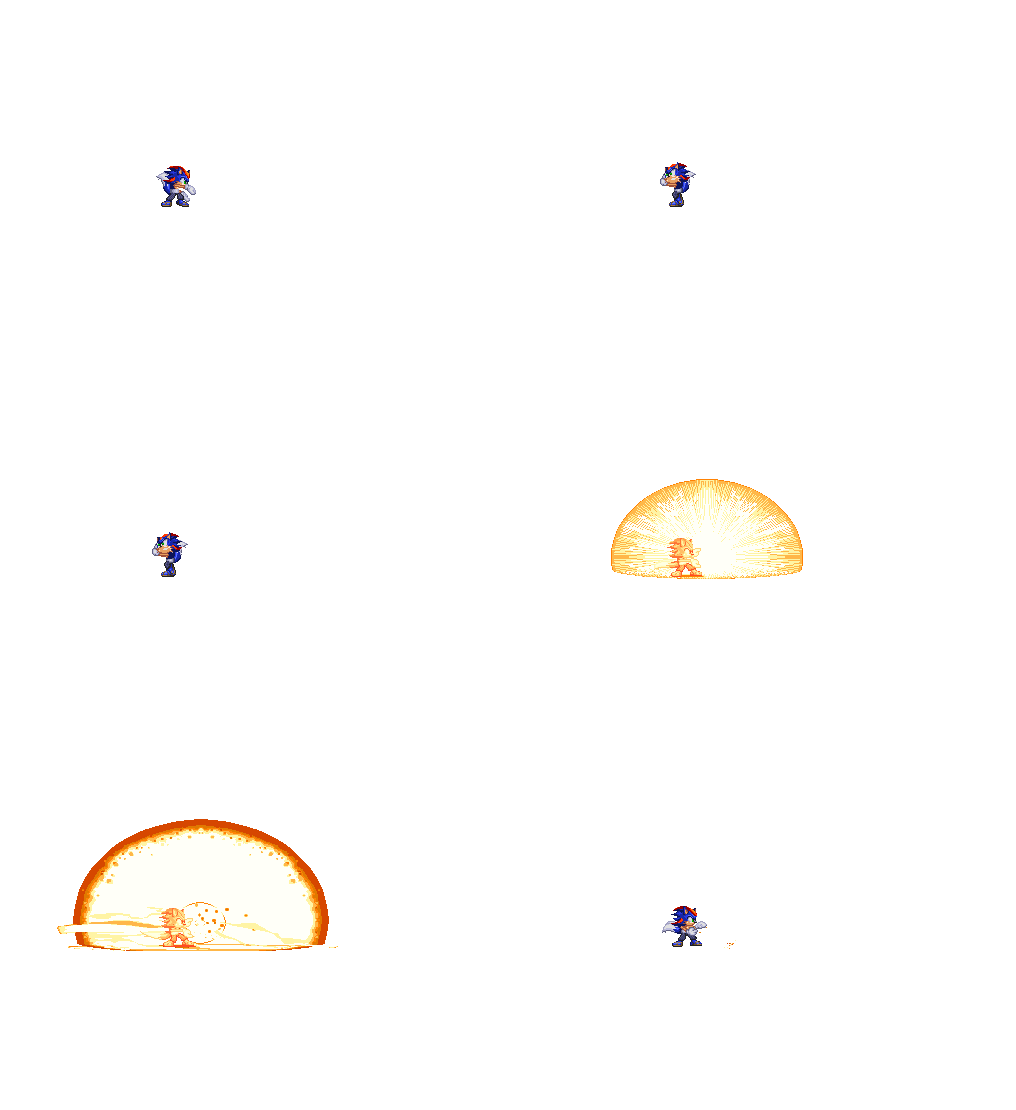
Which style do You guys think looks better, more like 2d animation or the one with more frames that looks more 3d ?
Im leaning towards more frames for idle stances , the first one has 60 frames but attacks will be like usual 2d fighting games with like 5 frames for simple attacks but i want to add motion blur for nicer visuals and more dynamic animations.These are experiments and ill redo some stuff.


Which style do You guys think looks better, more like 2d animation or the one with more frames that looks more 3d ?
Im leaning towards more frames for idle stances , the first one has 60 frames but attacks will be like usual 2d fighting games with like 5 frames for simple attacks but i want to add motion blur for nicer visuals and more dynamic animations.These are experiments and ill redo some stuff.

Does anyone know a website with collection of punch/kick animations from games or just punch frames, i need to collect some keyframes to have the poses right , i can rip them with fighter factory but maybe someone did it already.
I basically just need punch/kick images on its attack box frame from fighting games.And maybe also anticipation frame.
My poses look kinda wonky and i have to draw various angles and plan this ahead.


I basically just need punch/kick images on its attack box frame from fighting games.And maybe also anticipation frame.
My poses look kinda wonky and i have to draw various angles and plan this ahead.

Bloodbane
Well-known member
bWWd said:Which style do You guys think looks better, more like 2d animation or the one with more frames that looks more 3d ?
Obviously the first one looks better. But my concern is number of frames you'd have to create per character. If you don't mind creating hundreds of frames, then go ahead with 1st one

bWWd said:Does anyone know a website with collection of punch/kick animations from games or just punch frames
Maybe something like : Emu Gif animation ?

bWWd,
First idle looks great, and won't clash with attacks... assuming one thing. You need just one frame of over-extension on the initial strike. As is, the fist stops short like it hit a brick wall and stays there until its motion trail plays out. That's what makes it look out of place with the idle animation.
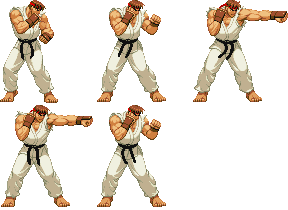
Basically, you just need to apply a touch of the same squash and stretch techniques to your attacks as you do to idle and walking sequences. Look at CVS Ryu. His Jab only has four unique sprites, but the second is a slight twist and over-extension, making it look a lot more organic.


Edit:
I just did a really crude edit myself as a proof test. Didn't actually add more sprites, just stretched out the initial extension frame. I also noticed the blurs are on the wrong side of his body compared to the punch motion - and for that matter they should really be a separate model anyway, but that's another discussion.
Bwwd Original:
DC Edit:

HTH,
DC
PS: I couldn't help humming some Was (Not Was) to myself while doing the edits.
First idle looks great, and won't clash with attacks... assuming one thing. You need just one frame of over-extension on the initial strike. As is, the fist stops short like it hit a brick wall and stays there until its motion trail plays out. That's what makes it look out of place with the idle animation.
Basically, you just need to apply a touch of the same squash and stretch techniques to your attacks as you do to idle and walking sequences. Look at CVS Ryu. His Jab only has four unique sprites, but the second is a slight twist and over-extension, making it look a lot more organic.
Edit:
I just did a really crude edit myself as a proof test. Didn't actually add more sprites, just stretched out the initial extension frame. I also noticed the blurs are on the wrong side of his body compared to the punch motion - and for that matter they should really be a separate model anyway, but that's another discussion.
Bwwd Original:
DC Edit:
HTH,
DC
PS: I couldn't help humming some Was (Not Was) to myself while doing the edits.
Al this is very valid info and i know about these principles of animation, its called overshooting , when hitbox frame is extended/stretched a bit beyond its range and goes back on next frame.I did it with with motion blur in front tho , but i think ill just use that on all attacks anyway with follow motion blur, im just not a fan of it in front and thats usual case when its used for overshoot
All this and more is nicely written about in this pdf for skull girls, i recommend it to everyone who wants to animate attacks and animations for video games.
https://ubm-twvideo01.s3.amazonaws.com/o1/vault/gdcchina14/presentations/833784_MarielCartwright_PowerfulAndEffective_EN.pdf
https://www.youtube.com/watch?v=Mw0h9WmBlsw
I experimented with overshooting on this one but it just didnt look as good for me as with motion blur.
About motion bliur being in front , it is physically incorrect when its in front of body but, imagine that a slight move back happened between anticipation frame and next frame, and you can justify motion blur.It just looks better when its in front, it looks unnoticeable when behind the body, so you have to cheat and play for the camera.
Also important rule for blurred frame is that when your 1st frame has hand hear your stomach and next one has arm it extended then your blur should start approximately where your stomach/hand were on previous frame ,if its noticeably longer ( like in my case) or shorter then blur looks less impactful or just wrong unless extended blur range is not that big,.But absolutely you can use short /longer ones for different types of timpact just be aware that it might not work , more important is the angle and "(" shape of the blur itself , bent ones, astraight ones look different and give feel of a hook or straight punch.
OK i will paste the image with various dynamic poses i gathered from games in case i will lose it.


All this and more is nicely written about in this pdf for skull girls, i recommend it to everyone who wants to animate attacks and animations for video games.
https://ubm-twvideo01.s3.amazonaws.com/o1/vault/gdcchina14/presentations/833784_MarielCartwright_PowerfulAndEffective_EN.pdf
https://www.youtube.com/watch?v=Mw0h9WmBlsw
I experimented with overshooting on this one but it just didnt look as good for me as with motion blur.
About motion bliur being in front , it is physically incorrect when its in front of body but, imagine that a slight move back happened between anticipation frame and next frame, and you can justify motion blur.It just looks better when its in front, it looks unnoticeable when behind the body, so you have to cheat and play for the camera.
Also important rule for blurred frame is that when your 1st frame has hand hear your stomach and next one has arm it extended then your blur should start approximately where your stomach/hand were on previous frame ,if its noticeably longer ( like in my case) or shorter then blur looks less impactful or just wrong unless extended blur range is not that big,.But absolutely you can use short /longer ones for different types of timpact just be aware that it might not work , more important is the angle and "(" shape of the blur itself , bent ones, astraight ones look different and give feel of a hook or straight punch.
OK i will paste the image with various dynamic poses i gathered from games in case i will lose it.

O Ilusionista
Captain 100K
Nice! I suggest you to post at twitter and in some discord servers too, there are always someone looking for spriter artistsCapcom 90s style, if someone wants some characters/designs , im open


O Ilusionista
Captain 100K
Some that had crossed my mind, mostly Mugen/Ikemen servers:What servers do You recommend?
IMT Server (its where you can find me easily, there are other artists there and you can get some feedback too)
Join the Infinity Mugen Team Discord Server!
Check out the Infinity Mugen Team community on Discord - hang out with 364 other members and enjoy free voice and text chat.
Vs Style Debuts - they are often looking for sprite artists to hire and they make a pretty cool MVC-based project
Join the Vs Style Debuts: Tag Team Revolution Discord Server!
Check out the Vs Style Debuts: Tag Team Revolution community on Discord - hang out with 409 other members and enjoy free voice and text chat.
NewAgeMugen - Another server where people constantly look for artists to hire
Join the NewageMugen Discord Server!
Check out the NewageMugen community on Discord - hang out with 53 other members and enjoy free voice and text chat.
In any of those, you can say that I had invited you, as people know me already on those servers and won't take you for a random guy (as Discord is full of this type of people)
I would love to have you at IMT server as well