Blocking and MP Charging issues

AlexDC22

Well-known member
So first ill start with blocking.... for enemnies in the old version they used to block, i have
blockodds 1
nopassiveblock 1
set on the bosses and none block anymore no matter what. Tried setting a range on them for blocking and still nothing... ive no clue as to why this is.

So 2 years a go when i picked up BOR again to pdate my game before it got lost on me >_>
i added charging to the players.. they have their animations and effects and everything is ok, except it wont charge.
the animation plays and everting while holding Jump and Block... i know in the wiki it says attack and special and this is how i have them renamed.
renamekey attack Attack
renamekey jump Jump
renamekey special Block_/_Counter
renamekey attack2 Escape_Attack
renamekey attack3 Special
disablekey attack4
renamekey start Start_/_Pause

2 years ago it did charge, also no other key combo for it works so am at a loss here.
i also have
mpset 100 0 0 1 0 0
set in the players text file as well... again it worked before.
i tried disabling the block/counter script from blodbane a few years back and still the same, i am not sure if that was the issue.. but it worked in the past.
am on V.4.0 for the record.
thanks for any help provided.
 
So first ill start with blocking.... for enemnies in the old version they used to block, i have
blockodds 1
nopassiveblock 1
set on the bosses and none block anymore no matter what. Tried setting a range on them for blocking and still nothing... ive no clue as to why this is.
I did a quick test and was able to make it work on a basic BOR module with the following adjustments using the V4 7612 build

C:
blockodds 1
nopassiveblock 1

anim block
    range 0 96
    rangea 0 96
    rangeb 0 96
    rangez -24 24
    loop    0
    offset    51 117
    bbox    38 9 25 110
    delay    96
    frame    data/chars/shermie/walk00.gif

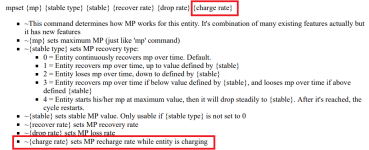
As for the charge, I believe the problem is in the "charge" parameter filled with zero. You filled out the recovery rate parameter, which works during the recharge by time or by hitting enemies, not by using the charge animation.

1721260011755.png

I was able to make it work on the same BOR module using the following adjustments.

C:
mpset 100 0 0 0 0 1

anim charge
    loop    1 # RECHARGE NEEDS LOOP
    delay    4
    offset    38 117
    bbox    20 0 53 119
    frame    data/chars/maxima/idle000.gif
    frame    data/chars/maxima/idle001.gif
 
I did a quick test and was able to make it work on a basic BOR module with the following adjustments using the V4 7612 build

C:
blockodds 1
nopassiveblock 1

anim block
    range 0 96
    rangea 0 96
    rangeb 0 96
    rangez -24 24
    loop    0
    offset    51 117
    bbox    38 9 25 110
    delay    96
    frame    data/chars/shermie/walk00.gif

As for the charge, I believe the problem is in the "charge" parameter filled with zero. You filled out the recovery rate parameter, which works during the recharge by time or by hitting enemies, not by using the charge animation.

View attachment 8672

I was able to make it work on the same BOR module using the following adjustments.

C:
mpset 100 0 0 0 0 1

anim charge
    loop    1 # RECHARGE NEEDS LOOP
    delay    4
    offset    38 117
    bbox    20 0 53 119
    frame    data/chars/maxima/idle000.gif
    frame    data/chars/maxima/idle001.gif
i really feel dumb on the charge smfh... thank you at least that was a simple fix...i did try adding to the last one since its the one that needs to be messed with, but having the rate one as well as the charge rate at the end at the same time nulls it... stupid oversight on my part.

the blocking tho... thats still not working for me... i hit him and he does the escape hits and everything else fine... except not being a punching bag lol...posting his header to see if i have another oversight? i cant tell and ive beel on the wiki left and right since yesterday lol

name GEESE
health 1500
speed 14
type enemy
escapehits 6
shadow 6
dust dust
blockodds 1
aggression 14
nopassiveblock 1
gfxshadow 1
diesound data/sounds/geesedie.wav


thanks again for the assist.
 
the blocking tho... thats still not working for me... i hit him and he does the escape hits and everything else fine... except not being a punching bag lol...posting his header to see if i have another oversight? i cant tell and ive beel on the wiki left and right since yesterday lol

name GEESE
health 1500
speed 14
type enemy
escapehits 6
shadow 6
dust dust
blockodds 1
aggression 14
nopassiveblock 1
gfxshadow 1
diesound data/sounds/geesedie.wav
The header looks fine. If you have a block animation in this character like I posted before, it must work, unless you have scripts interfering.
Don't forget to define a proper longer delay for the block animation duration, something between 50-100 should be fine. Otherwise the animation will end too quickly.

Another thing is related to ranges in general, you need to define a range where it will not conflict with your attack ranges, otherwise the entity will most times prioritize the attacks instead of blocking.
 
Can you show us Geese' BLOCK animation?
heres the animation.... weird thing is the z blocking works like a charm lol.. the others not so much at all
ive also layed withe the distances and still nothing

Code:
anim BLOCK
        range  0 90
        rangea 0 90
        rangeb 0 90
        rangez 0 24
        loop    0
        delay   6
offset    32 111
        frame   data/chars/geese/block1.gif
offset    42 95
        frame   data/chars/geese/block2.gif  
offset    46 88
        delay   100
        frame   data/chars/geese/block3.gif
 
Range Z is not right. Think about the logic. 0 is at your offset, just like the other axis.

So in the case of Z, you are making them only ever block attacks that are higher on Z axis (toward camera on screen).

Try rangez -24 24

HTH,
DC
 
Last edited:
Range Z is not right. Think about the logic. 0 is at your offset, just like the other axis.

So in the case of Z, you are making them only ever block attacks that are higher on Z axis (toward camera on screen).

Try ranger-24 24

HTH,
DC
am assuming you meant range not ranger as that says is not understood in the log, still even using just range and those values and other values he does nothing but talk trash at me >_> lol
 
am assuming you meant range not ranger as that says is not understood in the log, still even using just range and those values and other values he does nothing but talk trash at me >_> lol

Sorry, that was a typo on my phone. I meant rangez -24 24, not range.

Fixing the post.

DC
 
Sorry, that was a typo on my phone. I meant rangez -24 24, not range.

Fixing the post.

DC
sadly this is as close as i can get to him without hitting him and he does his block, but anything that would hit him he never blocks it at all... so essentially its useless the way it stands at the moment...so yeah he blocks on whif all the time, but attacks that can actually hit he does not... hope am being clear enough lol
thanks
 

Attachments

  • paxplode - 0004.png
    paxplode - 0004.png
    50.3 KB · Views: 2
sadly this is as close as i can get to him without hitting him and he does his block, but anything that would hit him he never blocks it at all... so essentially its useless the way it stands at the moment...so yeah he blocks on whif all the time, but attacks that can actually hit he does not... hope am being clear enough lol
@AlexDC22

Maybe you are planning the block feature in your game but using an incompatible concept. Commonly, A.I. controlled characters will use block animation based on attack box detection, not animation detection. It means that if you are too close to an enemy and the attack box immediately appears in a position where a collision will happen, there's no time for the enemy to trigger the block animation.

However, you can solve this problem by adding tiny/invalid attack boxes in positions where a collision will never happen but allowing the enemy to know that you are trying to do an attack before the real attack box appears. You don't need to fill the entire animation with attack boxes frame by frame, just adding one in the first frame is enough.

attack 999 999 1 1 1 0 0 0 0 0

1721322191658.png
 
@AlexDC22

Maybe you are planning the block feature in your game but using an incompatible concept. Commonly, A.I. controlled characters will use block animation based on attack box detection, not animation detection. It means that if you are too close to an enemy and the attack box immediately appears in a position where a collision will happen, there's no time for the enemy to trigger the block animation.

However, you can solve this problem by adding tiny/invalid attack boxes in positions where a collision will never happen but allowing the enemy to know that you are trying to do an attack before the real attack box appears. You don't need to fill the entire animation with attack boxes frame by frame, just adding one in the first frame is enough.


View attachment 8678
sadly still the same.. i tried reading the wiki for those range concepts and honestly i dont get them to well... this is how the animation sits with all yallhave helped me with and still nothing... i know is on me, i just cant get this damn block to actually block smfh
thanks again

Code:
anim BLOCK
        range  0 90
        rangea 0 90
        rangeb 0 90
        rangez -24 24
        loop    0
        delay   6
offset    32 111
attack 999 999 1 1 1 0 0 0 0 0
    frame   data/chars/geese/block1.gif
offset    42 95
        frame   data/chars/geese/block2.gif   
offset    46 88
        delay   100
        frame   data/chars/geese/block3.gif
 
sadly still the same.. i tried reading the wiki for those range concepts and honestly i dont get them to well... this is how the animation sits with all yallhave helped me with and still nothing... i know is on me, i just cant get this damn block to actually block smfh
thanks again

Code:
anim BLOCK
        range  0 90
        rangea 0 90
        rangeb 0 90
        rangez -24 24
        loop    0
        delay   6
offset    32 111
attack 999 999 1 1 1 0 0 0 0 0
    frame   data/chars/geese/block1.gif
offset    42 95
        frame   data/chars/geese/block2.gif  
offset    46 88
        delay   100
        frame   data/chars/geese/block3.gif
The video below shows what I'm talking about.


Another thing is about the resolution you are using. The ranges are defined in pixels, but 90px in a resolution of 480x272 must be rescaled 2x in a resolution of 960x544 in order to maintain the same proportion.
 
The video below shows what I'm talking about.


Another thing is about the resolution you are using. The ranges are defined in pixels, but 90px in a resolution of 480x272 must be rescaled 2x in a resolution of 960x544 in order to maintain the same proportion.
now i get what you mean... he blocks often but the hits go through him and it does not hit anything it seems...theres no collision with him
 
now i get what you mean... he blocks often but the hits go through him and it does not hit anything it seems...theres no collision with him
Yeah. The point is, enemies will only block an attack if it's possible to anticipate, they can't block in the same instant an attack box appears and collides with him (it's possible to make it with scripts but it's another story).
So, the "fake" attack box in the first frame will trick and force them to recognize your intention of attacking before the real attack box appears.

all good now and the blocking is great xD
Great :)
 
Back
Top Bottom