
You are using an out of date browser. It may not display this or other websites correctly.
You should upgrade or use an alternative browser.
You should upgrade or use an alternative browser.

Complete Golden Axe Remake 1.5
No permission to download
- Thread starter Sindor
- Start date
-
- Tags
- golden axe
Project is completed.


kimono
Well-known member
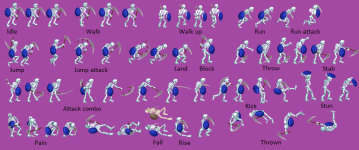
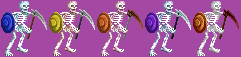
SkeletonGA2 now has a basic idle, stab, throw, dodge as expected for a basic player.
@Bloodbane: I'm having trouble with the spawning of a corpse (Mayat or MayatH) when an enemy dies.
As a reminder, these corpses allow the Wizard to resurrect skeletons through necromancy.
Mayat and MayatH don't stay on platforms, and I can't figure out how to keep them there.
Does anyone have any ideas? I've tried a few things, like changing their type, disabling gravity, and even putting a bbox on them.
Here is an example of how they are invoked:
Code:
anim death
    delay    5
    offset    60 98
    frame    data/chars/longmoan/die1.png
    frame    data/chars/longmoan/die2.png
    frame    data/chars/longmoan/die1.png
    @cmd spawnA "Mayat" 0 0 0 "Longmoan"
    frame    data/chars/misc/empty.png
    @cmd suicide
    frame    data/chars/misc/empty.png
Attachments

Bloodbane
Well-known member
Does anyone have any ideas? I've tried a few things, like changing their type, disabling gravity, and even putting a bbox on them
I'm making some attempts to solve this bug. Currently the best way is to set subject to gravity 0.
[Some attempts later]
I've found a proper solution which is by setting new base on the corpses. You can get the updated texts below:
Attachments
Last edited:
kimono
Well-known member
I'm lucky to be surrounded by talented people and thank you again @Bloodbane for resolving this issue 
I have quite a few people to introduce to you and highlight their fantastic work, like @hbdhl who tried his hand at a back attack for Lizardman:

Personally, I'm still having trouble with this Minotauros and have added jump attacks, a block, and a functional dodge:
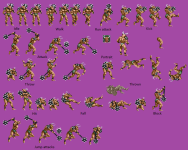

I am still studying alternative palettes but am not yet fully satisfied with them.
I have quite a few people to introduce to you and highlight their fantastic work, like @hbdhl who tried his hand at a back attack for Lizardman:
Personally, I'm still having trouble with this Minotauros and have added jump attacks, a block, and a functional dodge:
I am still studying alternative palettes but am not yet fully satisfied with them.
Last edited:


Remember, we haven't finalized a standard for playable bosses yet. They don't necessarily need to have the same attack combos as the default cast.Personally, I'm still having trouble with this Minotauros and have added jump attacks, a block, and a functional dodge:
I am still studying alternative palettes but am not yet fully satisfied with them.

O Ilusionista
Captain 100K
The only thing which bothers me a bit is the kick, as he uses the same leg position for 3 frames:Personally, I'm still having trouble with this Minotauros and have added jump attacks, a block, and a functional dodge:

kimono
Well-known member
@LetsPG : It's done, and you can see the result a few posts above.
Thanks to @Mr.Hunter 's color suggestions, I was able to make my choice and create some beautiful palettes, thank you !
@shirakani: The bare minimum for playable bosses is a powerful attack, a run attack, a kick, a throw, jumps + jump attacks, and a dodge.
Indeed, it will be possible to add a non-knockdown attack, and a back attack is also a good idea.
It will always be possible to further refine them with a really cool special move
@O Ilusionista : You're right, I need to rework that kick and I'd like to add a horizontal circular attack to it as well.
Thanks to @Mr.Hunter 's color suggestions, I was able to make my choice and create some beautiful palettes, thank you !
@shirakani: The bare minimum for playable bosses is a powerful attack, a run attack, a kick, a throw, jumps + jump attacks, and a dodge.
Indeed, it will be possible to add a non-knockdown attack, and a back attack is also a good idea.
It will always be possible to further refine them with a really cool special move
@O Ilusionista : You're right, I need to rework that kick and I'd like to add a horizontal circular attack to it as well.
@shirakani: The bare minimum for playable bosses is a powerful attack, a run attack, a kick, a throw, jumps + jump attacks, and a dodge.
Indeed, it will be possible to add a non-knockdown attack, and a back attack is also a good idea.
It will always be possible to further refine them with a really cool special move
Yep. Bosses do not need a combo. They can make do with a single powerful hit and some unique special moves that make them stand out/worth playing. You're getting used to how I create special moves so, yeah, we'll go with that method. Tho I do agree with O Ilusionista that the kick sprite looks really jank. At the very least the kicking leg needs to straighten out or his standing leg needs to straighten up.
kimono
Well-known member
Look at the limited number of sprites I have for him: the only movement he can do right now is walk down. No running or walk-up animations.Your minotaur's sprite shifts downward when walking. Will this be fixed?
There's still a lot to develop for this character
One question : Ax Battler has a spawn1 64 60 on level 1. How would you make it move from offscreen left to right, knowing that this is how it works for all Golden Axe levels (see at 1:43)?
Last edited:
kimono
Well-known member
Okay and thank you for the report: I will correct its offset.You misunderstood me. I meant that the walking sprite is not aligned with the character's idle sprite, causing the sprite to appear lower when walking than when standing. A similar error exists with the Spearman character.
O Ilusionista
Captain 100K
Basically, I know two ways of doing it - one I use on Avengers and the other I use on PDC.One question : Ax Battler has a spawn1 64 60 on level 1. How would you make it move from offscreen left to right, knowing that this is how it works for all Golden Axe levels (see at 1:43)?
1st method - You paste a script on the stage which will force the players to spawn using a specific (new) animation and they check their position on the stage to revert to idle
requires no new entity, but requires a new animation for all players
2nd method - you create a player control entity, which turn off player control and force the players to use the run/walk animation, set their speeds and then revert to idle
requires no new animation, but requires a new entity and a piece of code.
The first method in action (its how I force Black Knight to be on top of the elevator)
The second one (34:40)
Last edited:

maxman
Well-known member
I do the 1st method most. You lock yourself from freely moving around since you're using a follow animation until you tell it to end the locking at the very last frame you see below. looper is used to repeat how many times one specific frame starts until it ends. 0 starts one time to loop, 1 loops twice, 2 loops thrice, or more.
I usually change x and z positions on players when I'm not using spawn# in levels. However, since I use spawn# to position themselves away from the zmin limit point, I don't need to change the z position for all players. The engine does it for you if you use spawn#, specifically on the z position. You can change the character positions wherever you want, especially the x position.
You can change position for your player here if you like, but if you leave spawn# there, the script will force the player to spawn into a specific position you tell it to. Just like I had it force and change to -100 on the x position part.
anim follow99
delay 300
offset 136 199
@cmd Screen 0
@cmd noJoin 1
frame data/chars/heroes/Clark/44938.png
delay 10
@cmd velo001 0.9 0 0
frame data/chars/heroes/Clark/44938.png # 1 10
frame data/chars/heroes/Clark/44944.png # 2 20
frame data/chars/heroes/Clark/44950.png # 3 30
frame data/chars/heroes/Clark/44956.png # 4 40
frame data/chars/heroes/Clark/44962.png # 5 50
frame data/chars/heroes/Clark/44968.png # 6 60
frame data/chars/heroes/Clark/44974.png # 7 70
@cmd looper 1 1 # looper {frame} {limit}
@cmd velo001 0 0 0
delay 2
@cmd Screen 1
@cmd noJoin 0
frame data/chars/heroes/clark/44974.png
I usually change x and z positions on players when I'm not using spawn# in levels. However, since I use spawn# to position themselves away from the zmin limit point, I don't need to change the z position for all players. The engine does it for you if you use spawn#, specifically on the z position. You can change the character positions wherever you want, especially the x position.
Code:
spawn1 30 10
spawn2 26 30
spawn3 22 50
spawn4 18 70
Code:
spawn empty
@script
void main(){
    int P1 = getplayerproperty(0, "entity");
    int P2 = getplayerproperty(1, "entity");
    int P3 = getplayerproperty(2, "entity");
    int P4 = getplayerproperty(3, "entity");

    if(P1){
        changeentityproperty(P1, "position", -100);
        performattack(P1, openborconstant("ANI_FOLLOW99"));
    }

    if(P2){
        changeentityproperty(P2, "position", -100);
        performattack(P2, openborconstant("ANI_FOLLOW99"));
    }

    if(P3){
        changeentityproperty(P3, "position", -100);
        performattack(P3, openborconstant("ANI_FOLLOW99"));
    }

    if(P4){
        changeentityproperty(P4, "position", -100);
        performattack(P4, openborconstant("ANI_FOLLOW99"));
    }
}
@end_script
coords 0 0
flip 1
at 0
You can change position for your player here if you like, but if you leave spawn# there, the script will force the player to spawn into a specific position you tell it to. Just like I had it force and change to -100 on the x position part.
Code:
    if(P1){
        changeentityproperty(P1, "position", -100, 200, NULL());
        performattack(P1, openborconstant("ANI_FOLLOW99"));
    }
Last edited:
Playtesting player Death Adder and I keep finding it hilarious that Alex says the king and princess were taken captive by Death Adder and it's like 'dude, I'm right here, I din do shit!!'.
Or maybe if you use playable Death Adder, the dialog should go like this:
"Alex, what has happened?!"
"You should know! You monster! You kidnapped the king and princess!"
"Wait, WHAT?! It wasn't me!!"
"Oh, sure you didn't! So there's another guy wearing a metal jockstrap and a stupid mask like yours huh?!... I can't deal with this, I'm out..." *dies*
"Alex... Oooooh no you don't! Buddy, we gotta talk!... But first!..."

Or maybe if you use playable Death Adder, the dialog should go like this:
"Alex, what has happened?!"
"You should know! You monster! You kidnapped the king and princess!"
"Wait, WHAT?! It wasn't me!!"
"Oh, sure you didn't! So there's another guy wearing a metal jockstrap and a stupid mask like yours huh?!... I can't deal with this, I'm out..." *dies*
"Alex... Oooooh no you don't! Buddy, we gotta talk!... But first!..."
kimono
Well-known member
It's entirely possible to change the dialogue depending on the character chosen, why not check it out 
There is also an alternative intro featuring Alex on this topic:
Minotauros will be replaced by Giantess from Revenge of Death Adder:

Honestly, RODA is full of amazing sprites and they will have a prominent place here as well.
Phoenix from Fighting Master will serve as minions for Eve in the eagle level to complete the eagleception
(fighting an eagle on a large eagle, accompanied by some eaglets )
There is also an alternative intro featuring Alex on this topic:
Honestly, RODA is full of amazing sprites and they will have a prominent place here as well.
Phoenix from Fighting Master will serve as minions for Eve in the eagle level to complete the eagleception
(fighting an eagle on a large eagle, accompanied by some eaglets
)