How to create a project from scratch - my 0 skills !

vokilvulga

Member
Hello. Chronocrash is an inspiring environment for all of us.
I would like to create an OpenBoR game.
Unfortunately, this is a completely new environment for me and I am I have no skills.

I would like to start by creating something elementary.
I think that, recompiling ready-made elements will be a good start.

My idea is to add or replace ready-made character models, on a ready-made matrix ...
Such a matrix could be the SEEP's game Fatal Fury Final or the game Beats of Rage.

My subject is wrestling, focusing on the power characters for plaiers, such as Max, Zangiev and M. Power and others.

Can you tell me where to find ready-made models and how to add them, as well as what program to use to operate with openbor.
 
Welcome back @vokilvulga.

I'm afraid you've selected a poor module for learning purposes. World Heroes Supreme Justice is very advanced and uses a cursor offset trick in the select screen. You can't simply add a playable character and have it work properly. Take a close look at the selection background and the select images for other models. You can try to use them as a template.

DC
I was actually trying to add one of the bosses as a selectable character. Am... And that probably requires complex transcoding!
- Ok then I will try to add the characters in a new platform.

This extra coding isn't part of the character folders is it?
Because I would like to use these characters and possibly add them to Fighting Spirit.
Another alternative would be for me to use Rhythm of Destruction 2 as a more basic platformer. I guess it has a more basic construction.
 
I was actually trying to add one of the bosses as a selectable character. Am... And that probably requires complex transcoding!
- Ok then I will try to add the characters in a new platform.

This extra coding isn't part of the character folders is it?
Because I would like to use these characters and possibly add them to Fighting Spirit.
Another alternative would be for me to use Rhythm of Destruction 2 as a more basic platformer. I guess it has a more basic construction.
You cannot just swap characters from games and "just" declare them in the character loading file.

Some possible way is to clone a character, and editing this cloned character to your tastes, by adding sprites, sounds, animations one by one.
So you can keep an eye in the progression, and can see immediately what is the "last updated thing" you dit that can create a loading problem.
 
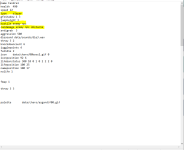
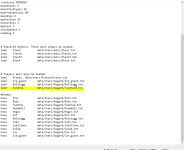
I entered the command '' load lee data/chars/lee/lee.txt '' in the ''models'' file, but it did not add the non-walkable character to the game's start menu.

Setting load to an enemy (or any entity actually) which is normally set to know in models.txt is not enough to add another playable. Speaking of playable, you can only have type player as playable character. So if the loaded character is not type player, he/she won't be selectable.
That being said, you can copy lee.txt to say leeP.txt and change his type into player to allow that. But read below:

And that probably requires complex transcoding!

Yes or no depending on what Lee uses in his text. If he's using generic command and script which is usable by both players and enemies, the above trick is enough. But if he uses enemy only script, it might work and won't crash the game but you might get funny result when playing as him.
 
This explains some odd results I got with GoW Ragnarock.
Added Fandreal as a selectable character. It turned out well but
Fandreal didn't recognize himself as an enemy when he met himself as a BOSS.
The boss didn't attack anyone, and the enemies attacked him. After they beat him, the game didn't go on until I lost too. Fandreal was reborn with some of my credits. The model I was driving took on a life of its own, and I took control of the reborn model. LOL...

When I added Fandreal and its clone FandrealP - the problem was fixed!
(I copied Fandreal.txt and renamed FandrealP.txt and added the above three lines so that they are suitable for the player - ''type player'', ''hostile enemy npc'' and ''candamage enemy npc obstacle'',

then I added FandrealP.txt for:

load Fandral data/chars/Asgard/FandrealP.txt in the
MODELS file.

No change in enemy options --


Where can I find the command that determines the strength of the damage that the characters deal?
I noticed that the enemies deal different damage but I can't find where to enter this command, which determines its strength.
 

Attachments

  • GOWR-MODELS-F.PNG
    GOWR-MODELS-F.PNG
    21.9 KB · Views: 6
  • GOWR-MODELS.PNG
    GOWR-MODELS.PNG
    39.6 KB · Views: 6
Glad you can solve the problem :D

Where can I find the command that determines the strength of the damage that the characters deal?

Damage is defined in each attackbox. Each attackbox deals its own damage so you'll need to modify all of them to modify the overall damage of the character. To find them, use search function for "attack" command declared before frame command. You could find something like this:
Code:
    attack    200 100 100 30 8
    frame    data/chars/hero/attack2.png

Damage of this attack command is defined by the fifth parameter which is 8.
Consult the manual for more detail of attack command.

HTH
 
This is the thread that keeps coming up when I search things like "openbor development basics" or "openbor lessons" but I am not finding what I am looking for.
I would like an explanation of how the development tools work. Specifically, packing. And it seems there are a number of ways to pack and you can find conflicting instructions on how to do it. I have watched a few of Digital Brilliance Hour's video tutorials but got discouraged when what I downloaded did not look exactly how his file directory is looking and was going to take a lot of investigating to find what he had. It is all a little daunting but if I can make progress early I'd be less likely to get discouraged and go and spend time on another hobby.

Can someone please write or direct me to a beginner's guide that goes something like this, specific to Windows?
  1. Lesson one: packing and opening the demo game
  2. Lesson two: switch a line of code, (like which enemy appears first) pack it, and see your change.
  3. Lesson three: switch a level order, pack it, and see your change.
  4. and so on...
I see msmalik681's video but is there something similar to this video but for Windows? I did find your Windows one from 2019 but is it still current? It seems to be missing a lot of context too.

These wiki pages are great for advanced functionality but they don't get that descriptive with the basics. It also seems crazy to try to have everything on a single page instead of byte sized chunks.

I also noticing there are roughly three broad categories when it comes to searching for things related to OpenBOR on the web which teaches you to use the right keywords in your searches:
  • OpenBOR development discussions
  • OpenBOR game recommendations strictly for player
  • How to get OpenBOR games to run on x platform for players
There also tends to be a lot of outdated material and a lot of it is not dated or does not mention the version number. It seems a lot of tools are adhoc and unofficial.
A glossary of terms would be great as well.

If someone were to write a book that would cut through all of this I would buy it.
 
Last edited:
@nsputnik
unpaking a module is easy, just grab the pak file with the mouse cursor and drag it to paxplode.exe.

i am one of the few who includes those files in the module , because i give players the chance to modify the continues or lives, and if they wish they can modify or experiment whatever they want

that said, the resources section also has paxplode, it will save you time because it is a smaller download
ther is also pack explorer, some modules cant be paxploded becasue something went wrong during packing....

read the manual, the new manual , use your browser to print it as pdf so you can read it on a tablet or cell phone, true, there are some things missing in the manual, so i keep some notes about it if i come cross enything weird.

the easiest thing to get into is level making, and music editing to create the loop mixes, and decorations , level effects, aned level triggers, platforms, breakable objects.
creating characters from scratch is a bit more complicated adn that will require more care

and last is scripting, it is the key to creating special effects, impressive character movesets, dynamic music, stereo sound, randomized sound effects, animated background layers, custom menus, adaptive cinematics, random or adaptive AI, and maybe even runnign doom on the openbor egine...
 
as for packing, the resources section shoud also have borpak.exe, packer.bat and or compile.bat

compiler .bat uses borpak.exe to pak the data folder

like this:
packer.bat mygame.pak DATA

after tis done change the name of my game to whatever you want...
 
@nsputnik Hi there. Sorry, but I would like to correct some information you mentioned, because some are a bit wrong and they could mislead new users.

I would like an explanation of how the development tools work. Specifically, packing. And it seems there are a number of ways to pack and you can find conflicting instructions on how to do it
First, there is no "multiple ways to pack" - you have to use the Packer tool. There are some different options on it
Second, its stated on the manual how to do it OpenBORManual - DCEmulation

  1. Lesson one: packing and opening the demo game
  2. Lesson two: switch a line of code, (like which enemy appears first) pack it, and see your change.
  3. Lesson three: switch a level order, pack it, and see your change.
  4. and so on...

All of this is stated on the manual.

These wiki pages are great for advanced functionality but they don't get that descriptive with the basics.
Sorry, but this is not true at all. I know there are some missing info on the manuals, but most of time its some advanced feature here and there.
For all the basics, its all there.

A constant mistake made by those who start developing with OpenBOR is not reading the manual. You need to read it entirely. It will give you a good idea of what the engine is capable of doing.

When I started, I downloaded the manual in .PDF and I read it on my cell phone every day while I went to work.
The problem is that many people don't have patience and want to skip steps. And, as he ends up frustrated, he ends up blaming the engine, the manual, the community, etc. Except for himself :)

It also seems crazy to try to have everything on a single page instead of byte sized chunks.
It's not. Its quite handy in fact. And, by the way, you have options where you can read it on a single page (legacy manual) or in small portions (wiki). And the next wiki will improve it a lot. So its up to the user to find which one he prefers.

I also noticing there are roughly three broad categories when it comes to searching for things related to OpenBOR on the web which teaches you to use the right keywords in your searches:
  • OpenBOR development discussions
  • OpenBOR game recommendations strictly for player
  • How to get OpenBOR games to run on x platform for players

I know I'm going to sound repetitive here, but that doesn't make sense either. There is no such thing as "OpenBOR game recommendations strictly for player".

And about "How to get OpenBOR games to run on x platform for players", the role of OpenBOR as an engine (and many people forget that it is an Engine, not an emulator where you play thousands of games) is to provide a development tool for games, not how to find them.

The vast majority of engines I know work like this, such as Mugen, Ikemen, Game Maker, Godot, Unity, etc. What most have is a link aggregator, separate from the engine, that leads to content that can be used in the engine. And OpenBOR also has this: Resources

If someone were to write a book that would cut through all of this I would buy it.
You can have it for free - its the manual/wiki.
Even if it was a book, people would still need to ... read it :)

I've compiled a lot of information on a single topic to make it easier to find information on how to start

But, again, the user needs to to their job and read it :)
We are here for any questions you may have.

 
  1. Lesson one: packing and opening the demo game
  2. Lesson two: switch a line of code, (like which enemy appears first) pack it, and see your change.
  3. Lesson three: switch a level order, pack it, and see your change.
  4. and so on...
Just to add that you don’t need to pack every time you do some change.
People usually only pack it back when uploading the game to share it.

Don’t know if mentioned already, once you unpack a mod, it will throw a data folder. In order to run an unpacked, you need the Paks folder to contain a blank pak file (just rename an empty text file if I remember correctly).
 
Starting your OpenBOR game with "zero skills" is ambitious, but ChronoCrash is a great place to learn! While modifying existing games like Fatal Fury Final or Beats of Rage is a good initial approach, it'll involve several steps. First, find character models and animations compatible with OpenBOR (check online forums and resources like The Spriter's Resource).

Next, you'll need a program like Neo Edit Pack to extract and edit existing game files. Then, learn the basics of OpenBOR scripting to define character moves and integrate them into the chosen "matrix." Tutorials and forums will be your best friends. Finally, test and refine your creation - the community at ChronoCrash is fantastic for support. Remember, start small, celebrate every step, and enjoy the journey!
 
Back
Top Bottom